Thursday, 30 January 2020

11 Key Metrics to Evaluate Potential Marketplaces

There are dozens of worthwhile marketplaces worldwide. Amazon, Walmart, eBay, and Etsy are just a few examples. What follows are tips for using data to identify (and optimize) marketplaces to sell your products.

The post 11 Key Metrics to Evaluate Potential Marketplaces appeared first on Practical Ecommerce.


from Practical Ecommerce https://ift.tt/317T497

Going international with SEO: How to make your WordPress site globally friendly

International expansion is an expected ambition for progressive websites. The online nature of this global reach means that the uncertainties, legal dangers, and cultural hazards are minimized. The world is at your fingertips, and the costs in reaching it successfully are minimal. The rationale for reaching out to a new audience, readership, viewership or listenership, maybe one of opportunity, exciting new prospects, high growth potential, or to escape a domestic audience that has become too saturated or competitive.

With only some limitations, the internet is a global phenomenon that effectively ties us all together with invisible strings. Send a Tweet from Prague and reply to it in Illinois. Publish an ebook in Seattle and share it with your friends in Beirut. There are practically no boundaries when it comes to sharing content online.

When it comes to your WordPress website, the one you’ve dedicated time, money and energy building, I expect that you will want it to possess the maximum global reach possible. This doesn’t just happen by chance and requires some key features within your site to make this happen. The following tips and suggested plugins should set you and your website on the path to international influence.

Four tips to help make your site globally friendly

1. Globalize your content

The foundation of an internationally appealing website is its content transcreation. This does not focus on the mere translation of words but ensures the recreation of meaning, intent, and context.

It is important to make sure that the meaning of the content does not change when translated into another language and does not convey your message wrongly. Cultural hazards are rife when it comes to the international expansion of any kind. To be accepted and welcomed in a different geographical area, you cannot afford to display misunderstood and potentially offensive content.

Unsurprisingly, over 73% of the global market prefers websites with content in their native language. If people cannot understand the content on your website, you cannot hope to keep their interest. In the same vein, inaccurate translations just won’t cut it. The best option is to find a content writer who can craft the copy in a specific language for better quality content.

2. Avoid rigid localized options

Some websites choose the default website domain and language based on dynamic Geolocation IP tracking. Others do not have rigid local settings and allow their websites to be accessed by users from anywhere. If you are hoping to reach as many readers as possible, this option is best. No matter the country from which your website is browsed, it can be accessed without limitations of location.

3. Avoid using text on images

Google cannot translate text on images. This is the same for logos, headings, and other information. This can be majorly off-putting for readers who do not understand some parts of your website. Further, no translator or software that runs on your multilingual site can translate graphical text. Therefore, avoid it altogether for the best results, or keep it to a minimum for a more international audience.

4. Localize checkout and shipping factors

Whether your WordPress site is an online store or sells software as a service that doesn’t require any shipping at all, your checkout process should be appropriately localized. Currency options are fundamental to users taking that final step to make the purchase. There are WordPress plugins available to allow for multiple currencies to be displayed and chosen from.

If you are giving the option of international shipping then inform the buyer beforehand whether or not the product is available for shipping to his local address. Make the option to convert the currency clear and choose a suitable API tool for currency conversions. In order to keep on track of abandoned cart figures, allow the user to view the delivery charges and taxes prior to checking out. Finally, remember that people from different locations are more comfortable with different payment methods- so ensure to provide multiple options.

Plugins to help make your site globally friendly

1. TranslatePress

This full-fledged WordPress multilingual plugin translates every aspect of your website. Its main feature is that it allows you to translate directly from the front-end. It allows you to easily switch languages during the translation- and the live preview is updated instantly. All translations of content, theme, plugins and even meta-data can be made without changing the interface.

It is ideal for manual translations. Do it yourself or assign a custom translator ‘user role’ to any user on your site. Users will then be able to translate as and when they want, without needing access to the admin area.

Lastly, the plugin creates SEO friendly URLs for all languages and boosts you up the local SEO results. Ranking well will make this extra effort to globalize your site worth all the while. Once you have established yourself as an authoritative and respectably ranking website abroad, you’re in and can continue the normal operation of your site.

2. Multi-currency for WooCommerce

As discussed, the need for multiple currencies on your international online store is unchallenged. This plugin allows users to easily switch to different currencies and make use of currency exchange rate converter with no limits. It can be used to accept only one currency or all currencies. Multi-currency for WooCommerce will enhance your site’s user experience and will do so for free. It’s a no brainer.

Implementing these can surely get you some good traction for your WordPress site on a global scale.

Feel free to share your thoughts and queries in the comments section.

The post Going international with SEO: How to make your WordPress site globally friendly appeared first on Search Engine Watch.


from Search Engine Watch https://ift.tt/2tRgmnL

On-SERP SEO can help you battle zero-click results

On-SERP SEO is the process of fully optimizing the first page of a search engine to maximize the visibility of your brand. On-SERP SEO is a tool you can use to battle the increase of so-called zero-click searches. Find out all about on-SERP SEO in this article.

Rise of the zero-click search

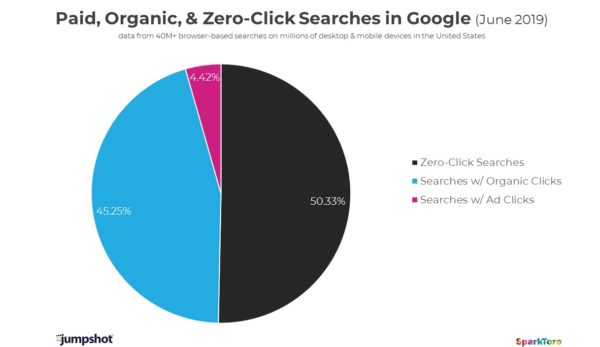
Rand Fishkin of SparkToro has been tracking developments in Google for a long time. One of his works is researching the changes in how people search and where the clicks go, based on data by analytics firm Jumpshot. From his recent reports emerges an interesting trend: less than 50% of all the searches lead to a click! These are the so-called zero-click searches.

Over half of all searches don’t lead to a click

Of course, the decline of the click can partly be attributed to the rise in rich results. For many queries, these results — like featured snippets, answer boxes and knowledge graphs — tend to answer the exact question a searcher has. Often, leaving the searcher without the need to click on to a full article. Since Google is working hard to understand languages, entities, and intents better, it is no surprise that it manages to answer an increasing number and ever harder set of questions right there.

In addition to upping their skills, Google is also expanding its own properties in search. For industries such as travel, you can almost book a complete trip without ever leaving Google. It won’t be long before that last hurdle will be gone as well. Of course, end-users love interacting with rich results as they often solve their needs immediately.

These developments are Google helping win an enormous amount of traffic to its own properties, from YouTube to Flights and Jobs to Events, leaving regular companies and individuals struggling to find room to shine in the SERPs. One of the means you could turn to combat this is called on-SERP SEO.

What is on-SERP SEO?

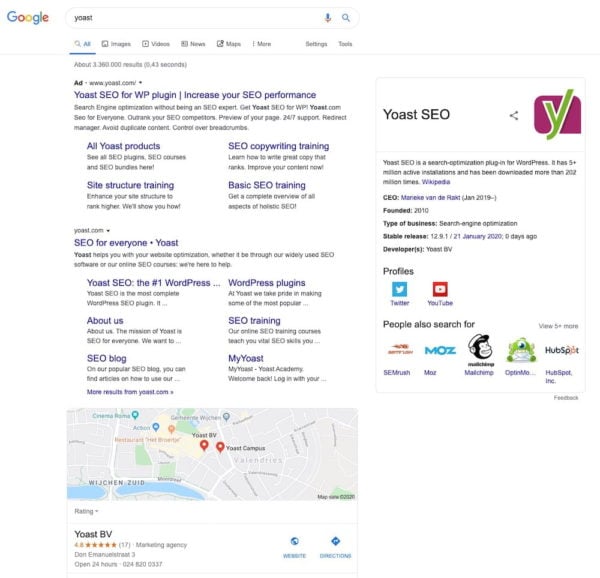
With on-SERP SEO, you try to get as much exposure for a query — or your brand — on Google’s front page as possible. That doesn’t mean you should write ten articles on your main topic in the hopes of them all showing up on page one of Google because that’s a pipe dream. No, it’s about owning all the areas where it counts: 

  • A featured snippet
  • A highly-ranking post
  • The knowledge graph panel
  • People Also Ask boxes
  • Image search
  • Video search
  • Local three-pack
  • And maybe run an ad or two for your brand

Combined, these SERP elements will give you maximum exposure for your brand. In addition, visibility might lead to better CTR. Nevertheless, it might be a good idea to look at sources of traffic/visibility outside of Google’s clutches.

Got to occupy that brand space, right?

Note: Last week, Google changed how they handle duplicate URLs for posts that have a featured snippet. In the past, the featured snippet was at position 0, but now it is basically number 1. The regular result from that featured snippet is dropped from the results, leaving only the featured snippet. This might impact how you approach your work and it might make it harder to ‘own’ the SERPs.

How can it benefit your site?

The main reason for working on your on-SERP SEO is enhancing the visibility of your brand. Not everything is about traffic! It does beg to differ if you can make the investment in on-SERP SEO. It doesn’t always lead to more traffic, so you must ask yourself if you can live with not getting traffic from that high-profile featured snippet.

For many searches and industries, it is hard to occupy a load of search results page features. So, what you can do depends on who you are — or who you are working for, of course. Non-branded searches make it hard to get into the knowledge graph, for instance. Do investigate and see what you can achieve!

How to start with on-SERP SEO

The process of on-SERP SEO consists of several parts. First, you need to find out how you are doing. Where are people coming from? How are they finding you? What’s the CTR for your main keyphrases? Plus, how are all these numbers trending?

When you’ve painted a picture of your situation, you start looking at the SERPs and try to find opportunities to stand out.

Look at the SERPs

Looking at the SERPs is incredibly rewarding — and an essential task. Not only will it give you an idea of what’s going in your industry, for your keyphrases or your brand, but it will also signal opportunities. You also have to look at what’s not there. When you finally know your SERPs inside out you see the changes Google makes unfolding before your eyes. What’s more, you might be ready to act if needed.

You’ll notice rich results — like featured snippets — pop up and disappear, and you’ll see different elements move around the page. Plus, you see what your competitors are doing. You’ll also notice ranking changes when they appear. Several SEO suites — like Moz Pro and SEMrush — provide tools to track what happens to SERPs and which SERP features appear for certain keyphrases. 

If you have a solid understanding of your relevant SERPs you might pick up a chance to shine along the way. Be sure to act if it makes sense!

Find opportunities

There are many answers to be found in the SERPs, but don’t be scared to start thinking outside the box. There are several ways to increase your site’s visibility in search. Let’s go over a couple of ones.

Improve search intent-based content

A very helpful tool in your arsenal is search intent research. Try to find out how and when people end up on your site and map that to your customer journey. Did you miss a couple of spots? Can you appear earlier in the journey? What do the SERPs look like for every step of the journey and does your content match does touchpoints? 

Improve your keyphrase-based work

Search engines are getting better at defining what a query is actually about, but they are nowhere near faultless in matching that with a correct response. This means that you should still provide search engines with every detail you can think about. So, it makes sense to look into search intent, but it also makes sense to do old-fashioned keyword research. But now, don’t simply look at which words have the highest traffic potential, but also a good chance at a click!

Research featured snippets

A prominent spot at the top of the search results — who doesn’t want that? Getting a featured snippet is a good way of getting in the spotlights. It’s not always easy to get clicks from a featured snippet, but if you do the results can be interesting to see. It might not even be necessary to do it all for the clicks, because featured snippets can also be used to build trust or increase brand awareness.

Getting a featured snippet takes work and is a lot easier if you already rank on page one with your content. That means you should prioritize getting featured snippets for content that’s already doing well. Don’t forget to check if your research is pointing you to new chances.

Enhance visual and video search

On-SERP SEO also means improving the findability of your images and video. For your main keyphrases, your visual content needs to come out on top. Don’t have visual content pop up on image search for your brand or keyphrases? Don’t have videos? Well, you know what to do if you want to fully occupy the SERPs. The Yoast Video SEO add-on helps you get those videos in search.

Manage your social media

Your social media can appear in searches for your brand — tweets in search and links in the knowledge graph panel —, so it’s good to put work in those profiles. They don’t really push traffic, but people may view these profiles to form an opinion on your business. 

Add structured data

Structured data is incredibly important for search engines to truly understand what your site is about. By using structured data correctly for any given topic (recipes, events, jobs et cetera), search engines might even reward you with a rich result listing. This means your search result is highlighted, meaning it will take up more real estate in the SERPs. Yoast SEO automatically adds a lot of Schema structured data to your site for the most important properties. You can also use the Yoast SEO content blocks to build FAQ pages and how-to articles that stand out in the search results.

Improve your local listing

It’s important to look at what your site is doing locally. Google My Business is a must-have if you want your business to stand out in the local results. Curate your listing, manage reviews and finetune your photos. Having a lively local profile can really help your visibility and brand awareness.

Take out ads for your brand

Ever since Google is running ads right under the search bar, it is a good idea to take out ads for your own brand — or keywords, if they are affordable. This way, you get an extra spot at the top that Google can’t take away from you. In addition, it prevents a competitor from advertising in your name. 

Conclusion about on-SERP SEO

In the age of declining clicks, you need all the help you can get to stay visible for the searcher. One of the things you can do is look at the SERPs to try and find ways to occupy a lot of real-estate. On-SERP SEO can help you increase brand awareness. It also helps you gain new insights into what’s changing in Google and how you can react to that.

It doesn’t make sense to go all-out with on-SERP SEO for all your keyphrases. But, it does make sense to make your brand stand out, which is easier because you have most of the tools available to get that knowledge panel and ad listing.

The post On-SERP SEO can help you battle zero-click results appeared first on Yoast.


from Yoast • SEO for everyone https://ift.tt/2UfInjk

Grammarly Review: Is it the Best Grammar Checker in 2020?

So reading a Grammarly review is now a priority after that embarrassment.

The one that made you realize “yeah, getting a grammar checker might be a good idea.”

You reviewed your email carefully.

Then you hit send.

And only then did you see it. The error your eyes skimmed right by. Buried in the middle of your text, you missed it, but now it flashes out at you, and it is all you can see.

Grammarly (affiliate link) could prevent the pain of those mistakes.

It’s the secret weapon smart writers use every single day to make their writing error-free, polished, and clean as a whistle.

Let’s jump in and learn more.
Grammarly Review: Is it the Best Grammar Checker?

What is Grammarly (and How Does it Work)?

Grammarly is an “AI-powered writing assistant” that helps you improve your writing.

It goes well beyond a basic spell checker. It uses the latest in artificial intelligence to apply English language conventions and grammar rules to your work.

Grammarly proofreads your beautiful words and alerts you to errors that can detract from your message.

As you type, Grammarly provides real-time feedback, informing you of mistakes, and makes suggestions to fix them. You can quickly correct issues as you create your messages.
Real-time feedback

The best part of this?

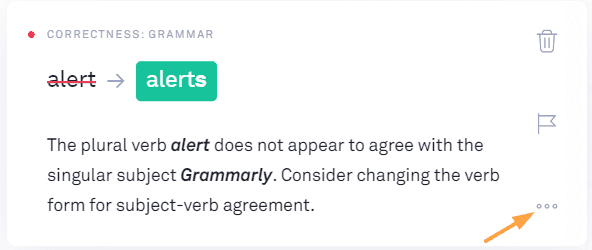
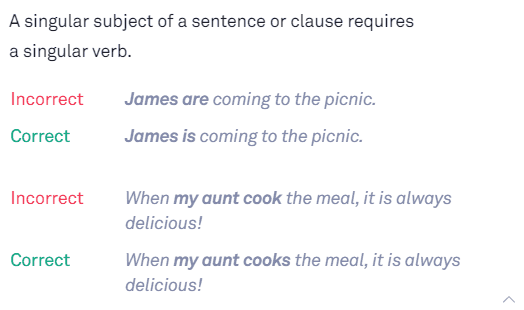
Grammarly gives you an explanation of the reasons behind the correction. This allows you to learn from your grammar errors, so you stop making them.

Simply click on the three-dot ellipse to reveal the explanation:
Grammarly Review: explanation example

This explanation can be invaluable. And if you need to brush up on your grammar skills, Grammarly provides a handbook of grammar rules for easy reference.

In each case, you make the decision whether or not to accept the correction. You remain in control of your writing.

True, Grammarly can’t replace a human proofreader, but it will catch a wide range of mistakes and errors. It isn’t perfect, so you always want to use your own judgment and think through the suggestions. Don’t blindly accept them.

Where Can I Use Grammarly?

Grammarly works almost everywhere you do — you can use it on your computer or your mobile devices. Whether you want to text, post on Facebook, tweet, comment on blogs, or write a blog post, it can be there for you.

To do this, Grammarly is available as both an app and as a browser extension in Chrome, Safari, Firefox, and Internet Explorer.

Here are a few of the platforms it works on:

  • Email (Gmail, Outlook)
  • Documents & Projects (Google Docs, Microsoft Word, Slack, Salesforce)
  • Social media posts (Facebook, Medium, Twitter, LinkedIn)
  • Websites (including backend web pages in WordPress)

So How much Does it Cost to Use Grammarly?

The free version of Grammarly won’t cost you a penny. It’s completely free.

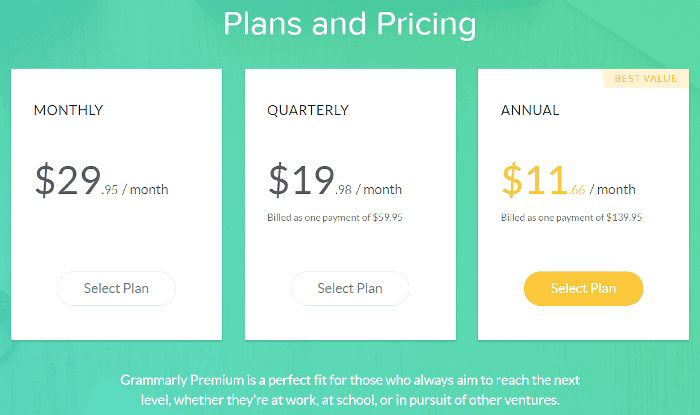
But if you need more features, here are the prices for Grammarly Premium (as of this writing):

  • A monthly subscription is $29.95 per month
  • A quarterly subscription is $19.98 per month (billed as one payment of $59.95)
  • An annual subscription is $11.66 per month (billed as one payment of $139.95)
Grammarly Review: breakdown of prices

Is the premium version of Grammarly worth the upgrade?

Let’s take a look…

What are the Differences Between Grammarly Premium and the Free Version?

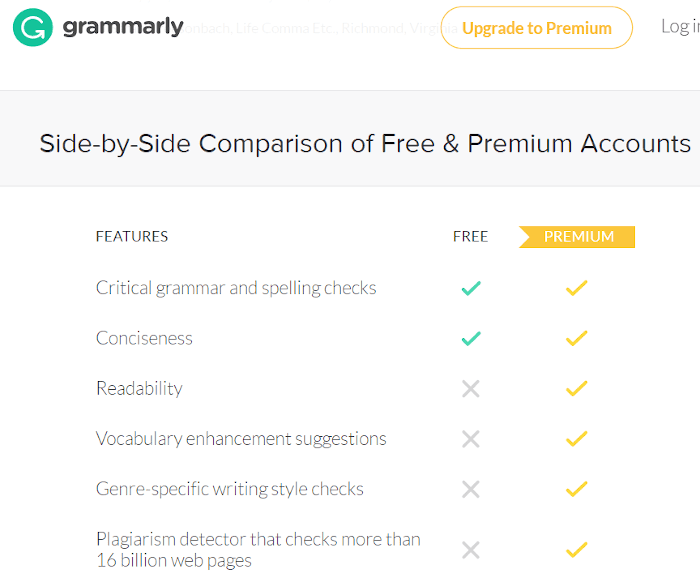
The free version of Grammarly offers corrections for spelling errors and basic grammar mistakes. It does a great job of preventing typos.

The premium version offers advanced writing feedback.

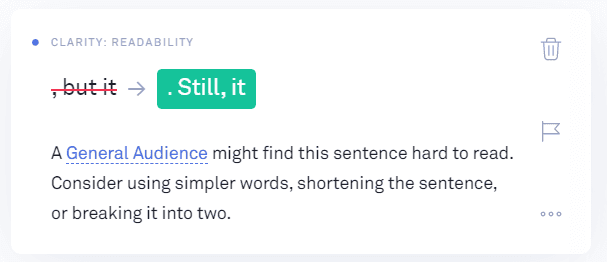
It watches for advanced grammar mistakes and contextual spelling errors. It also suggests improvements in sentence structure, word choice, and style.
Grammarly Review: example of suggestions

Overall, the free version is okay for casual writing. But for longer-form or professional content that you need to be its absolute best, you’ll want to consider Grammarly Premium.

Here’s Grammarly’s side-by-side comparison:
Grammarly Review: free vs. premium comparison

Let’s go over the extra features you get with Grammarly Premium:

Advanced Grammar and Punctuation Checks

The premium version offers additional grammar and punctuation functionality. A few examples are:

  • Punctuation errors such as either missing or unnecessary commas, or comma splices.
  • Sentence structure issues like missing verbs, incorrect adverb placement, or faulty parallelism.
  • Style errors, for example, using the passive voice, or colloquial phrases in a formal document.

Grammarly Premium says it runs 400+ checks on your writing!

“Readability” (Or, What Are You Trying To Tell Me?)

Readability is the difference between a reader enjoying your writing or quitting in frustration.

A high readability score means a piece of writing is easier for a reader to understand — the higher the score, the easier it is to read. It’s important because you don’t want to exhaust your reader with lengthy sentences and lots of complex words.

Grammarly uses the Flesch reading-ease test to measure readability. For most writing, you want to aim for a score of 60 or higher. This means that people with at least an eighth-grade education would find it easy to read.

Grammarly provides a handy report to provide this readability score along with your average word and sentence length.
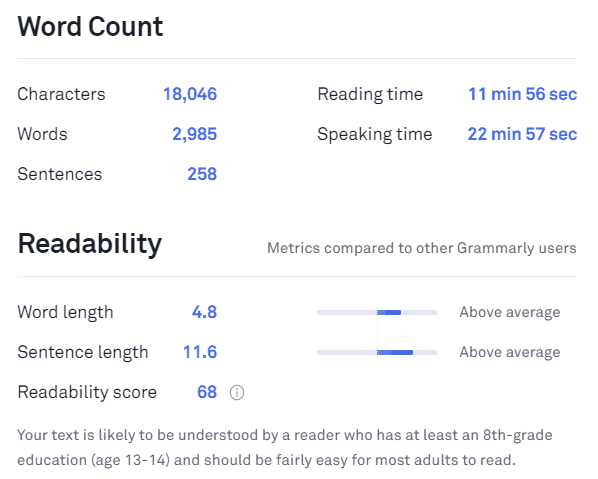
Readability example

To help you improve the numbers on this report, the premium version of Grammarly will flag overly long sentences. It will also suggest simpler words where appropriate.

“Vocabulary Enhancement Suggestions” (Or, Improve Your Vocabulary)

Grammarly Premium will offer you alternatives for either overused words or weak adjectives.

It will alert you if you use a particular word over and over again, and it will offer substitutions to keep your writing engaging.
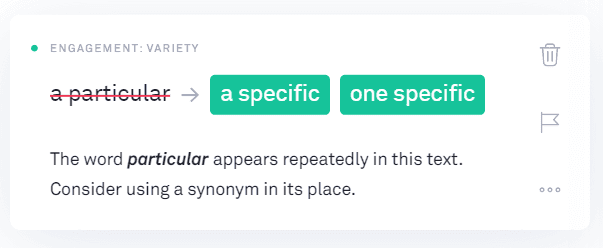
Grammarly Review: subsitutions

If you use a weak adjective like “fine,” it will suggest you replace it with something more dynamic.
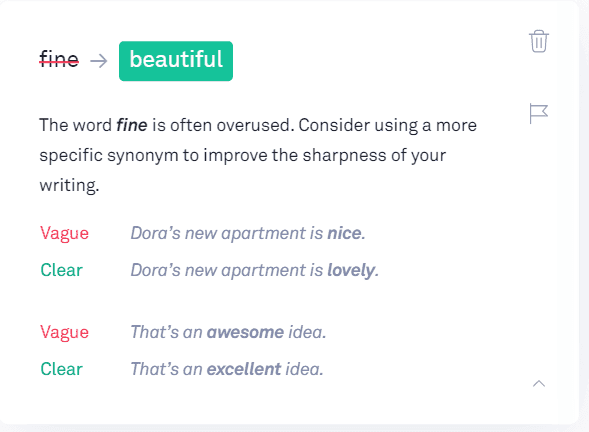
Grammarly Review: example of a suggestion

“Genre-specific Writing Style Checks” (Or, Set Writing Goals)

Are you looking for an inexpensive writing coach? Then use Grammarly Premium to get “tailored writing suggestions based on your goals and audience.”

Here are some of the goals you can set for each piece of writing:

Audience (General, Knowledgeable, or Expert)

You want to write for the level of your audience, and you can set this goal to reflect that.

For example, for a general audience, anyone should be able to read your work. At the expert level, you can use longer sentences and words (like medical or technical terms).

Formality (Informal, Neutral, or Formal)

As an example, in blog writing, you can begin sentences with a preposition. But if you are writing a paper for a more formal audience, you’ll want to use by-the-book grammar rules. This allows you to toggle between sets of grammar rules.

Domain (Academic, Business, General, Technical, Casual, or Creative)

The domain you select will have to match the options in Formality. For example, if you choose Academic, the Informal option is unavailable.
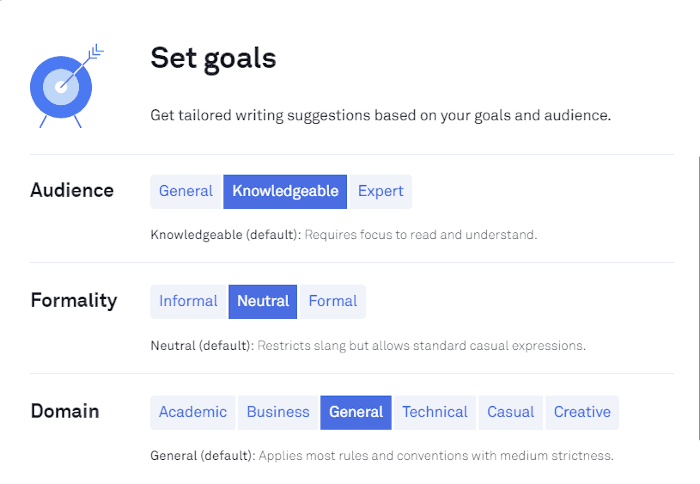
Formality example

The next two goals for Tone and Intent are experimental but fun to use:
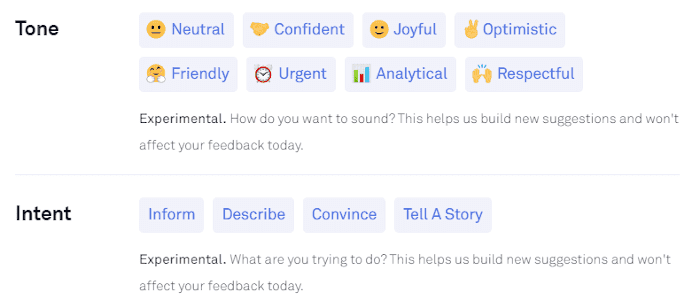
Tone example

Plagiarism Checker

One of the main benefits of Grammarly Premium? There are unlimited plagiarism checks. You can check your text as obsessively as you’d like, no extra charge.

If you read a lot and have a decent memory, you are in danger of accidental plagiarism. You may write what you believe to be an original thought, but nope, it isn’t. Using a plagiarism checker is vital!

You might inadvertently plagiarize by copying and pasting research text into your document, intending to label it properly later. Then the doorbell or phone rings. Life happens.

You come back to your writing and use the snippets of text, forgetting that it isn’t yours and failing to give credit to its creators. A giant oops.

One precaution is to never copy and paste research text into your final document. Always keep it separate and clearly labeled.

If you want to create a citation for a chunk of text, Grammarly provides the options to cite it using either MLA, APA, or Chicago Manual of Style.

Select the convention you want to use, and it will generate the citation for you and add it to your document.

Grammarly also provides links to the appropriate citation generator website if it can’t automatically generate a citation on its own.

In short:

Before you hit publish or submit a new document to your editor, you should run a plagiarism detector to verify your text is truly original.

And Grammarly Premium makes this possible.

Vital Feedback To Improve Your Writing

The best reason for paying for Grammarly Premium is it helps you to become a better writer by telling you why it is flagging an error. It gives you the reasons for your mistakes so you can learn and improve your writing skills.

You cannot become a better writer without feedback.

For example:
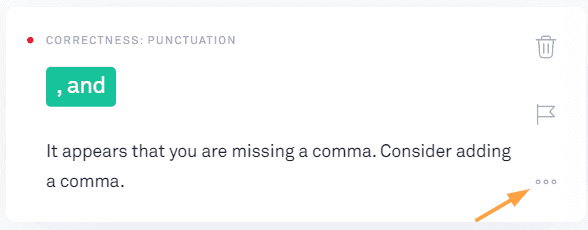
Grammarly Review: feedback example

Click the three dots on the correction card to learn more about why this is being flagged as an error, and you’ll see this:
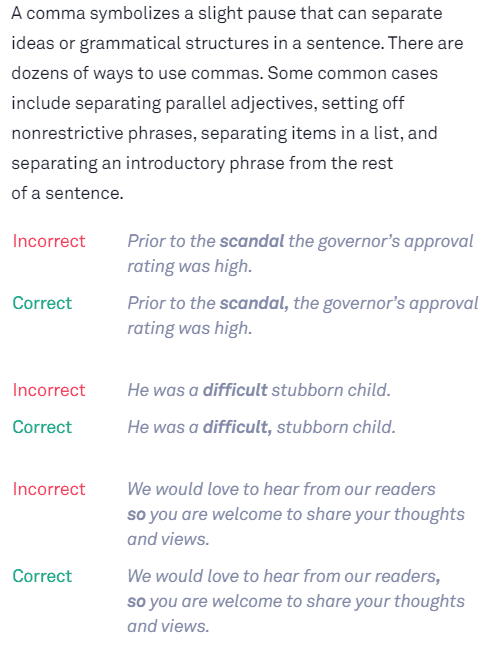
Grammarly Review: error example

I was the queen of forgetting the Oxford comma, a grammar convention that can help prevent ambiguity. After months of fixing it, guess what, I finally have it drilled into my head to use it!

If you pay attention to the reasons for your errors, over time, both your grammar and your writing ability will improve.

Again, always use your judgment. Look things up if something doesn’t look or sound correct. Use this as a learning tool, but remember there is no replacement for brushing up on your grammar.

Which Grammar Checker is the Best?

There are numerous grammar checker options out there for writers — Gingerly, Hemingway, After the Deadline, WhiteSmoke, LanguageTool, and ProWritingAid among them.

Here are a few reasons we believe Grammarly is the best:

Grammarly is Fast and Accurate

Grammarly can process large amounts of text quickly and accurately. For example, it took only a few seconds to run through a 7,000-word post.

It is also known for catching the highest quantity of errors compared to its competitors.

Grammarly is Super Easy To Use

Grammarly reduces the friction in using grammar checking software by making it as easy and as accessible as possible.

Take a minute or so to install the browser extension, and you are off and running. Almost everywhere you communicate on the web, Grammarly will help you keep your writing mistake-free.

If you create longer text for review, no problem. Log in to use the Grammarly Editor online or download the app to your desktop. Then you have the option to either copy and paste your text or upload it.

Grammarly has a clean, intuitive interface. No need for tutorials, or to waste time learning software. If you have any questions, there are helpful onscreen question marks to click for pop-up answers.

Grammarly is Available in Multiple Formats

Grammarly allows you to work on the web, on your desktop, or on your mobile devices. Here’s a list of the formats:

  • Grammarly Editor is available as a web-based tool. Log into the grammarly.com website and you’re ready to edit.
  • Grammarly’s Web Browser extension (Chrome extension, Safari, Firefox, and Edge). Download the Grammarly extension and use Grammarly on your favorite websites.
  • Grammarly’s app for desktops is available for either Windows or Mac. It’s one click to access, and you can either upload or copy and paste a document to check it.
    Grammarly add-in for Microsoft Office on Windows. This add-in allows you to use Grammarly while working with Microsoft Word & Outlook. This plug-in is for PCs only, it isn’t currently available for Mac.
  • Grammarly Keyboard for iOS or Android. Download this app to check your writing on mobile devices.

With a variety of options, you can bring Grammarly’s helpful algorithms with you wherever you write.

Grammarly is Customizable

Being able to customize your writing goals for the type of writing you are doing is a powerful feature.

Grammarly allows you to apply the right set of grammar rules according to the kind of work you are doing. Example: casual writing, which allows the bending of rules not acceptable in formal writing.

Grammarly also gives you a custom dictionary. If your writing contains brand names, jargon, or abbreviations, you can add them to your personal dictionary. This eliminates constant flags for incorrect spelling.
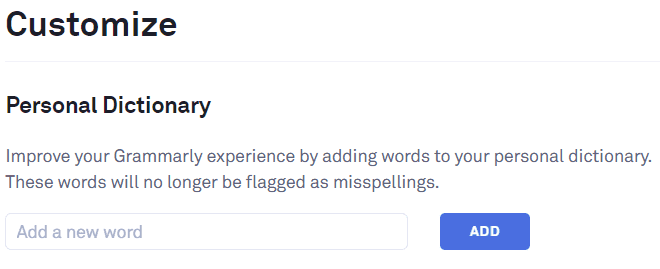
Custom dictionary example

This is a useful feature, but before you add a word to the dictionary, double-check your reasoning. Adding slang or jargon that works with one piece of writing might not be a good idea to add to your dictionary.

Why?

Because then it’s ignored when you work on something a bit more formal.

Grammarly also allows you to customize your English Language preference. It distinguishes between American English, British English, Canadian English, and Australian English.

You don’t want to be told to change the spelling of colour to color if you are writing in British English, right?
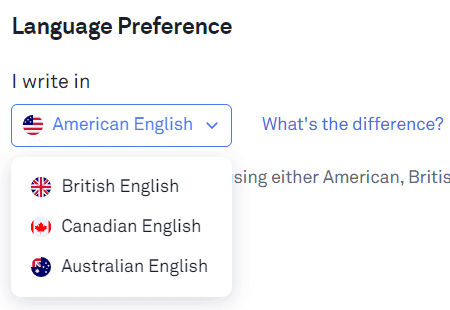
Grammarly Review: language preference

Grammarly: Frequently Asked Questions

Is Grammarly Premium Worth It?

If your grammar skills are solid and you keep spelling mistakes to a minimum, the free version of Grammarly could be all you need.

But if your skills are lacking, or if you’re a professional or student whose livelihood depends on written communication, Grammarly Premium is well worth it because it’ll catch mistakes that could damage your credibility (or torpedo your test scores).

Is it Safe to Use Grammarly?

Yes, but it depends on how comfortable you are with your information being transmitted online. According to its privacy policy, Grammarly transmits your writing to its online servers. Your text is stored on those servers while Grammarly runs its AI magic on it.

Similar to the precautions you’d take with email, you should be cautious of highly confidential or sensitive documents. Grammarly has many safeguards in place to protect your data, but no company (whether it’s Grammarly or Google) can promise 100% security.

So if you are an employee, you may want to check with your IT department for your company’s data management policies.

And if you are writing something deeply personal and private, you probably don’t want that anywhere near the internet anyway.

In fact, go analog and write it on paper. Then shred it for the ultimate privacy.

Who Should Use Grammarly?

You don’t need to be a professional writer who is paid to write to use Grammarly — anyone who uses the written word to communicate could benefit from it.

After all, if your message contains glaring errors, it’s hard to focus on the message and not the errors, which detract from the message you are trying to get across.

Grammarly is especially beneficial for writers judged on the quality of their written work, such as:

  • Bloggers
  • Content Marketers
  • Copywriters
  • Authors
  • Students
  • Business people who write emails or reports or create presentations.

Is There Anything Better Than Grammarly?

Possibly. It depends on your needs and your situation.

Here are a few Grammarly competitors that provide better options for some users:

ProWritingAid

ProWritingAid is the probably best Grammarly alternative. It is a solid grammar checker with similar features.

It offers in-depth feedback on your writing style by providing over 20 different writing reports. As an example, one of the reports will flags cliches in your writing.

ProWritingAid may be a better choice for fiction writers as it offers reports such as pacing checks for your fiction story.

If you use Scrivener as your primary writing tool, ProWritingAid provides Scrivener integration. You can still use Scrivener with Grammarly, but you will need to copy and paste your text into Grammarly’s app.

ProWritingAid may be a better choice for budget-constrained writers. It costs $70 per year (there are discounts on multi-year licenses), and for an additional $10 per year, you get 50 Plagiarism checks.

Ginger

This online grammar checker may be a better choice if you write in a language other than English. It can translate text between 60 different languages.

The interface is not as easy to use as Grammarly, and it offers fewer features. However, at $89.88 for a yearly subscription, it can work for budget-minded writers.

Hemingway App

The Hemingway App is not a replacement for Grammarly, but it is a useful complement to it. The online version is free, and the desktop app is $19.95 if you’d prefer to work offline (or support the developers).

The goal of this app is to have you write, well, like Hemingway. It provides feedback to help you keep your writing simple and easy to read.

It does this by flagging sentences that are either “hard to read” or “very hard to read.” However, the edits are up to you — it doesn’t provide suggestions to fix the complex sentence structure.

The Hemingway App also flags the use of the passive voice and the use of more than three adverbs in a piece of work. It will alert you to complex phrases and provide a few recommendations for alternatives.

Again, you want to use your own judgment when considering edits. Stay true to your own writing style, as long as it is clear and easy to read.

Does Grammarly Work With Word?

Yes, Grammarly works with Microsoft Word. There is an add-in you can download to your computer (Windows only). Once installed, you can click the Grammarly button on the Home tab, and a Grammarly sidebar will appear.

The sidebar allows you to choose which checks you want to run on your MS Word document.
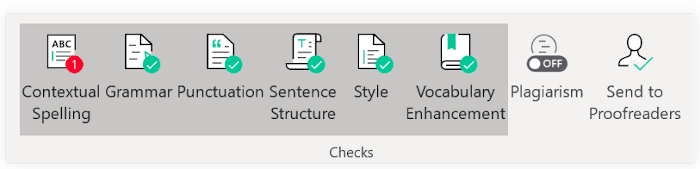
Grammarly in Microsoft Word

Once enabled, Grammarly checks for errors and suggest fixes.
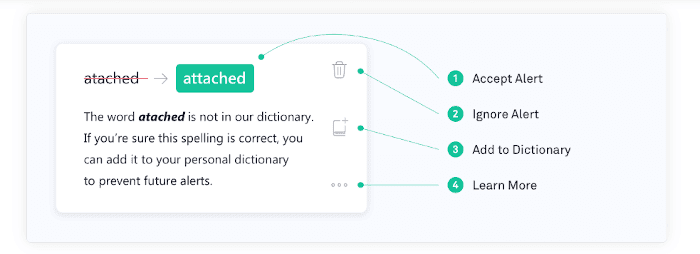
Grammarly Review: bug fixes in Word

Does Grammarly Work In Google Docs?

Yes, Grammarly works in Google Docs, but as a beta version only.
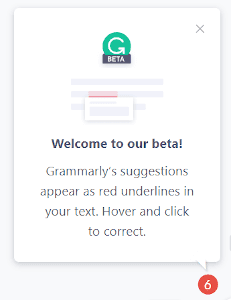
Gramarly Review: using Google Docs

Even with the Grammarly Premium upgrade, the Google Docs version is limited. For example, it will flag mistakes and provide suggestions for corrections, but it doesn’t give you the reasons for your errors. It’s also missing the suggestions to improve Clarity, Engagement, and Delivery that’s included with the premium version.

It also doesn’t pick up the same amount of “Correctness” errors in Google Docs that it will when you copy and paste the same text to the Grammarly app.

As a workaround, you can make changes to the grammatical errors that are flagged to keep your document as clean as possible. But then you’ll want to copy and paste your work into the web or desktop app to make your final sweep for errors and improvements.

Is Grammarly Really Worth It?

Now that you’ve read this in-depth review of Grammarly, you know the answer.

The free version of Grammarly cleans up typos and prevents embarrassing mistakes. If you are a casual writer who writes mainly for fun, the free version may be enough for you. And for anyone who takes their writing seriously, the premium version is a solid investment.

Grammarly doesn’t replace professional proofreaders. Human proofreaders will catch more than Grammarly can and will pick up contextual errors that Grammarly may miss.

Is Grammarly worth it?

Yes.

Grammarly can clean up and improve your writing so that when you hand it over to a human editor to proofread, it will require a lot less work. And less work for them means it will cost you less.

If you do your own proofreading and editing, the Grammarly Premium plan offers a valuable writing assistant. It helps you keep your writing clear, engaging, and easy to read.

If you aren’t sure about the premium version, try Grammarly for free (affiliate link) first to see how you like it.

Signing up is easy — you’ll only need your email address to get started.

About the Author: Karen MacKenzie is a freelance writer and Smart Blogger Certified Content Marketer. She blends her business and financial experience with a desire to connect with readers in a warm and friendly manner. Go to kmackenziewriter.com if you’d like to hire her for your next project.

The post Grammarly Review: Is it the Best Grammar Checker in 2020? appeared first on Smart Blogger.


from Smart Blogger https://ift.tt/31hCcNz

Avast closes Jumpshot over data privacy backlash, but transparency is the real issue

In this photo illustration an Avast Antivirus logo seen displayed on a smartphone.
Avast will shutter its Jumpshot subsidiary just days after an exposé over how they sold user data. But transparency remains the key issue at play here.Read More

from Social – VentureBeat https://ift.tt/2GBr8Bc

The perils of tricking Google’s algorithm

Let’s admit it, all of us are trying our best to please search engines (SE) and cracking Google’s algorithm. After all, who doesn’t want some extra visibility and revenue?

Naturally, billions of websites are adopting innovative practices to gain Google’s attention and approval. In order to rank high on the SERP, businesses should comply with the Google updates that are introduced on a regular basis. But this, in no way, means finding loopholes in these search engine algorithms or adopting strategies to trick them. In fact, businesses employing such empty SEO tricks have to face the music later. Many firms already have experienced Google’s wrath in the past.

Google has been regularly introducing algorithm updates to improve the quality of its search results. But it also penalizes sites that employ unethical or outdated practices to rank higher. This can adversely impact a brand’s reputation and bottom line. Ideally, these updates should be used as a guide for improving a site’s UX, ranking on SERPs is an end result that will follow.

Read on to know the ill-effects of chasing Google’s algorithms. There’s also a bonus involved! You will also learn some effective tips to stay on top of these updates while boosting your business reputation.

1. Google penalties

Google’s algorithm updates are a solution to reward good content and identify and penalize websites using unethical and outdated SEO practices. Google absolutely doesn’t approve of tactics like keyword stuffing, buying links, linking to penalized sites, unnatural links, and others. Algorithm updates, Panda, Penguin, Pigeon, RankBrain, Broad Core, and others aim at improving the quality of search results for users.

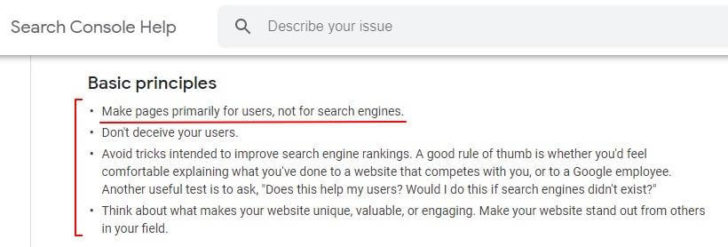
Google webmaster guidelines

Source: Google Webmaster Guideline

Thus, web developers, digital marketers, bloggers, and online businesses messing with these updates are penalized, sending their website plummeting down the SERP.

Google can penalize such websites in two ways –

A. Algorithmic penalty

Several other factors can cause your ranking to go down. Yet, with the introduction of an update, there’s a fair chance that your website may be affected. This is especially true if your site doesn’t adhere to the specific parameters assessed by the update.

For instance, Google Panda assigns a quality score to your site after checking for duplicate content and keyword stuffing. If your site has duplicate content, its ranking is bound to suffer.

Similarly, the latest January 2020 Core Update will be checking websites for authoritative and relevant content with a healthy E-A-T rating. So, if your website violates any of the guidelines shared by Google, it will automatically be penalized or filtered.

Make sure you check for issues in your domain on Google Search Console at regular intervals.

B. Manual penalty

This is a direct result of your website being penalized by a Google employee for not complying with the search quality guidelines. Manual penalties are Google’s way of punishing websites with spammy behavior. The Manual Actions Report on Search Console allows you to check such penalties, offering an opportunity to resolve them.

Check out this infographic by DigitalThirdCoast that shares an analysis of the businesses that tried to cheat Google along with the repercussions they had to face later.

2. Loss of reputation and credibility

Businesses obsessed with algorithm updates not only attract penalties but also lose focus on improving their site’s UX. Either way, the business loses its reputation and credibility. Lost reputation means an immediate loss of potential revenue, benefiting no one else but the competition.

Check out what John Mueller, Webmaster Trends Analyst at Google has to say about cleaning up the mess after being slapped by a Google penalty.

John Mueller's comment about Google penalties

Source: Reddit

Of course, there are ways to recover from Google penalties. But it takes a lot of effort to rebuild the business reputation and trustworthiness, let alone improving the firm’s online ranking and winning back the lost customers.

3. Marketing myopia

One of the gravest dangers of being preoccupied with Google algorithm updates is losing sight of the business vision and goals. Instead of focusing on the audience’s needs the firm tends to adopt an inward-looking approach only to satisfy Google.

Google will forever introduce these updates. There’s no end to their journey towards improving the quality of search results. Google is clearly focused on its vision. Are you?

Don’t lose sight of your vision. Use Google’s algorithm updates as a guide to steer closer to your business goals.

What can you do to rank better on Google?

1. Don’t perennially chase Google updates

Google makes minor changes in its algorithm almost every other day. In 2019 alone multiple updates were reported. Not all were confirmed as Google is less upfront about these updates.

List of Google's algorithm updates in 2019

Source: Moz

The sole objective of these updates is to create a better user experience. Merely chasing them and going all over the place with execution will not only land you with a penalty but also affect your reputation in the long term.

Stop obsessing about these updates and focus on making your website and content better each day.

2. Focus on delivering first-rate digital experience

Google’s algorithms are constantly judging and rating sites based on the quality of experience they offer and their E-A-T rating. In a nutshell, you need to prioritize these pointers.

A. Serve quality content

“Quality” seems to be a subjective term but not for Google. The search giant clearly states that the content on a website should be in-depth, relevant, useful, and from a credible source. Simply put, it asks us to create E-A-T worthy content.

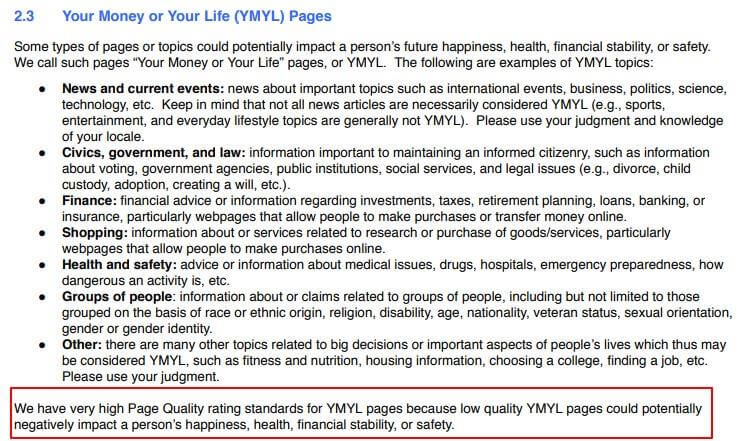
This is especially true for the YMYL websites that affect an individual’s health, happiness, safety, or financial stability.

Google's page quality rating standards for YMYL websites

(Source: Google’s Search Quality Guidelines)

Ask yourself these three questions when creating a piece of content:

  • Is the content contributor an expert on the subject? (Expertise)
  • Is the content contributor an influencer or an authority in the domain? (Authority)
  • Is this content accurate and from a credible source? (Trustworthiness)

B. Work on your backlink profile

Backlinks are one of the top-ranking factors that help Google decide a website’s authority and credibility in its niche. Focus on getting quality backlinks from authority sites.

How?

Well, authoritative sites will award links to websites serving relevant, useful, and shareable content. Build authority by creating great content in various forms like videos, podcasts, case studies, infographics, and others.

You should also collaborate with experts for content-creation projects. For instance, expert roundups can not only strengthen your network with influential people in a niche but also provide solid content for your upcoming posts.

Tip to work on back links via roundup posts to rank well

(Source: https://ift.tt/1LEd4n3)

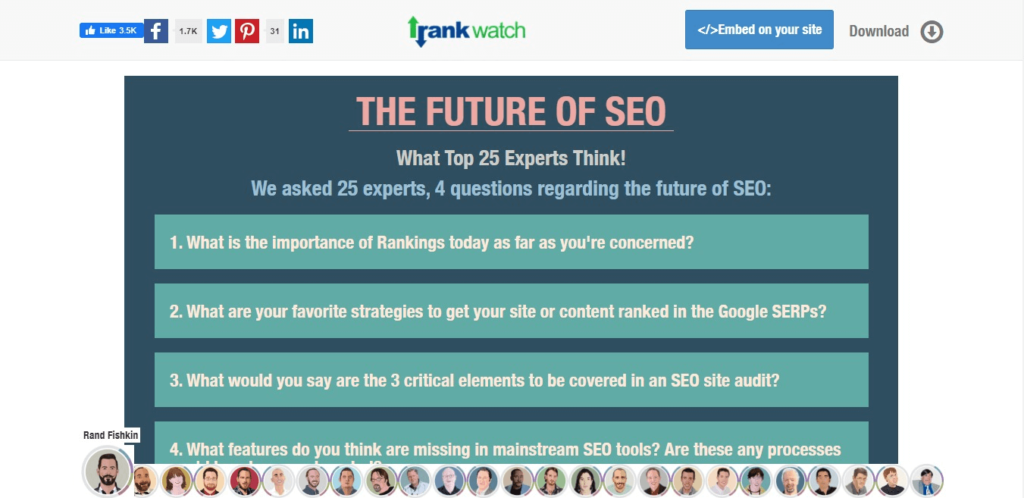
Check out how RankWatch conducted an expert roundup involving 25 marketing experts like Rand Fishkin and Barry Adams to discuss the future of SEO. Such inbound link-building initiatives have earned the website a healthy number of backlinks from websites with healthy page authority (PA).

Here are the results as seen on MozBar.

Inbound link result on Mozbar

Source: Moz Analytics

C. Improve your site speed

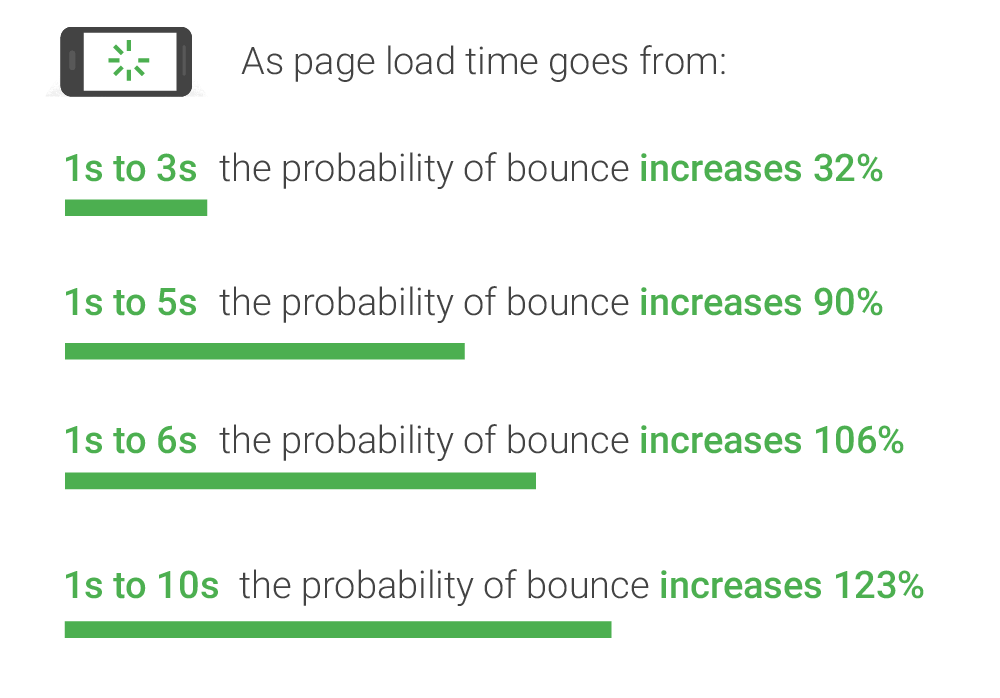
A website’s bounce rate is directly proportional to its load time. Google recommends having a site speed index of under three seconds.

How page load time affects traffic

Source: Think with Google

If your website takes longer than three seconds to load, be prepared to wear Google’s “Badge of Shame”. You read it right! Google’s planning to slap slow websites with this badge.

Google's badge of shame

Source: Chromium blog

It’s best suggested to take effective steps to improve your site speed which will, in turn, boost your site’s UX and improve your ranking.

D. Avoid over-optimizing webpages

Google will see through any unscrupulous SEO hacks that are employed to game the system. Build sites to improve your audience’s online experience, not to trick Google. We will touch such unethical practices at the next point.

3. Play by the rules

Though Google isn’t transparent with its algorithm updates, it keeps sharing valuable tips for webmasters and content creators, encouraging them to serve quality content and boost their site’s UX. Use these tips to your advantage.

A. Take learnings from the search quality guidelines

Google wants webmasters to follow its guidelines when building sites and posting online content. So, it’s important to constantly stay updated about the current guidelines. Refer to the search quality guidelines when creating an SEO strategy for your business.

B. Avoid black and gray-hat SEO tactics

Avoid using black-hat SEO techniques and monetization schemes like keyword stuffing, private blog networks, spammy links, and affiliate links among others. Moreover, Google absolutely disapproves of gray-hat SEO tricks like buying expired domains, cloaking, dummy social accounts, and scraped content among others. These techniques normally go unnoticed but when used excessively are spotted by Google, attracting a penalty.

Therefore, it’s best to avoid both these unethical SEO tactics that only focus on tricking the algorithm. Make delivering value to users a priority!

4. Check for crawl errors

At times, your website isn’t featured in the top searched because Google’s spiders haven’t crawled it. One of the major reasons for this is a possible error in your code. Use Google’s Index Coverage report and URL Inspection tool to identify and fix the gaps in your code.

Also, remember to optimize your crawl budget to ensure that your important webpages in Robots.txt are crawled. Finally, watch out for 301 and 302 redirect chains that can hurt your crawl limit and cause the SE crawler to stop crawling your site.

Wrapping up

A website doesn’t enjoy high visibility on Google, it practically doesn’t exist. Therefore, everyone’s bending over backward to crack Google’s algorithm updates. However, businesses adopting strategies merely to trick Google are headed for a slippery slope.

Google’s algorithms are smart enough to identify and punish websites that are up to no good. So, take my advice – instead of trying to crack Google’s algorithm updates, work towards creating awesome content and offering the best experience to users. The tips shared in this post will guide you in the process.

George Konidis is the co-founder of Growing Search, a Canadian based digital marketing agency providing optimal SEO and link building services worldwide. He can be found on Twitter @georgekonidis.

The post The perils of tricking Google’s algorithm appeared first on Search Engine Watch.


from Search Engine Watch https://ift.tt/2S4ln47

A Small Amount of Data Can Do It for B2B Personalization

In B2B marketing, content personalization doesn’t require you to know their shoe size, family situation, pet ownership, or car model. A small amount of data combined with relevant insights can go a long way. Let’s explore. Continue reading

The post A Small Amount of Data Can Do It for B2B Personalization appeared first on Content Marketing Institute.


from Content Marketing Institute https://ift.tt/2ObIVmR