At Yoast, we truly believe you should be using the block editor (formerly known as Gutenberg) in WordPress, simply because it’s a much better experience than the ‘classic editor’. Unfortunately, when we look at our statistics, we see that a large segment of our users still uses the classic editor. Which is why we’d like to explain why you really should start switching over.
Do you want to learn how to use the blocks in the block editor to their fullest potential? Look no further and check out our free WordPress block editor training! It’ll teach you how to create a well-designed blog post with the block editor. Let’s create some amazing content!
The Gutenberg project and with it, the block editor is literally where all the innovation in the WordPress space is happening. Think of it this way: the only car race you’re going to win by using old technology, is a classic car race. If you want to win in SEO in the next few years, I guarantee you’ll need to be on the block editor. If you’re not, and if some of your competitors are, they’re going to beat you.
While the block editor may be very good, you may think: why would I switch? If the classic editor is working for me, so why bother? Well: the block editor is only the first step in a longer process. More and more parts of the WordPress admin will start using blocks, and because of that, getting familiar with the block editor is essential.
Future versions will iterate on what the block editor already does, moving to site-wide editing, instead of just the content area. The first required step for that is defining content edit areas, something Matias discussed in this post on Make Core, one of the blogs of the core WordPress development team. That post by Matias prompted this post by Justin Tadlock on how the Gutenberg project is shaping the future of WordPress themes. This is getting me, and our entire team at Yoast, very excited.
The Gutenberg project aims at making WordPress easier to use. That’s a long term goal, but it’s already doing that now too. When we have site-wide editing, we won’t need to teach people how to use widgets anymore: they’ll be the same as the blocks they see in the editor. In fact, the entire distinction will be gone.
Reasons to use the block editor now
Besides all of these great developments, you really should use the block editor now and stop using the classic editor. Let me give you an overview of simple and clear reasons. With the block editor:
You will be able to build layouts that you can’t make in TinyMCE. Most of the stuff we did for our recent digital story required no coding. Plugins like Grids make it even easier to make very smooth designs.
You can make FAQs and HowTo’s that’ll look awesome in search results. Our Yoast SEO Schema blocks are already providing an SEO advantage that is unmatched. For instance, check out our free FAQ and How-to blocks.
Simple things like images next to paragraphs and other things that could be painful in TinyMCE have become so much better in Gutenberg. Want multiple columns? You can have them, like that, without extra coding.
Speaking of things you couldn’t do without plugins before: you can now embed tables in your content, just by adding a table block. No plugins required.
Creating custom blocks is relatively simple, and allows people to do 90% of the custom things they would do with plugins in the past, but easier. It becomes even easier when you use a plugin like ACF Pro or Block Lab to build those custom blocks.
Custom blocks, or blocks you’ve added with plugins, can be easily found by users just by clicking the + sign in the editor. Shortcodes, in the classic editor, didn’t have such a discovery method.
Re-usable blocks allow you to easily create content you can re-use across posts or pages, see this nice tutorial on WP Beginner.
There are many more nice features; please share yours in the comments!
If you haven’t used the Block Editor recently: go, try it! I’m sure you’ll be happy with it.
At Yoast, we are huge fans of the block editor. Admittedly -not right from the start-, but we’re now block-editor fanboys and fangirls. That’s why we created an awesome free block editor course! We hope it will help everybody to use the block editor to the fullest!
In this course, you’ll learn how to create awesome content with the new WordPress block editor! It adds thousands of new possibilities for creating posts and pages and it makes editing a lot easier. In the new Block editor training, we take you by the hand and guide you through the process of creating and publishing content with the new block editor. What’s more, we also show you some cool examples and explain how you can make the switch from the classic editor to the block editor. Ready to start learning?
In this online course, we teach you everything you need to know about creating well-designed, perfectly structured content with the new WordPress block editor. You’ll learn:
what the block editor is, why it was created and why you should be using it;
how to use the block editor: how to add, move, transform, group, reuse and edit blocks;
how to publish a post using the block editor;
how to add more blocks – and thus: functionalities – to the block editor;
how to switch from the classic editor to the new block editor and what you should pay attention to when transitioning;
everything about the future of the block editor – or project Gutenberg, like the goal of the project and the plans that have been announced.
We’ll take you by the hand and guide you through the process of creating a post with the block editor through practical screencasts, PDFs and assignments. To illustrate the endless possibilities of the block editor, we’ll also show you some awesome examples of content created with the new editor.
How is the course set up?
The Block editor training is a hands-on and practical training that consists of three modules:
What is the block editor?
Using the block editor
Extras
These modules are divided into several lessons. Each lesson contains interesting videos, in which our WordPress experts – like Marieke van de Rakt and Jono Alderson – explain everything you should know. The practical lessons in module 2 also contain screencasts, so you can see exactly what you should do. We’ve also created reading materials, in which we explore topics more broadly. To complete a lesson, you take a quiz or do a practical assignment. In this way, you’ll know for sure whether you fully understand the theory and whether you’re able to put your knowledge to practice. Once you’ve finished the course, you’ll receive a Yoast certificate and a badge you can display on your website.
Online & on-demand
The block editor training is an online and on-demand training, like every other Yoast SEO academy training course. This means you can learn whenever you want and wherever you want! And did we already mention it’s completely free of charge?
Start creating block-tastic content now!
After the Block editor training, blocks will no longer hold any secrets for you and you’ll be ready to outshine your competition with visually stunning blog posts and pages! Are you ready? Check your Yoast SEO academy courses overview or click the button below to start the course!
Yoast SEO academy offers more in-depth courses about SEO and WordPress too. Want to learn how to write texts that are a breeze to read for readers and search engines alike? We offer classes on SEO copywriting! Or do you want to find out what keywords are most effective for your site? Our keyword research classes will tell you how. With a Yoast SEO academy Premium subscription, you’ll have access to 11 specialist courses created by SEO experts. Check it out now!
You’ve had this great idea. You’ve built this amazing website. And then, you want that website to attract visitors! You want to be found! What to do? How do you get started with SEO? How do you start with SEO on a brand new site? In this blog post, I’ll talk you through the 7 steps you need to take in order to get your SEO strategy up and running.
So, you’ve started your first site and you want it to be found, so you can share your thoughts and views with the world. What to do? Let’s go through the steps of starting with SEO!
Install Yoast SEO
Provided that your website is on WordPress, installing Yoast SEO should be the first step in your SEO strategy. Our Yoast SEO plugin will help you to make sure your website is crawlable and findable. Yoast SEO will immediately take care of some technical SEO issues, just by being installed on your website. Besides that, our plugin will help you to construct your website in such a way that Google will understand and rank it. We offer a free and a premium plugin. If you’re just starting out, you’ll probably won’t need our premium version yet, although it can already save you some valuable time.
Get that first link
Google needs to know your website exists. And, in order for Google to know about your awesome new site, you need at least one external link towards your site. The reason for this: Google crawls the web. It follows links and saves all the webpages it finds in a very large database called the index. So, if you want to get into that index, you need (at least) one external link. So make sure to get that link from an external website!
What do you want to rank for?
Make sure to attract the right audience to your website. Who are your customers? For whom did you build this website? What terms do your customers use when searching on Google? And what’s their search intent, what kind of content are they looking for? Find out as much as you can about your audience.
SEOs refer to this stage as doing your keyword research. This is a hard and important phase. There are a lot of helpful tools that make doing keyword research easier. Some of these tools are free, others are rather expensive. While these tools will make the difficult phase of keyword research easier, you should remember that you can’t outsource your keyword research to a tool. You really need to think about your audience and about the search terms they are using. It’s also important to analyze what you’re seeing in the search results pages when entering your keywords. Take your time for this phase. It is crucial. If you do your keyword research correctly, you’ll come up with a long list of keywords you want to rank for.
Set realistic goals
For a new site, it is rather hard to rank high in the beginning. Older sites already have a history, established their authority and a lot of links pointing towards them. That means that Google’s crawlers come by more often at older sites. For a new site to rank, you’ll always need to be a little patient. And remember: some search terms will be out of reach for a new site because there’s too much competition. Trying to rank for [WordPress SEO] will be rather hard for any new blog, because of some fierce competition on that term from Yoast.com.
If you’re just starting with your site, try to aim at ranking for long-tail keywords. Long-tail keywords are keywords that are longer and more specific and have far less competition than the popular head keywords. After a while, when your site starts to rank for the long-tail keywords, you could try and go after the more head keywords.
Internal linking
As I already mentioned in step 2, Google follows links. Google also follows the links on your website, your internal linking structure. It crawls through your website following the internal linking structure of your site. That structure is like a guide to Google. Make sure your internal linking structure is flawless. That’ll help with your ranking.
If you start with a brand new website, you’ll probably don’t have much content yet. This is the perfect time to think about structure. Now it is relatively easy. It’s like having a new closet and you haven’t started buying clothes. Now is the time to think about the things you want to put on the top shelf and which items you want to hide in the back of your closet. So, decide which pages are most important to you. What are the pages you want to rank with? Make sure that these pages have the most internal links pointing towards them.
Start writing
In order to get ranked, you need to have content. A very important step in how to start with your SEO is to write amazing content for all these search terms you want to be found for. The content analysis in the Yoast SEO plugin will help you to write that content. Our analysis will help you to write a text that is both readable and SEO friendly.
While you’re writing, make sure to use the words you want to be found for. Use them in headings and in the introduction and conclusion of your text. After writing your text, you should optimize your SEO title and your meta description. The Yoast SEO plugin will help you to do all these things.
Get those links!
External links are important to get your site in high positions in those search engines. But gathering those external links can be a hard process. Make sure to write content people want to share and link to. Original ideas and great, valuable content will make the chance that people would want to share that much bigger.
Of course, reaching out to people and making them aware of your awesome website and product can be a good strategy to get those external links too. Read more about a successful link building strategy or find out what link building is first.
And then what?
The truth is that SEO is more than these 7 steps. This is only the very beginning, the steps you take to start with SEO. In order to get longterm high rankings in the search engines, you need to do hard work. Your content has to be amazing, your site structure has to remain flawless (and that’s challenging when your site is growing) and you’ll have to keep earning those external links. The only way to really do that, in the long run, is to make sure that your audience enjoys visiting your website. If you want to rank the highest, make sure your site is the very best. Good luck!
When you roll out the red carpet on a new website, you might be expecting visitors to start coming eagerly. In reality, before people start visiting your site, search engines need to find, index and rank it. In this article, I share some tips that could help you get your site indexed faster.
A quick note before we go on. Although in the short term, there are some things you can do to get your site indexed faster, you mustn’t forget the long game. A sustainably high-ranking website depends in large part on creating remarkable content. Why? Because search engines want to find the best answer to the queries their users make. The site with the best content wins the race to the top of the search results.
How do search engines work?
To understand how to get your site indexed, it’s useful to know how search engines work. Search engines generate results in three main steps: crawling, indexing, and ranking.
Crawling is the process of discovery done by crawlers, bots, or spiders. A computer program instructs crawlers on what pages to crawl and what to look for. When crawlers land on a page, they gather information and follow links. Whatever they find, they report back to the search engine servers. Then, the search engine tries to make sense of the page in order to index it. It looks at the content and everything it finds, it puts in a giant database; their ‘index’.
Finally, ranking begins when you search for something online. So, the search engine algorithm looks through the index and filters the pages to find the best ones. We do not know the exact mechanics of the algorithm. Still, we know that search engines are especially enthusiastic about high-quality content and user-friendly, up-to-date pages.
So, how can you speed up this process and help search engines find you quicker? An excellent way to start is submitting an XML sitemap in Google Search Console.
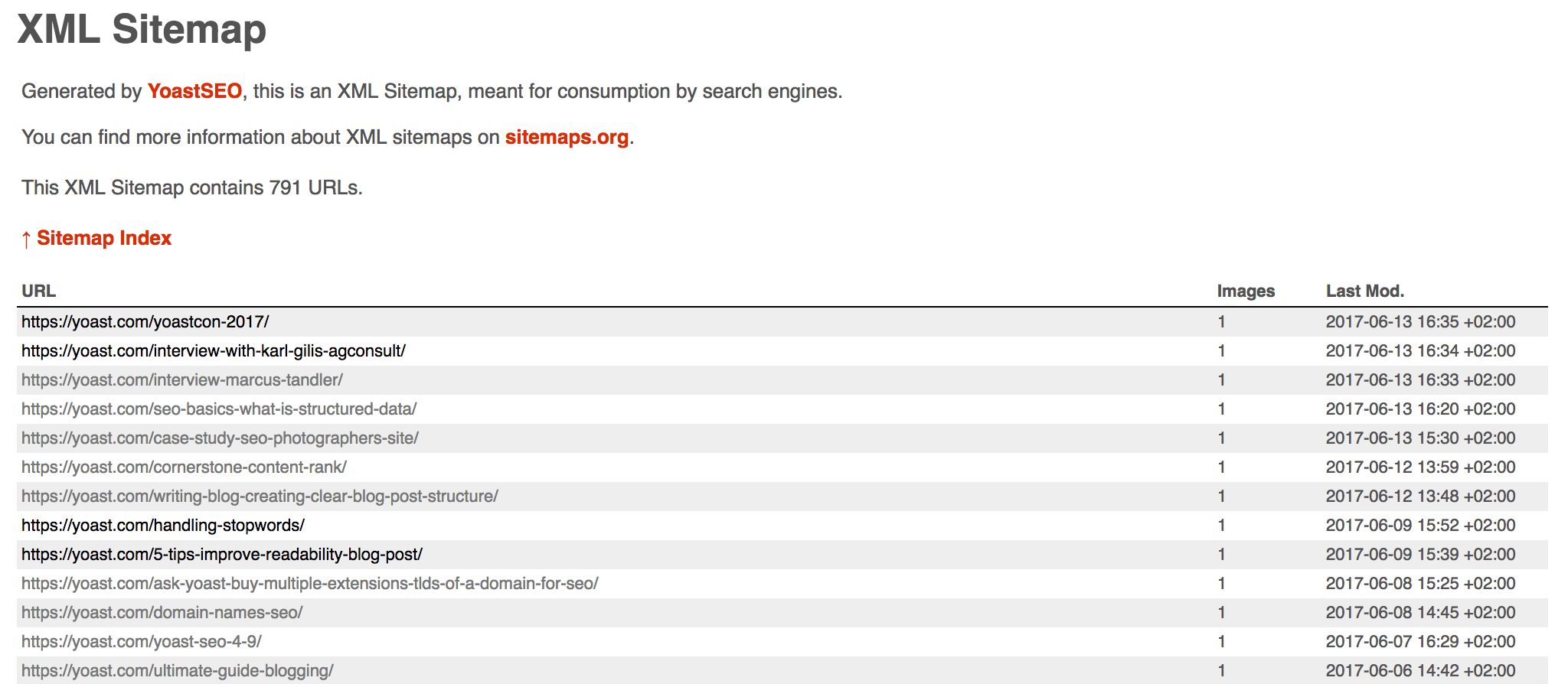
An XML sitemap is a file that contains information about your website. In plain language, it is a list of your most important pages. It is a useful tool that helps Google find and explore your site. Yoast SEO can help you to create a sitemap. All you need to do is enable the XML sitemap option and the sitemap will be automatically generated. It’s quite a time saver!
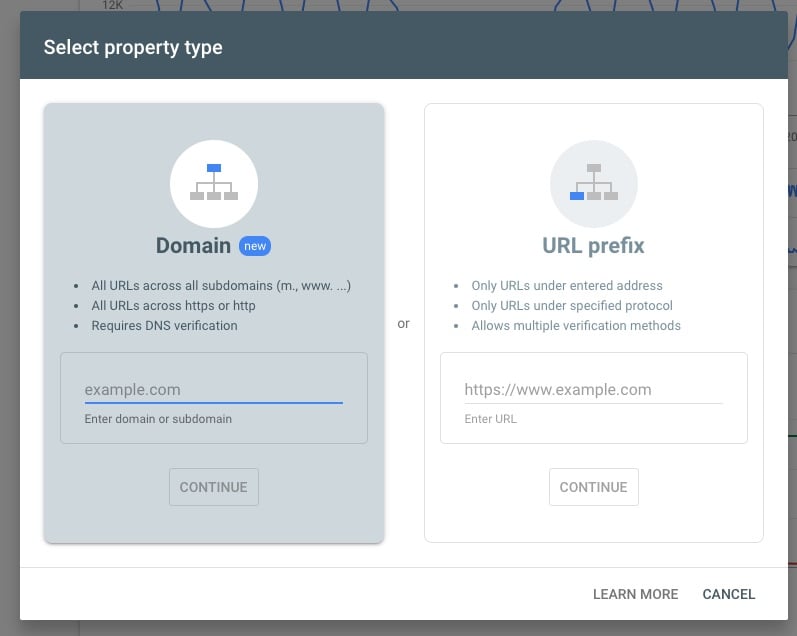
After you’ve created the sitemap, you need to tell Google about it. Google Search Console is a tool that can help you with that. To add your sitemap to the Console, you need to create an account. Yoast SEO can also help you get your site verified with Google Search Console.
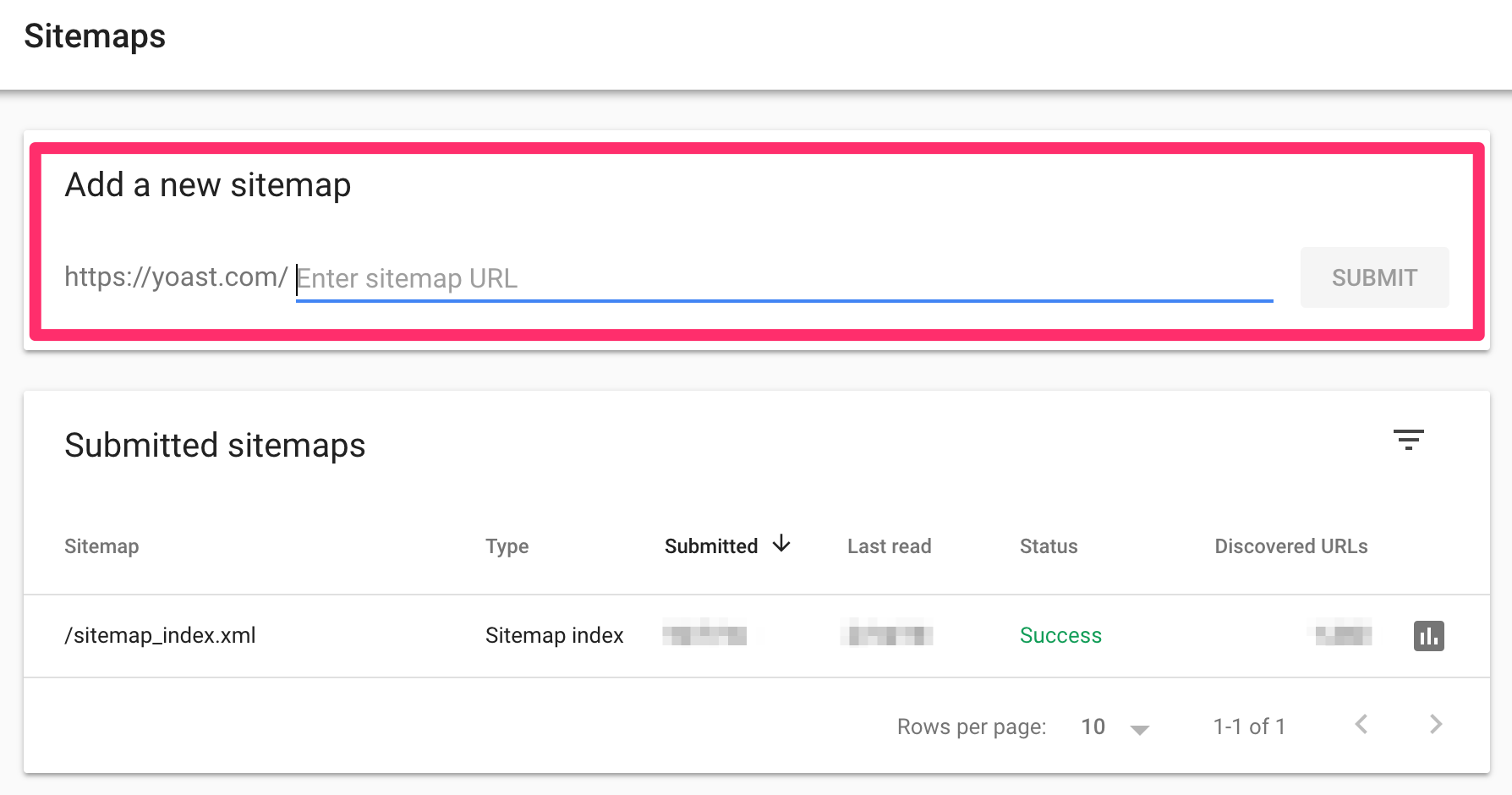
In Google Search Console, you will find the XML sitemap tab. There, you can add the sitemap you created, so that Google will know where to find it. If you update content on your site, your XML sitemap will be updated automatically.
And/or, submit your most important individual pages in Google Search Console
On top of this, you can ask Google to crawl individual pages too. In Google Search Console you’ll find the URL inspection tool, where you can ask Google to crawl or recrawl a URL. There’s a quota, so think about which pages are crucial for your business in terms of ranking and submit those here.
Why do you need an XML sitemap?
We mentioned that crawlers discover pages by following links. When you have a new website, you may face at least two issues. First, there are likely not that many external sites that point to your website. Second, you probably still don’t have a lot of content, so your internal linking and your site structure are not (yet) stellar. Without links, how can the crawlers come to your site?
One solution to getting your site indexed is to create a sitemap right from the start and add it to Google Search Console. However, since you might still not have a lot of content, you should be careful with what you include in it. Although you can create sitemaps for videos, images, categories, and tags, it does not mean that you should necessarily do it. For example, you might have already set up some categories. But, for each category, you have just one post. In that case, creating a sitemap for your categories is not so useful, since the content does not give a lot of information, both to visitors and crawlers.
It is important to note that Google may not crawl and index all the items in your sitemap. Still, we encourage you to create one, as we believe that you will benefit from it.
Getting your site indexed beyond Google
We told you how you could submit a sitemap with Google Search Console. But, it’s not the only search engine out there. So, how can you submit your sitemap to other search engines? It is easy with Yoast SEO. Other search engines also have Webmaster tools, where you can submit a sitemap and follow the performance of your site. Currently, you use Yoast SEO to add your site to:
After you’ve created a sitemap and connected it to search engines with Yoast SEO, can you finally sit back, relax, and watch as visitors pour in? Not really. As we said, you will have to continue making high-quality content. Don’t forget that you can also use social media to your advantage and strategically share your content there. Another important thing is getting links from other, preferably high-ranking websites. That means that you will need to work on your link building. Of course, don’t forget to apply holistic SEO strategies to your website to cover all SEO fronts and ensure high rankings.
Our current string of releases focusing on improving our code is continuing with Yoast SEO 13.3. In this release, for instance, you’ll find a sizable update to how we work with languages. In addition, we have a Schema structured data addition and several improvements to how Yoast SEO handles URLs. Read on!
Improving the way we handle languages
As you know, Yoast SEO has a very advanced system for working with languages. We analyze your texts and give you tips to improve the readability or the enhance the SEO-friendliness of those articles. Yoast SEO Premium customers get an even more advanced analysis that makes it even easier to optimize your text in a natural way. All thanks to word form recognition, related keyphrases and synonyms.
Getting the analysis so smart is no small feat. Languages are hard to grasp and every language has its own rules and peculiarities. To get these analyses to function properly, we need to finetune these for each language. In Yoast SEO 13.3, we’ve drastically improved this system.
We now break down words to their stems automatically — also called stemming —, but no longer build a complete list of all the different word forms. This was a complex and time-consuming process that made it hard to scale. This new version makes it much easier for us to improve the system — and to roll out a lot more languages in the near future.
Keep in mind, the analysis itself haven’t changed — just the way we come to the end results.
Enhancements in Yoast SEO 13.3
In Yoast SEO 13.3, we’ve improved how the plugin handles URLs. Saša Todorović also submitted a number of improvements to how Yoast SEO works with URLs as well. We made sure that URLs keep human-readable, both in our forms and in the metadata Yoast SEO outputs on the frontend. Of course, they will remain encoded in the Schema structured data, because of the way JSON works with this.
Speaking of Schema, we’ve added a potentialAction entity to the WebPage and Article Schema pieces. This means we can indicate in the structured data that readers of this piece of content have the option of leaving a comment, for instance.
Update now to Yoast SEO 13.3
There you have it, Yoast SEO 13.3. This release bring a better language processing system, plus enhancements to the way Yoast SEO works with URLs. In addition, we fixed several bugs and made improvements to our code. You can find out more in the changelog for Yoast SEO 13.3. Download now!
A question that often pops up for sites that are chasing “hot topics” is: how to get Google to crawl our site faster? This could be either because you have a big site and want to see changes faster or because you’re optimizing a news site. There are a few things you can do to improve your crawl speed. We’ll cover them in this post.
There are a couple of possible reasons why Google is slow when spidering your site. The first might seem obvious: if Google doesn’t find enough (quality) links pointing to your site, it doesn’t think your site is very important. The other reasons are technical: Google has too much to crawl on your site, your site is too slow, or it’s encountering too many errors.
Your site doesn’t have enough authority
When your site doesn’t have enough quality inbound links, Google will not crawl your site very quickly. You can imagine it doesn’t necessarily want to spend much time on a site that it doesn’t consider important. When your site is brand new, this will be the case.
So, when you need more crawl action on your site, start doing some link building. We’ve written about that topic before, I’d suggest reading these three posts. They cover what you need to know to get started, so I won’t go into it any further here:
If the above three posts are not enough for you, there’s more in our link building archive.
Technical reasons for slow crawling
The technical reasons for Google to crawl your site slowly can be divided into three groups: your site is too slow, you have too many errors, or you have too many URLs.
Your server is slow
The main reason why we see Google crawling sites slowly is when the site itself is actually slow. If your website is slow to respond to requests, or loads lots of bulky resources, Google might intentionally lower their crawl frequency and depth (or limit your crawl budget) to try to prevent things from breaking.
If you have a lot of errors on your site for Google, Google will start crawling slowly too. To speed up the crawl process, fix those errors. Simply 301 redirect those erroring pages to proper URLs on your site. If you don’t know where to find those errors: log into Google Search Console. If you have access to your site’s access logs, you can also look at those, preferably with a tool like Screaming Frog’s Log file analyzer. To prevent your site from being crawled slowly, it’s important that you regularly look at your site’s errors and fix them. We have a more extensive article on fixing 404 errors to help with that.
When your site is down too often, Google will also slow down incredibly hard. If this happens because of your hosting, switch hosting. Make sure to check your site’s uptime with a tool like Pingdom.
Too many URLs
If you simply have too many URLs on your site, Google might crawl a lot but it will never be enough. This can happen because of faceted search navigation for instance, or another system on your site that simply generates too many URLs. To figure out whether this is the case for you, it’s always wise to regularly crawl your own site. You can either do that manually with Screaming Frog’s SEO spider, or with a tool like Ryte.
Tips to increase your crawl speed
A couple of simple tips to increase your site’s crawl speed:
Using the methods above, find and fix all the errors.
Make sure your site is fast.
Add an XML sitemap to your site and submit it to the search engines.
If all of that fails to improve your crawl speed, start link building!
Specifically for news sites, if you want to be indexed faster, you should also look at our News SEO plugin. When you’re in (or want to be in) Google News, it can help make sure you meet all the technical requirements.
Search intent is becoming more and more important. Google is getting better and better at guessing exactly what searchers are looking for when they type in their – sometimes cryptic – search terms. That’s why you need to focus on it as well! What is search intent, again? How do search engines approach user intent? And how can you assess if you target the right type of intent with your content? This post is all about that!
Search intent?
Let’s start with a quick refresher on the term ‘search intent’. You’ll recognize from your own online behavior that each search term is entered with a particular intent in mind. Sometimes, you want to find information. Other times, you’re looking to research or buy a certain product. And don’t forget all those times you enter a brand name because you don’t want to type out the site’s entire URL. We generally distinguish four types of searcher intent: informational, commercial, transactional and navigational. If this is new to you, head over to our SEO basics article on search intent, that’ll make understanding this post a bit easier.
Search engines try to predict user intent
Of course, for each of these four categories of user intent, there can still be a lot of variation in what exactly a user is looking for. Search engines use data to interpret what the dominant intent of a query is. They want to present results that match user intent exactly. Before we can use the search results to create our intent based content, we need to understand how search intent works for different queries.
Search terms with dominant intent
Sometimes, a search term has one dominant interpretation. Those terms can be very straightforward, like [buy King Louie Betty dress] or [symptoms of diabetes]. For the first term, results will mainly show pages offering that particular model of dress for sale, or similar dresses by that brand. For the second, results are filled with answer boxes and websites offering medical information.
Google also understands the intent behind terms that aren’t as literal. For example, whenever people all over the world enter [white house] as a search term, they’re not looking for information on painting their house white. They want to know something about the residence of the president of the United States, and search engines show results accordingly.
Search terms referring to several entities
In many cases, the same term can be used to look for very different things. Let’s take the search term [Mercury]. Some people will be looking for the planet, others for the element, even others for the Roman god of commerce, and a few might actually be looking for the lead singer of the band Queen. The reason for that is that this one word can be used to describe several distinctly different things – also described as entities. The context makes clear which entity a word is referring to. It’s important to be aware of how this works in search engines, so read up on the topic in Edwin’s post about entities and semantics.
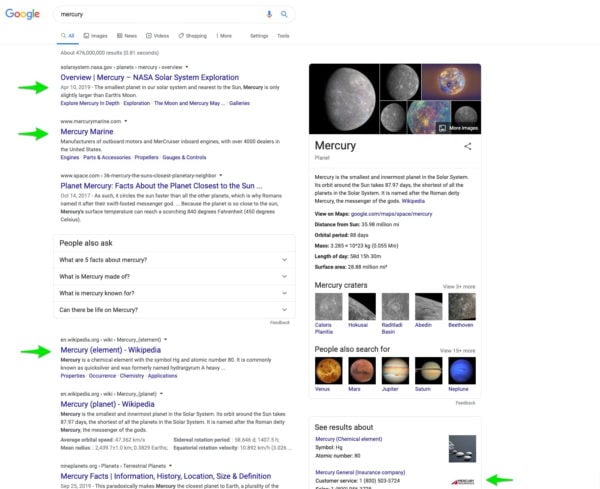
All these searches probably have informational intent, but they’re not looking for the same thing. While it’s difficult – especially from one word, like in this example – search engines still try to figure out what their users really want when typing in their search term. So, if, for example, less people click to the ‘mercury-element’ results, than to the ‘mercury-planet’ results, they’ll deduce that more people want information about the planet Mercury, and alter the results pages accordingly. If we take a look at the search results for the term [Mercury], we’ll indeed see that most results relate to the planet. From that, we can conclude from that it’s the dominant intent: most people who type in this term are looking for the planet.
Google tries to satisfy multiple intents for the search term [mercury]
Search terms without dominant intent
Some search terms don’t have one clear-cut intent, which leaves search engines guessing at what to show. You can recognize these searches when the results pages show many different results. Take the query [tree house], for example. Depending on your exact location, the search results show images of tree houses, information and videos on how to build one, advertisements for buying one, and businesses called ‘Tree house’, including a brewery, restaurants, holiday homes, and a code learning web platform. This variety means that Google has most types of intent behind this query covered. But it may make ranking more difficult.
Why should you use the search results to create intent-based content?
Simply put: because the search results give direct insight into what people are looking for when they’re typing in your keywords. You can easily lose sight of the SERPs (Search Engine Results Pages) as your most direct source of information. But if you focus on your site alone, or only look at things through the eyes of tools, you miss invaluable information about what your audience is looking for. Search results pages not only show you how you and your competitors are doing, but also where new opportunities are and whether you need to adjust your SEO strategy. For instance, if you see a lot of images in the results pages for your keyphrase, and you don’t have any, that’s an opportunity!
To get the most objective idea of the search results for a query, make sure you use a private browser window. A local SERP-checker, such as https://valentin.app/ can also help you get even more objective results, and find out what the results look like in other cities.
Creating intent-based content yourself
There are a few steps you can take to attune your content better to user search intent and work towards creating intent-based content.
Choose keywords from your keyword research and enter them in a private browser window or SERP-checker.
Analyze what you see on the results pages. Which type of intent is most common? (informational, commercial, etc?) Is there one dominant interpretation and if so, what is it? Do you see videos? Images? Related searches?
Evaluate whether the content you have – or plan to publish – is in line with the things you found on the results pages. Do the types of intent match? Is your content in the right form?
If yes, great! Perhaps you can find ranking ideas in related searches. And, have a quick peek at the competition, to see what you’re up against.
Do you notice that things don’t match up, and the SERPs show intent that doesn’t align with what you offer in your content? Depending on what you find in the SERPs, you might still be able to rank. For example, perhaps there isn’t a dominant type of intent, in which case your content could still make the cut. However, if you find intent that unanimously doesn’t match what you have to offer at all, ranking will be difficult, unless you’re having a high authority site. In that case, consider whether it’s worth the effort to create your content, or if you need to adjust your strategy a little. A solution could be to target a slightly different related keyword, with better matching user intent, or to adjust your content.
This all still sounds a bit abstract. So, let’s look at a few examples to give you a better idea of this process in practice!
Examples of research to create intent-based content
Using the right terminology in informational content
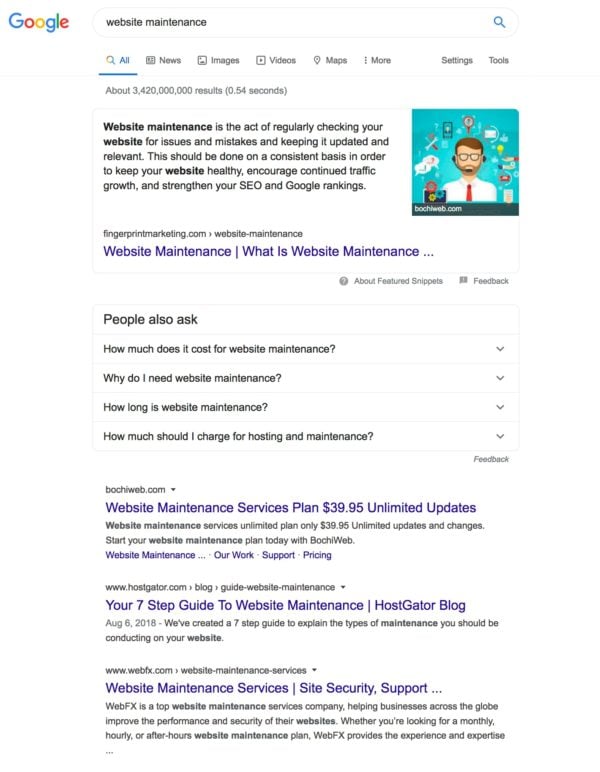
Results page for the search term [website maintenance]
Here at Yoast, we write about all aspects of SEO. One of those aspects is keeping your website in good shape. We had an article planned on this topic, and one of the most important terms we used in this article was ‘Website maintenance’. Our article was about keeping your site content fresh and your site’s structure well-maintained in the process. However, when we started looking at the SERPs, we noticed that wasn’t what people were looking for at all when they used that term. The content in the answer box wasn’t really related, and the other results almost exclusively consisted of companies offering services to work on technical site maintenance and hosting, with some results stressing the importance of this.
So, from analyzing the SERPs, we got two important insights. Firstly, many people using the search term [website maintenance] have commercial intent, rather than informational. Secondly, they were actually looking for something completely different. So, while we could write an article about website maintenance, to rank, it needed to be a completely different article. It should discuss things like hosting, technical site performance, etc, as that’s what searchers are looking for.
We realized we had to make changes to the article, adapt our strategy and target a keyword with better matching intent. We changed some of the wording in this article (and related ones as well) from ‘maintenance’ to ‘keep old content’, ‘update or delete’ and ‘cannibalization’. Of course, you could argue that we didn’t pick the right words here in the first place. The reason for that might’ve been that we got a bit stuck in our own content bubble, and forgot about the user. Looking at the SERPs helped change perspective in this case.
Business case: selling recycled jewelry
Let’s look at another example, one that small business owners might relate to. Say, you run an online shop that sells jewelry made with recycled materials. One of your product groups is jewelry made of recycled nespresso pods. So, you’re thinking of trying to rank for [recycled nespresso pods] with a product page or category page. Is that a good idea? Time to look at the search results pages!
Of course, it somewhat depends on location, but prominent on the results page for [recycled nespresso pods] are results about how the pods are recycled. A few are from Nespresso itself, and you could also find some of their videos on recycling. Other results cover the process of recycling and how consumers can get their pods recycled. There is nothing on using recycled pods as a crafting material. So, now you know that this phrase will be difficult to rank for, as it’s not what users are looking for.
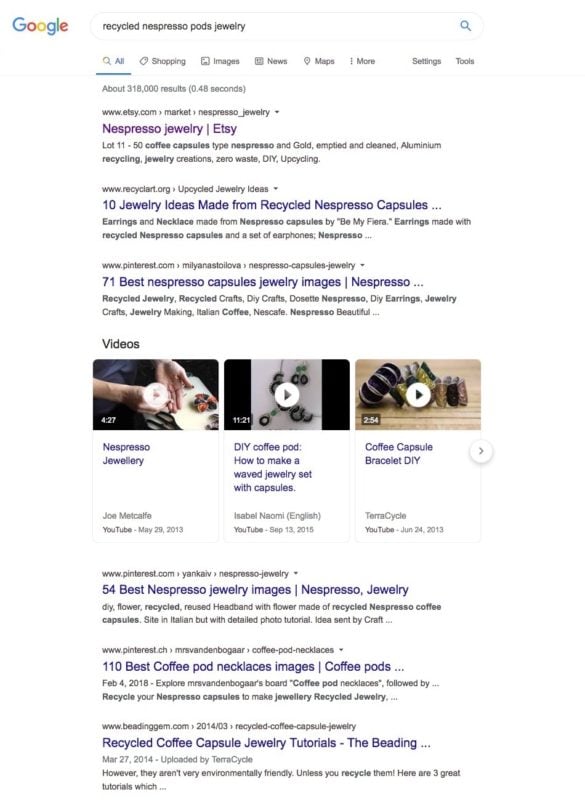
Results page for [recycled nespresso pods jewelry].
What about [recycled nespresso pods jewelry], then? As can be expected, the results align a lot better with what you have to offer. However, most results are geared towards informational intent. While the top result is Etsy -which would be difficult to compete with- other results show lists of ideas and tutorials. This means, again, it would be hard to get your commercial or transactional product (category) pages on this list. However, you could still rank if you’d change your strategy, and wrote a tutorial on crafting a basic piece of nespresso jewelry. In such a tutorial, you could easily refer people to your products if they’re looking for more intricate pieces. It might even be worthwhile to make a video tutorial, as there are video results on the results pages.
Conclusion
This post covers a lot of different aspects of search intent in this post. It deals with which types there are, whether or not there is a dominant interpretation and looking at the SERPs to gauge a query’s intent. The exact steps to take will differ on a case to case basis. A good takeaway, in any case, is to always take a good look at the results pages for keyphrases you’re targeting. Analyze what you see, as it’s valuable, first-hand information. Be realistic and be prepared to put in the work if you find you need to change your strategy. We’ve said it time and again: SEO is a lot of work, and you need to work hard to be the best result – for the right query.
You’ll probably have heard the term user journey a lot, but what is it exactly? And what does it have to do with SEO? The user journey consists of all the steps a user takes to reach their goal. In buying something, the user journey includes steps like reading reviews, checking prices, comparing shops etc. In SEO, you can map out the user journey and place content on all the points a user comes into contact with you. Let’s take a look.
Your user journey: how do you purchase a product?
The concept of the user journey becomes instantly clear when you are looking to buy something. Let’s say you want to buy a new tv — your 15-year old 42 inch LCD tv doesn’t cut it anymore. You do research and ask yourself some questions: how big should it be? Which screen technology? What about 4k or maybe 8k for future-proofing? Do my friends have any advice? Which shops can I go to to see some screens in action? You go through a whole lot of steps before you are ready to pull the trigger on a new tv.
That proces, from the moment you realise you need a new tv to the moment you turn on the new tv in your home — and even after that fact — is called the user journey. As an eCommerce store selling tv’s you need to know how a user might get from A to Z and prepare useful content for the moments when that user might need that content.
Now, you might think that you can simply think about which steps a user might take in any given situation and put that on some kind of timeline. Well, it’s more complicated than that. If you think about it, your process of buying something might differ completely from someone else’s. You can’t force everyone to follow the same path.
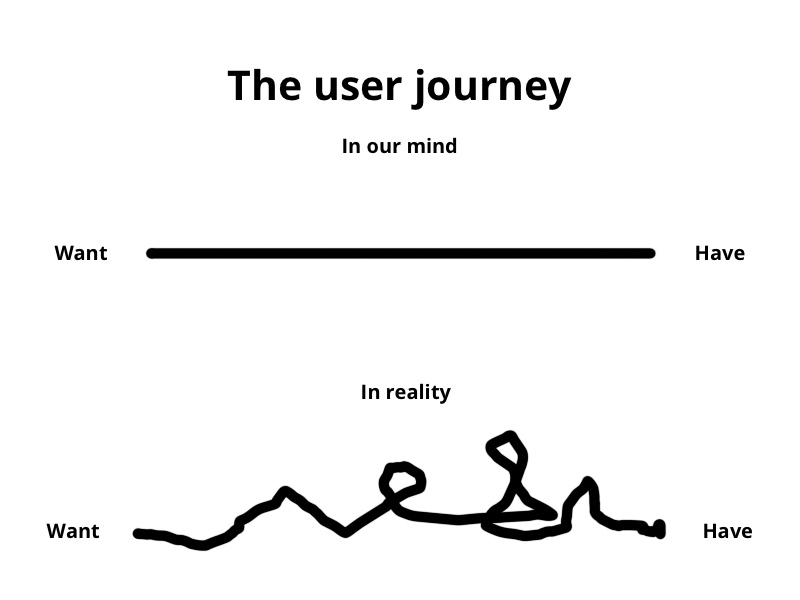
In addition, the user journey is hardly ever a straight line, more often, it’s a squiggly line moving in all directions. Users go from awareness, to research, to checking prices, to research, to talking to friends about it et cetera. Eventually, the user makes a decision — some users take hours, other months.
This also goes for how people behave on websites. They hardly ever arrive neatly via the homepage only to follow the path you want them to follow. In different stages of the journey, people need different kinds of information and they will, therefore, enter your site via different pages — probably the one buried deep in your site. After that, they can move in any kind of direction. That means that every page on a site needs to consider multiple user journeys, and act as a landing page. You can’t assume that there’s a linear/predictable flow through a site.
Mapping the user journey makes it easier for users to find what they need to come to a decision. For site owners, it offers a helpful guide to where what kind of content should be to help speed up this decision making process.
Classic marketing still applies
Thinking about user journeys automatically lets you think about all those classic marketing funnels. The AIDA model — over a hundred years old —, for instance, is a good fit for making user journeys insightful. AIDA stands for:
Attention: get your potential consumer to notice you
Interest: find a way to hold that attention to build interest
Desire: persuade the consumer to make them want your product/service
Action: get the consumer to make that conversion
AIDA is often appended with another letter, the S for Satisfaction — or the R for Retention. This is where you keep your customer once that sale is done, be it in excellent customer service or guiding him or her to their next purchase. You have to try and get some kind of loyalty. For many things, you don’t want to simply convert a sale, but also a customer for life and a champion of your brand.
Mapping the user journey helps structure the process
Mapping the user journey helps you make sense of what you need to do to turn that potential customer into a loyal returning one. Once you start researching, you’ll probably find a number of holes in your strategy or thought-process. You’ll have missed a couple of entry points and discover thinking that hadn’t occurred to you. Once you find this, you’ll also notice that there is a lot of content missing that should have helped potential customers in their journey towards you.
Mapping done well, you’ll have a solid story for your customer’s process and a guide that helps you take away all pain points.
How to map out a user journey?
The most important thing for mapping a user journey is getting inside the potential customer’s mind. These are the people doing the travelling and they know what they do to get somewhere. Don’t think you can make up stuff by yourself or your marketing team. Talk to people! Also find out what they’re saying on forums and social media like reddit.
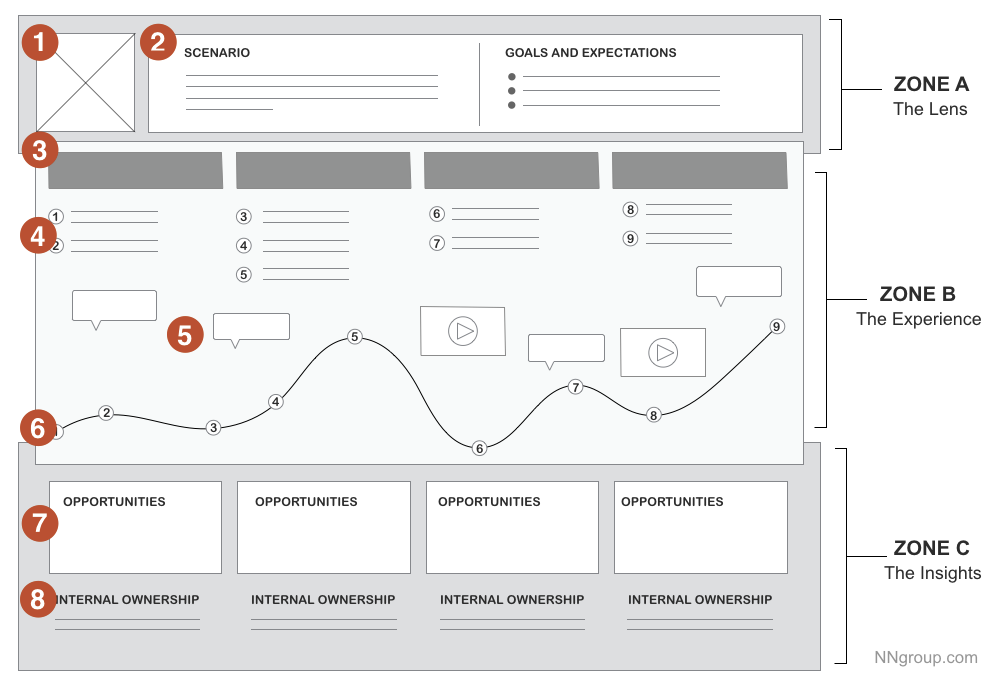
What journey does the user take to get to your solution? (c) Rosenfeld Media
Mapping a user journey can sometimes feel like releasing the kraken — it can become unwieldy, like something with a lot of tentacles. It is, therefore, a good idea to limit the scope somewhat. Set clear objectives, know when a task ends and don’t try to fit everything you do into one user journey. Research specific tasks for specific people and go from there.
Define scope
Before you start, you need to have the basics questions answered. Who are you? What is your mission? Which problems does your product or service solve? Who is your audience or who do you think your audience is? Know yourself before you jump into a research project with the wrong knowledge.
With that out of the way, it is often a good idea to make a high-level overview of what you want to achieve. Consider how you think the user will behave on this particular journey. Don’t go into detail, but simply make a quick visualisation of the process — this helps you to define the scope of the user journey. Keep in mind, you won’t know the exact user journey until you do the research. Don’t stick to these assumptions, please.
By mapping out a journey from A to Z, you get everything and the kitchen sink but that’s probably not what you need. It’s often better to focus on a sub-journey powered by a specific scenario. This makes it easier to develop, maintain and improve.
For instance, if you offer SEO training courses, you might want to map a journey for people unaware of SEO that encompasses everything from becoming aware of the plusses of SEO to learning of SEO courses to finding your specific SEO course. That’s a whole lotta journey, so to say. In this case, you could make a high-level overview and fill these in with more detailed sub-journeys. That makes creating and mapping content to them easier as well.
In addition, it is good to think about who you are targeting. Are you targeting everyone? Probably not! By narrowing down the user profiles, you can get more specific in your journeys. This way, you can take the experiences of a user, for instance, into account.
Start researching what you have
If you’ve been in business for a while, it might be that you’ve done a lot of user research already — both qualitative and quantitative data. Maybe you know your customers inside out. Have you interviewed customers, cool! Asked them how they use your newsletter? Nice. Got a whole bunch of keyword research sheets? Awesome. Did eye tracking tests on your new website? Epic. Go over every bit of research you have done and collect the most valuable insights that can help advance the development of the user journey.
Take special note of your keyword research. If you haven’t done keyword research properly, you need to get to it. Search volumes and popularity of certain phrases can be helpful insight into what people want/need, and you can react accordingly. In addition, looking at the kinds of sites which rank for those keywords is useful. If the results for a particular keyword are mostly informational, for example, it’s probably worth considering that those searches are from people early on / in research phases, and your content/ui/etc should react accordingly.
Determine what you need
Once you’ve pored over the available research, you get an idea of what you need to form a full picture of your user/customer. You might notice a couple of patches that haven’t been discussed or questions that haven’t been asked by your customer. Make lists of all the questions you still need to answer before you know to fill in the user journey. Don’t assume anything. Don’t fill in the gaps yourself before doing the research.
Perform your research
It’s time to fill in the gaps. Once you’ve written your research plan, you can start your research. To get a good grasp on the way users are behaving, you can use all kinds of ways to get those answers:
Conduct customer interviews with specific questions
Direct observations
Field studies
Competitive analysis
You can combine these qualitative insights with quantitative insights, from survey data, Google Analytics, sentiment analysis et cetera.
Structure the results
Once you’ve gathered all the data, you can start structuring the results. How you do this is up to you, but you could use the following buckets to structure your data and the user’s thoughts and expectations.
Actions: which steps does a user take to advance the journey?
Motivations: how do they feel about the process?
Questions: which questions do users ask themselves while trying to advance the journey?
Obstacles: what stops them from advancing?
Combined, you’ll get a clear sense of the user journey. In addition, you’ll also get an idea of the obstacles you need to take down to help the user progress without too much friction.
Visualize the results
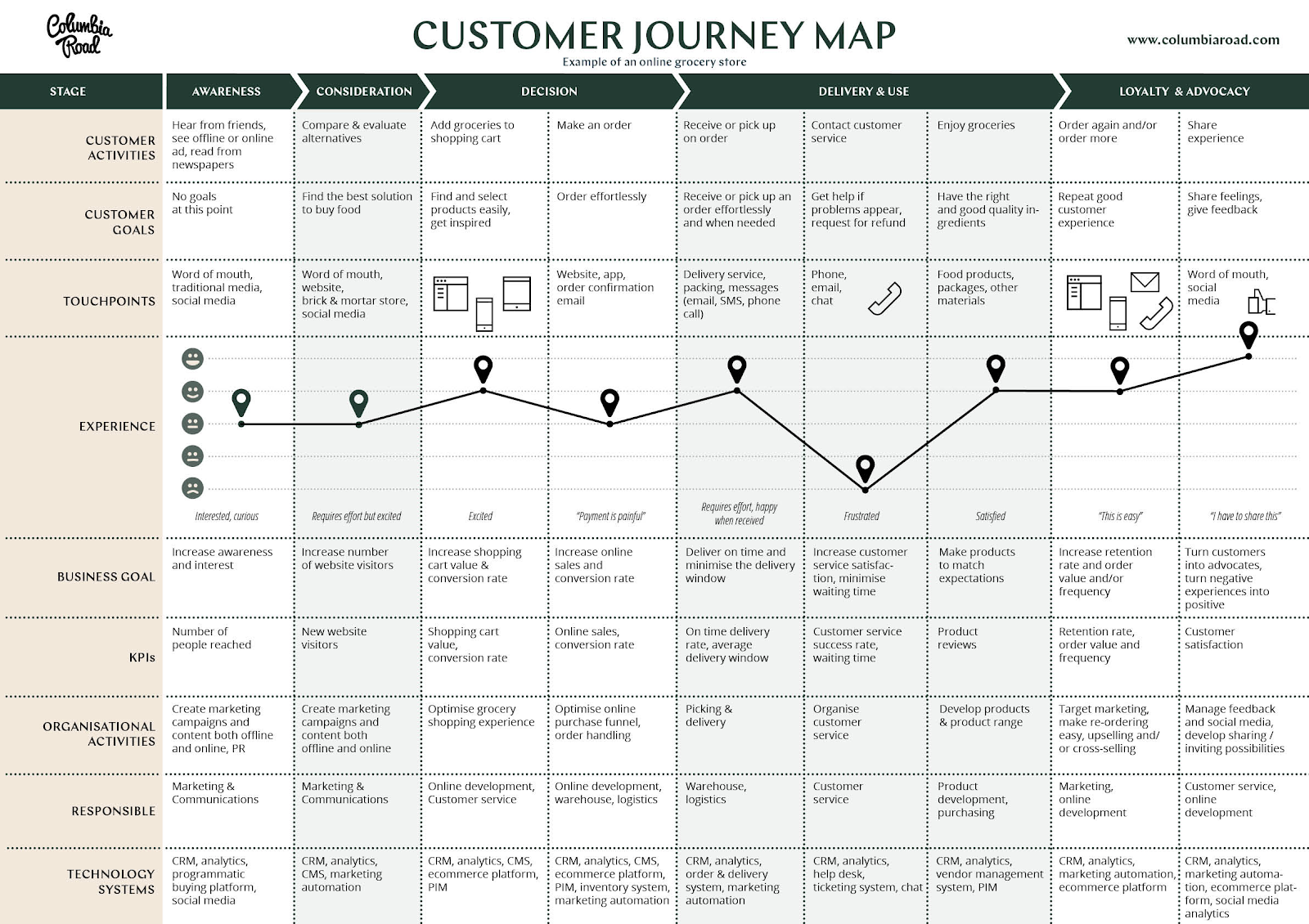
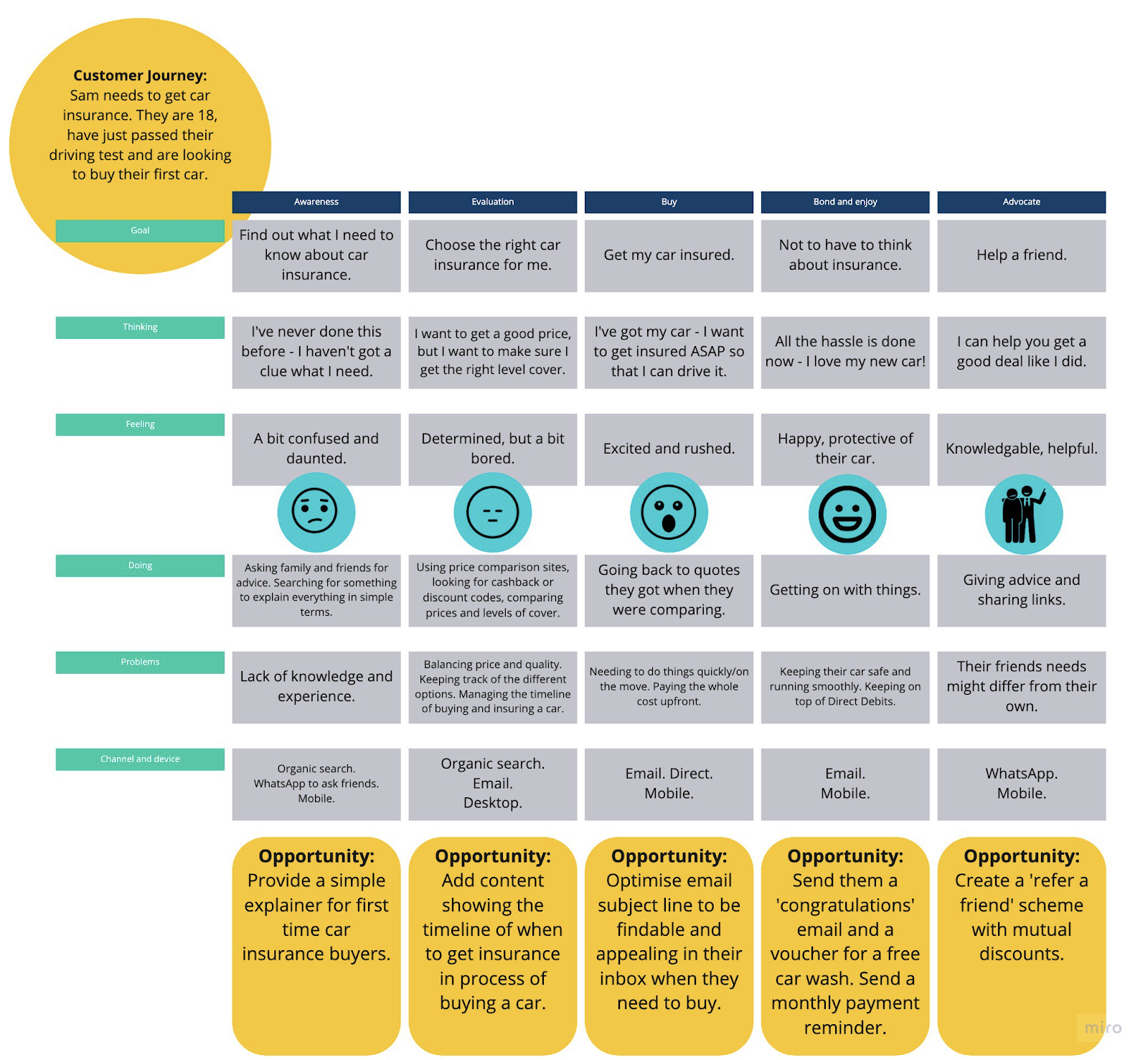
The most recognisable part of the user journey is the visual that supports it. User journey visualizations come in all shapes and sizes. Pick one that you can understand and that fits what you want to achieve. Here are a couple of examples:
Once you’ve built up the user journey, it’s a good idea to try it for yourself. Maybe even let real customers or users do the journey. Ask them if it seems logical? Do the steps jump around? Maybe it’s too narrow or too broad? This all helps to validate the journey and take out any assumptions you might have made.
Map content to journey touchpoint
Now, you’ll have the full scope of the user journey in focus, so you’ll notice all the points where a user or customers comes into contact with you or your product. These so-called touch points are great entrance points for high-quality, and extremely relevant content that answers all the questions the user has at that particular moment in the user journey.
It’s time to start mapping your content to these specific touch points. We’ll explain how to do that in another post. While thinking about your content, keep the old AIDA model in your mind: how do you get attending and arouse interest? And once you have that, how do you get people from visitors to customers — and keep them there?
SEO is only part of the user journey
The user journey contains, more often than not, almost everything you do as a company. If you want to successfully help a potential customer from A to Z, you need to have everything in order. As users often start their journey by typing a query in a search bar, SEO plays an important role to get them relevant content when they need it. SEO, however, is merely a part of the machinery that forms a successful journey.
This probably goes without saying, but your product or service should be truly valuable and good. There’s no sense in getting people to try a subpar product. Marketing 101, right? The same goes for your branding. It has to be recognisable, genuine, unique and befitting of your company. Your site has to be technically awesome, filled with relevant content and looking incredible and trustworthy. The user experience should be stellar. Practice holistic SEO!
The consumer experience should be impeccable as well. Your potential customer is going to do a lot of research, both online as well as offline. So make sure that your companies profiles are well-tended. Get those five star online reviews and respond to the negative ones. Have active social media accounts that send out relevant content and respond to users’ questions.
Also, think about what you are doing offline. Are you running ads anywhere? Sponsoring events? Holding your own event? Think about ways to get into the minds of people without having to resort to the internet. Many people will want to form a good picture of how you are, what you do and if you are deserving of their money, so to say.
A primer on user journeys for SEO
This post gives you a solid overview of the use of user journeys for SEO. User journeys help you make sense of how users behave and they help you produce relevant content that answers questions and converts. Even if you don’t launch a full scale research project for this, thinking about how a user behaves and maybe even talking to a couple of them gives you great insights that might further your business.
When blogging, it pays dividends to lay out the structure of your piece before you begin writing. The structure is the skeleton of your text and preparing it has multiple benefits. Firstly, it’s easier to write a text when your structure is already there. Plus, a clear structure helps the reader grasp the core message you’re trying to bring across and enhances the readability of your article. Here, we’ll give you practical tips to help you set up a clear text structure.
Why is text structure important for SEO?
Structuring a text well improves readability and, thereby, helps your readers to understand your text. If readers better understand the information you provide, it’s more likely they’ll find the answer to the question they have. When Google notices, by so-called user signals, you’re giving valuable answers to certain queries, chances are you’ll climb the rankings.
Think before you start writing. Get a pen and paper and write down what you want to write about. That could include a bit of keyword research, but ideally, you’ve already done that. Check out our ultimate guide to keyword research for more on this. Next, set up a text structure and keep it close to hand while writing your blog post. One way of setting up a structure for your text is by following these three steps:
Create a list of topics
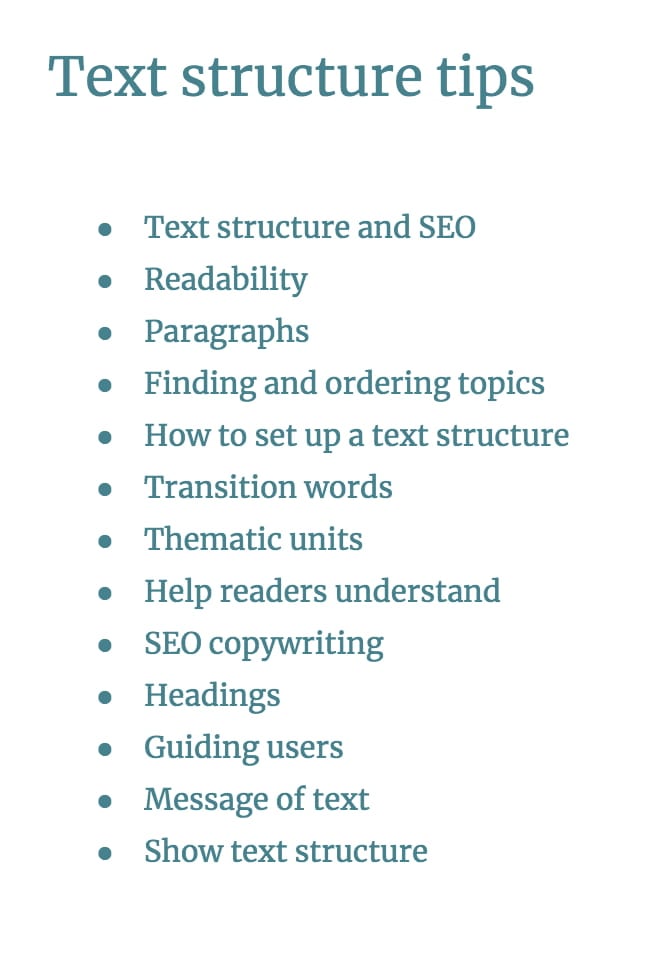
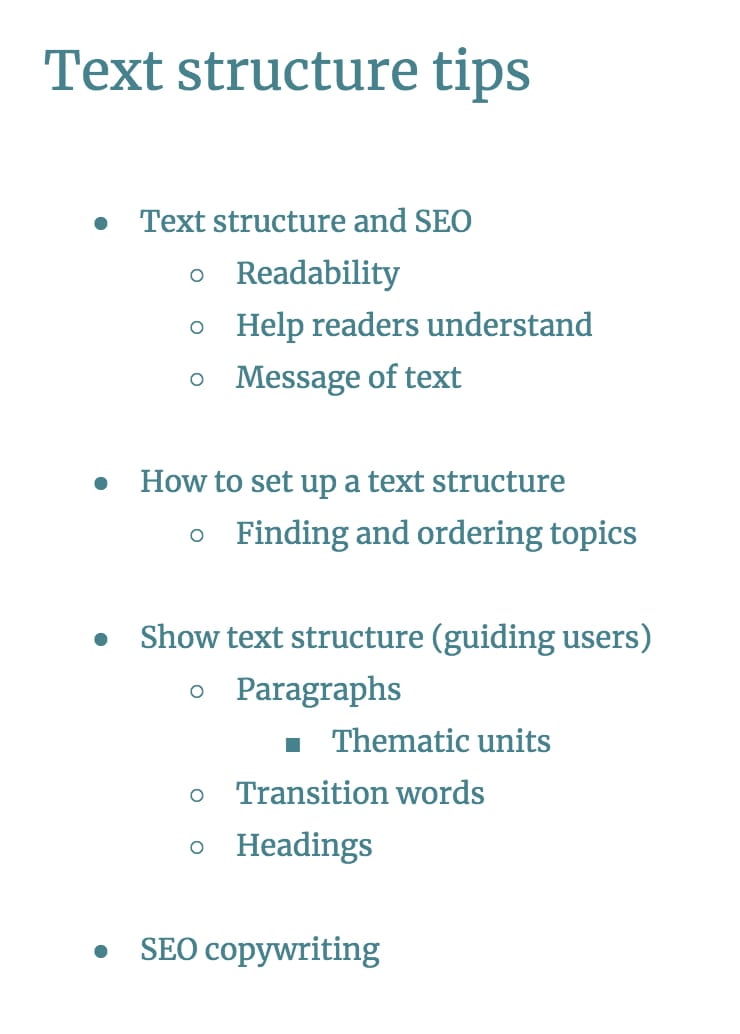
Once you’ve gathered all the information you want to use in your post or article, you can begin structuring, so make a list of everything you want your article to cover. For instance, for this post this could be:
Bundle topics together
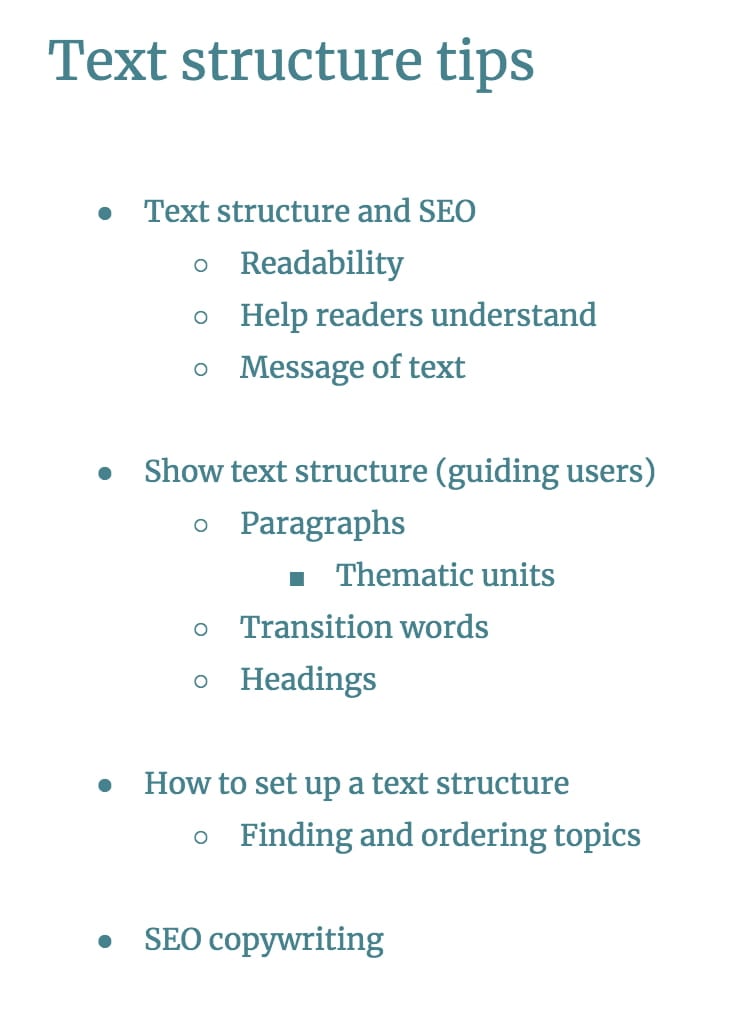
When you have a clear overview of all the topics you want to discuss in your article, you can start bundling topics. Similar topics should, of course, be discussed together. For this post, this could look like this:
Order your topics
When you’re done bundling, you should decide on the order of the topics in your article. In most cases, you can decide to order thematically. For instance, if you want to discuss various aspects or angles of the main topic of your blog post. But you can also order your text chronologically or didactically, as you can see in the order types table below. In the example we’re discussing, ordering topics thematically makes the most sense:
Write a few words about every sub topic
After you’ve ordered the topics you want to address in your article, you should make a new list. This list essentially is a summary of the article you’re about to write. Write a short sentence or a few words for every paragraph you plan to write. This list serves as the skeleton of your article, and you should keep it close to refer to during the rest of the writing process.
Order types
Apart from arranging the order of topics according to a theme; you could also order them chronologically or by explaining the basics first and going on to more difficult aspects – known as a didactic order. This is a good idea when you are trying to explain a complicated subject:
Order type
Thematic
ordered on theme, aspect, topic
Chronological
old to new
Didactic
easy to hard
Problem – solution(s)
introduce the problem first and then possible solutions
Another way to order your articles is the inverted pyramid style, a method that’s been used by journalists for ages. It means you start out with the most crucial element in the beginning and later add details and more background information. Especially in news articles, this works well.
Guide users through your text
So, now you’ve got a skeleton/summary of the text you’re about to write. When you start writing keep the following best practices in mind to make sure the reader will easily flow through your well-crafted structure!
1. Create paragraphs
You have bundled topics together in the text structure you have set up, so now you can start to write your paragraphs. But what makes a good paragraph? A paragraph can be defined by three things. Remember these things while writing!
A paragraph should form a thematic unit.
A paragraph contains one core sentence and an elaboration of this core sentence.
Info should be made more visible by using whitespace.
Lots of people make mistakes while creating paragraphs. Some writers just put whitespace in their text in random places for aesthetic purposes but don’t think about the coherence and structure of the text. In many cases, the coherence within paragraphs and between paragraphs remains unclear. These kinds of mistakes can mess up the structure of your articles.
Paragraphs can be short or long. The length of a paragraph is decided by the theme you are discussing, so it could be anywhere between two and fifteen sentences. However, for writing on websites, we would advise creating short paragraphs (keep it to less than 6 or 7 sentences). Because reading from a screen is hard.
For text on websites, we’d advise you to start your paragraph with the most important sentence, then explain or elaborate on it. A reader will be able to grasp the most important concepts from your article, just by reading the first sentences of your paragraphs. You can conclude longer paragraphs with a summarizing sentence to clarify your point.
2. Use transition words
To guide your reader, you should use plenty of transition words. Transition words give direction to your readers. These words show the reader that you’re summarizing (e.g. and, too), comparing (e.g. less than, rather) or concluding something (e.g. thus, consequently, hence).Table 2: examples of transition words
Type of relation
Examples of transition words
enumerate
and, first of all, also, another, furthermore, finally, in addition
cause
because, so, due to, while, since, therefore
compare/contrast
same, less, rather, while, yet, opposite, much as, either
conclude
as a result, hence, consequently, therefore, in conclusion
ambiguity
seems like, maybe, probably, almost
emphasize
most of all, most noteworthy, especially relevant
Examples of transition words
Using transition words is like putting cement between your sentences – they show your readers the connection between sentences and paragraphs.
If you’re not used to using transition words, it can be hard to correct content you have already written. Be sure to use transition words whenever you are summarizing or enumerating. Also, using signal words in your conclusion helps people to grasp your core message.
3. Use headings to help your reader – and Google
In the first place, headings are of great importance for your readers. Headings allow your readers to quickly scan through your text and decide whether or not (or which parts of) they want to read your article. Therefore headings should be attractive and should cover the content of the paragraphs below. Whether headings play a direct role in SEO is debatable, but if readers easily grasp the message of your content, that surely helps your SEO.
You should put a heading above each paragraph, or above a series of paragraphs which contain similar topics. The headings should reflect the structure of your text. We advise you to put a heading above very long paragraphs, or above several shorter paragraphs which are thematically similar. Here’s a detailed guide on how to implement headings in your post and on your site.
A better structure leads to better copy
Setting up a coherent structure for your blog post is an essential step of SEO copywriting. It will result in a better understanding of the message of your blog posts. If people understand your message, they will be much more likely to share your post on social media or buy what you are selling.
Taking time to think about a clear text structure before you start writing is worth your while. As you’re writing, think about the structure of your paragraphs, your use of transition words and the headings in your post. If you follow these ‘rules’ your blog post will be far more understandable and readable to your audience.
Want to dive deeper into the subject of copywriting? Sign up for our SEO copywriting course for more writing tips!
These days, the way we do SEO is somewhat different from how things were done ca. 10 years ago. There’s one important reason for that: search engines have been continuously improving their algorithms to give searchers the best possible results. Over the last decade, Google, as the leading search engine, introduced several major updates, and each of them has had a major impact on best practices for SEO. Here’s a — by no means exhaustive — list of Google’s important algorithm updates so far, as well as some of their implications for search and SEO.
2011 – Panda
Obviously, Google was around long before 2011. We’re starting with the Panda update because it was the first major update in the ‘modern SEO’ era. Google’s Panda update tried to deal with websites that were purely created to rank in the search engines, and mostly focused on on-page factors. In other words, it determined whether a website genuinely offered information about the search term visitors used.
Two types of sites were hit especially hard by the Panda update:
Affiliate sites (sites which mainly exist to link to other pages).
Sites with very thin content.
Google periodically re-ran the Panda algorithm after its first release, and included it in the core algorithm in 2016. The Panda update has permanently affected how we do SEO, as site owners could no longer get away with building a site full of low-quality pages.
2012 – Venice
Venice was a noteworthy update, as it showed that Google understood that searchers are sometimes looking for results that are local to them. After Venice, Google’s search results included pages based on the location you set, or your IP address.
2012 – Penguin
Google’s Penguin update looked at the links websites got from other sites. It analyzed whether backlinks to a site were genuine, or if they’d been bought to trick the search engines. In the past, lots of people paid for links as a shortcut to boosting their rankings. Google’s Penguin update tried to discourage buying, exchanging or otherwise artificially creating links. If it found artificial links, Google assigned a negative value to the site concerned, rather than the positive link value it would have previously received. The Penguin update ran several times since it first appeared and Google added it to the core algorithm in 2016.
As you can imagine, websites with a lot of artificial links were hit hard by this update. They disappeared from the search results, as the low-quality links suddenly had a negative, rather than positive impact on their rankings. Penguin has permanently changed link building: it no longer suffices to get low-effort, paid backlinks. Instead, you have to work on building a successful link building strategy to get relevant links from valued sources.
2012 – Pirate
The Pirate update was introduced to combat illegal spreading of copyrighted content. It considered (many) DMCA (Digital Millennium Copyright Act) takedown requests for a website as a negative ranking factor for the first time.
2013 – Hummingbird
The Hummingbird update saw Google lay down the groundwork for voice-search, which was (and still is) becoming more and more important as more devices (Google Home, Alexa) use it. Hummingbird pays more attention to each word in a query, ensuring that the whole search phrase is taken into account, rather than just particular words. Why? To understand a user’s query better and to be able to give them the answer, instead of just a list of results.
The impact of the Hummingbird update wasn’t immediately clear, as it wasn’t directly intended to punish bad practice. In the end, it mostly enforced the view that SEO copy should be readable, use natural language, and shouldn’t be over-optimized for the same few words, but use synonyms instead.
2014 – Pigeon
Another bird-related Google update followed in 2014 with Google Pigeon, which focused on local SEO. The Pigeon update affected both the results pages and Google Maps. It led to more accurate localization, giving preference to results near the user’s location. It also aimed to make local results more relevant and higher quality, taking organic ranking factors into account.
2014 – HTTPS/SSL
To underline the importance of security, Google decided to give a small ranking boost to sites that correctly implemented HTTPS to make the connection between website and user secure. At the time, HTTPS was introduced as a lightweight ranking signal. But Google had already hinted at the possibility of making encryption more important, once webmasters had had the time to implement it.
2015 – Mobile Update
This update was dubbed ‘Mobilegeddon’ by the SEO industry as it was thought that it would totally shake up the search results. By 2015 more than 50% of Google’s search queries were already coming from mobile devices, which probably led to this update. The Mobile Update gave mobile-friendly sites a ranking advantage in Google’s mobile search results. In spite of its dramatic nickname, the mobile update didn’t instantly mess up most people’s rankings. Nevertheless, it was an important shift that heralded the ever-increasing importance of mobile.
2015 – RankBrain
RankBrain is a state-of-the-art Google algorithm, employing machine learning to handle queries. It can make guesses about words it doesn’t know, to find words with similar meanings and then offer relevant results. The RankBrain algorithm analyzed past searches, determining the best result, in order to improve.
Its release marks another big step for Google to better decipher the meaning behind searches, and serve the best-matching results. In March 2016, Google revealed that RankBrain was one of the three most important of its ranking signals. Unlike other ranking factors, you can’t really optimize for RankBrain in the traditional sense, other than by writing quality content. Nevertheless, its impact on the results pages is undeniable.
2016 – Possum
In September 2016 it was time for another local update. The Possum update applied several changes to Google’s local ranking filter to further improve local search. After Possum, local results became more varied, depending more on the physical location of the searcher and the phrasing of the query. Some businesses which had not been doing well in organic search found it easier to rank locally after this update. This indicated that this update made local search more independent of the organic results.
Acknowledging users’ need for fast delivery of information, Google implemented this update that made page speed a ranking factor for mobile searches, as was already the case for desktop searches. The update mostly affected sites with a particularly slow mobile version.
2018 – Medic
This broad core algorithm update caused quite a stir for those affected, leading to some shifts in ranking. While a relatively high number of medical sites were hit with lower rankings, the update wasn’t solely aimed at them and it’s unclear what its exact purpose was. It may have been an attempt to better match results to searchers’ intent, or perhaps it aimed to protect users’ wellbeing from (what Google decided was) disreputable information.
Google’s BERT update was announced as the “biggest change of the last five years”, one that would “impact one in ten searches.” It’s a machine learning algorithm, a neural network-based technique for natural language processing (NLP). The name BERT is short for: Bidirectional Encoder Representations from Transformers.
BERT can figure out the full context of a word by looking at the words that come before and after it. In other words, it uses the context and relations of all the words in a sentence, rather than one-by-one in order. This means: a big improvement in interpreting a search query and the intent behind it.
As you can see, Google has become increasingly advanced since the early 2010s. Its early major updates in the decade focused on battling spammy results and sites trying to cheat the system. But as time progressed, updates contributed more and more to search results catered to giving desktop, mobile and local searchers exactly what they’re looking for. While the algorithm was advanced to begin with, the additions over the years, including machine learning and NLP, make it absolutely state of the art.
With the recent focus on intent, it seems likely that Google Search will continue to focus its algorithm on perfecting its interpretation of search queries and styling the results pages accordingly. That seems to be their current focus working towards their mission “to organize the world’s information and make it universally accessible and useful.” But whatever direction it takes, being the best result and working on having an excellent site will always be the way to go!
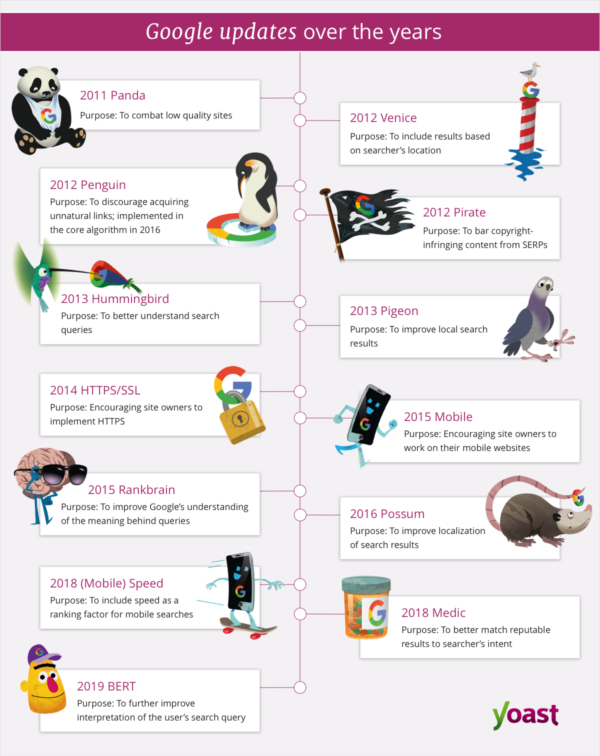
Feeling a bit overwhelmed by all the different names and years? Don’t worry! We made a handy infographic that shows when each Google update happened and briefly describes what the purpose was.
Breadcrumbs are an important part of almost every good website. These little navigational aids don’t just tell people where they are on your site, but they also help Google work out how your site is structured. That’s why it makes a lot of sense to add these helpful little pointers. Let’s take a look at how breadcrumb navigation works.
What are breadcrumbs?
A breadcrumb is a small text path, often located at the top of a page indicating where the user is on the site. On yoast.com, for instance, the path to our Yoast SEO plugin page is Home > WordPress Plugins > Yoast SEO for WordPress. This breadcrumb trail immediately shows you where you are. Every step of that path is clickable, all the way back to the homepage.
But why is this navigational help called a breadcrumb? When Hansel and Gretel went into the woods, Hansel dropped pieces of bread onto the ground so they could find their way home if they got lost. These breadcrumbs eventually became the model for the breadcrumbs we see on websites these days.
You can see the breadcrumb clearly in Google
Breadcrumbs also appear in Google search results, and you can take advantage of this if you use Yoast SEO or add the correct form of structured data to your site. Breadcrumbs in search results give users an easy-to-understand overview of where the page sits on your site. Yoast SEO automatically adds the necessary structured data — a BreadcrumbList — in JSON-LD format for you. Just flip the switch in the settings and you’ll see the relevant lines appear in your source code — although, sometimes, you need to add a small piece of code to your theme as well. Find out more on our breadcrumb structured data in our documentation.
Different types of breadcrumbs
You may have noticed that there are different types of breadcrumbs. These are the three most common ones:
Hierarchy-based breadcrumbs
These are the most common and it’s how we use breadcrumbs on our site. Breadcrumbs like this tell you where you are in a site structure and how many steps there are to get back to the homepage. Something like Home > Blog > Category > Post name.
Attribute-based breadcrumbs
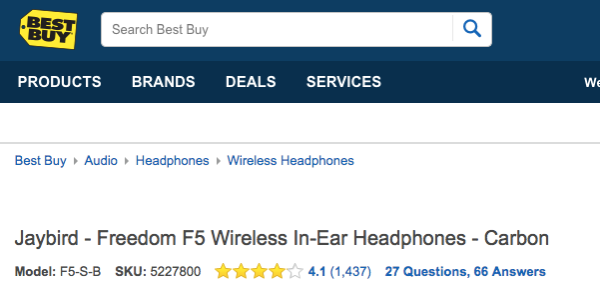
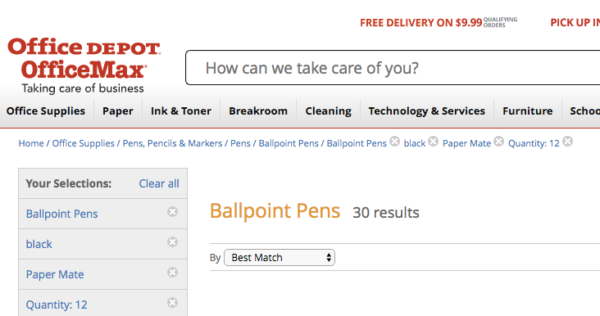
Attribute-based breadcrumbs are seen most commonly when a user has searched on an e-commerce site, and the breadcrumb trail is made up of product attributes – for example: Home > Product category > Gender > Size > Color.
History-based breadcrumbs
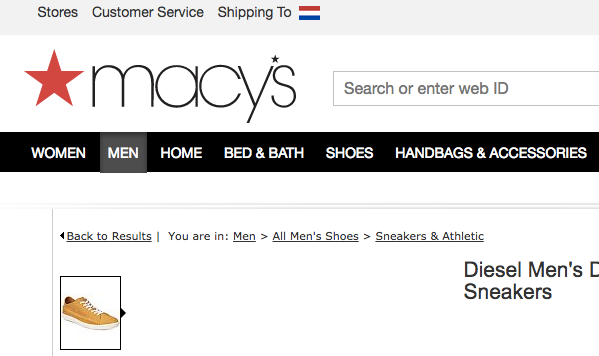
History-based breadcrumbs do exactly what it says on the tin; they are ordered according to what you have been doing on the site. Think of these as an alternative to your internet history bar, so you get something like this: Home > Previous page > Previous page > Previous page > Current page. It’s also possible to combine these like Macy’s does in the screenshot below.
Advantages of using breadcrumbs
There are several advantages to using breadcrumbs on your site. Let’s take a quick look at them:
1. Google loves them
Your visitors like breadcrumbs, but Google does too. Breadcrumbs give Google another way of figuring out how your website is structured, but, as covered earlier, Google may also use your breadcrumbs in the actual search results, which makes your result much more enticing to users. To increase the chances of your breadcrumbs appearing in Google, you need to add structured data like Yoast SEO does.
2. They enhance the user experience
People hate being lost. When confronted with a new location, people often look around in search of recognizable objects or landmarks – and the same is true of websites. You need to keep visitors happy and reduce friction as much as possible. Breadcrumbs can help your user experience since they are a common interface element that instantly shows people a way out. There’s no need to click the back button!
3. They lower bounce rates
Hardly anyone enters a site via the homepage — It’s all about organic search. That means any part of your site could be an entry point. You need to come up with a way to guide these visitors to other parts of your site if the selected page doesn’t meet their needs. Breadcrumbs can lower bounce rates because you’re offering visitors an alternative way to browse your site. Don’t you think it’s better to send a visitor to your homepage than back to Google?
How to add breadcrumbs
There are several ways of adding breadcrumbs to your site. Firstly, if you use WordPress, you can use one of the many breadcrumb plugins or – of course – Yoast SEO. If you use a different CMS the process will be different. It is also possible to add them to your code by hand. If you also want them to appear in Google results, you need to use structured data in a way that Google understands. You can find more information on this in Google’s developer documentation on breadcrumbs.
Yoast SEO offers an easy way to add breadcrumbs to your WordPress site. It will add everything necessary not just to add them to your site, but to get them ready for Google. To add breadcrumbs to your site, you need to add the following piece of code to your theme where you want them to appear:
This code can often be placed inside the single.php or page.php files, just above the title of the page. Some themes want it at the end of the header.php file. It’s not a good idea to add it to functions.php since this could cause problems.
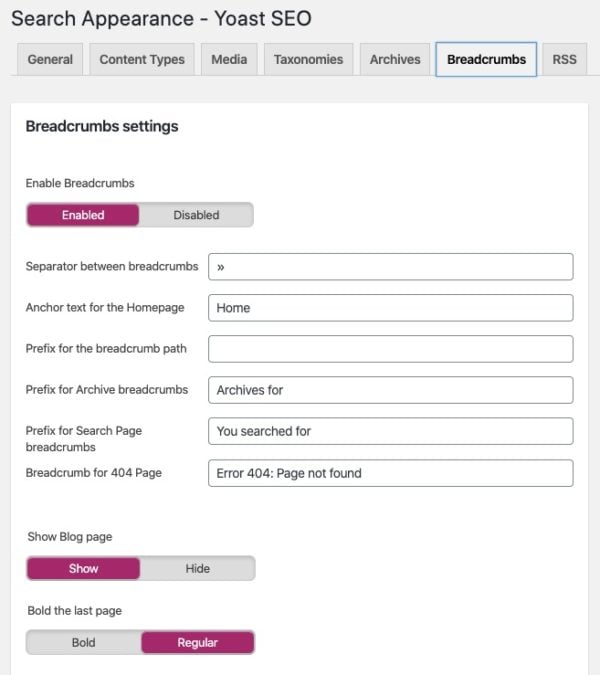
After adding the code, you can go to the advanced settings of Yoast SEO and switch on breadcrumb support. You can also control how the breadcrumb structure will look and what prefixes will be used. Find out more on our document on implementing breadcrumbs with Yoast SEO.
You can find the settings for breadcrumbs in SEO > Search Appearance > Breadcrumbs
Conclusion
Despite using breadcrumbs, Hansel and Gretel still got lost in the woods. Don’t let that happen to your visitors! Breadcrumbs provide an easy-to-grasp way for visitors to navigate your site and they instantly understand how your site structure works. Google loves them for the same reason. So use Yoast SEO to easily add breadcrumbs to your site.