Monday, 2 July 2018

8 Powerful Email Copywriting Techniques

email copywriting techniques

Anyone who’s ever written a marketing email has asked themselves these questions:
  • How do I get my subscribers to open this?
  • How do I get them to take action?
  • Did they even *see* me in their inbox?
Not getting the results you’re after might make you want to visit your subscribers one-by-one and personally remind them to read your emails and click your links. Fortunately, you don’t have to do anything so drastic. By following some basic rules of copywriting, you can dramatically increase your email engagement and get subscribers to take action. Here are a few best practices you can start using in your email copy right away. (Want to start sending amazing emails to your subscribers today? Try a 30-day free trial of AWeber. Test out our  ridiculously easy-to-use Drag-and-Drop editor and industry-leading deliverability.)

Use a Conversational Tone

Your goal is to communicate. This starts with everyday language, short sentences, and short paragraphs. Famous writer Elmore Leonard said: “If it sounds like writing, rewrite it.” That’s a good rule. Your copy should read as close to spoken English as possible. It should be easy to read and easy to scan. Big words don’t make you sound smart — they make you sound like someone trying to sound smart. So how do you know if you’re writing conversationally? According to Copy Hackers, a conversion copywriting site, Dr. Suess is a good example of how to use short words and short sentences in a way that captivates the reader. If you need more help simplifying your writing, check out Hemingway App. It flags overly complex sentences and assigns a reading level to your writing (the lower, the better.) This post, for example, reads at a sixth grade level. That’s about where you want to be writing. Related: Learn from the Masters! 16 Successful Entrepreneurs Share Their #1 Email Tip

Avoid Jargon, Buzzwords, and Acronyms

Jargon, buzzwords, and acronyms are an epidemic these days — especially in the world of tech and startups. Jargon and acronyms can alienate readers who don’t know what you’re talking about. You might as well speak gibberish to them. Instead of using these overly technical terms or abbreviations, be sure to use simple, easy-to-understand language and to spell out terms before you use them in acronym form. As for trendy buzzwords: Try to think beyond them. Words like ‘pivot’ and ‘disruption’ are becoming cliches that make people tune you out and take you less seriously. Instead, take the time to come up with simple alternatives:
  • Cohort = customer group
  • BoFU = Bottom of the funnel
  • Virality = popularity
This is really just the tip of the iceberg, though. Forbes has a list of the most obnoxious startup jargon — like ‘rockstar’ and ‘hacking’ — while TechRepublic suggests we stop using these 10 Buzzwords, like ‘curation’ and ‘freemium’.

Write a Killer Subject Line

Headlines have always been the foundation of good copy. In email marketing, your subject line is what gets you opened and read. Without a good one, you’ve got nothing. When writing your email’s subject line, think about:
  • Personalization: By personalizing your subject line, you can increase open rates by 50%, according to Marketing Dive. That might mean incorporating a subscriber’s first name in your subject line to make the message feel tailor-made.
  • Curiosity: Evoking a sense of curiosity in the the reader can get that person to click through and open your email. Ex: Want a chance to win $100?
  • Scarcity: Promoting limited time or quantity items can create a sense of urgency around your email that piques interest and drives conversions.
If you need more help figuring out a home-run subject line, here are 6 subject line formulas that will improve your open rates.

Know the Medium

One reason that email remains the number one marketing channel is that it gives you the power to talk directly to your audience. You’re leaving money on the table if your copy doesn’t reflect this. Why “batch and blast” with the same generic message to everyone when email gives you the power to personalize, segment, and automate? After all, automation can increase leads, conversions, and revenue...and it can save you time. The stats prove it: Automated email messages average 70.5% higher open rates and 152% higher click-through rates than other marketing messages, according to Epsilon Email Institute. And here at AWeber, we saw a 118% increase in open rates when we segmented our audience. We sent smaller groups of subscribers the exact information they were interested in, instead of sending our entire list the same exact content. Set up automated emails that help make every email you send relevant, interesting, and timely. Click here for your crash course in email automation.

Write for People (because businesses can’t read)

The term B2B is misleading because you’re not writing for businesses — you’re writing for decision-makers within a business. Humans, in other words. This is why we take the time to come up with buyer personas that reflect our customers’ unique needs. These people have emotions, so don’t just throw statistics at them. Don’t just use logic to appeal to their minds. Aim for the heart and connect on an emotional level. In your emails, use emotion-based principles like reciprocity, commitment, and social proof (to name a few) to make an emotional plea to your readers. Related: 95 Tools to Help You Be the Best Email Marketer on the Planet

Agitate Problems, Then Solve Them

Whether you’re outlining single email or an entire campaign, this is your formula:
  1. Identify a problem (P) Ex: Need an easier way to open cans.
  2. Agitate that problem (A) Ex: Isn’t it frustrating to use a hand crank can opener? It’s slow, hard work.
  3. Present your solution (S) Ex: With the electric can opener, you can open aluminum cans in seconds with no effort.
TV infomercials absolutely nail PAS. A voiceover identifies a problem: “Do you always end up making way too much pasta?” Then a montage in black and white agitates the problem with people tripping over big tangles of spaghetti in the kitchen. Finally, we get the solution: A happy family eating just the right amount of pasta, thanks to the Pasta-Matic. Obviously, there are other reasons not to copy what infomercials do, but they give a larger-than-life example of this formula in action. The key is to be relevant. There are millions of problems out there, and most of them don’t matter to your reader. The problem has to be real, not just an excuse to talk about your product. In an email, your copy needs to express a genuine understanding of what this problem means to your potential customers — and then swoop in with a simple solution.

Don’t Be Too Salesy

You don’t have to be salesy just because you’re selling something. Email readers have a good sense for “salesy” tactics (like when you try to get them to click on a CTA with misleading copy), and 9 times out of 10, it will alienate your audience. These days, people have zero tolerance for interruption, pressure, tricks, and manipulation. The reason: Research shows online attention spans are shorter than ever, and therefore most people have developed a strong detector for these time-wasting tactics. But you still want to sell to them. What can you do about that? Simple: Tell stories instead. Storytelling is the opposite of being salesy. You can still drive traffic, convert, close, and all of those nice things without resorting to cheeseball tactics. The great thing about storytelling is it’s actually less work than being salesy. You don’t have to resort to tricks and hacks. You simply communicate in a way that’s clear and interesting. Stories (be it personal, fictional, etc.) are how our brains evolved to learn new information. According to science, we’re hardwired to take in stories. By harnessing this powerful form of communication, you’re putting tens of thousands of years of evolution on your side.

Parting Wisdom: Don’t Stop Learning

A final catch-all tip: never stop learning. Writing is a skill that takes time and practice to master. And continue to read content by great writers. We recommend Ann Handley's newsletter. She's an author and AWeber customer who sends interesting, smart, and beautifully-written stories in her newsletter Total Annarchy. For copywriting tips, sign up for AWeber customer Henneke Duistermaat's Enchanting Marketing emails.  For the basics of grammar and composition with books like Eats, Shoots & Leaves and the classic (but always relevant) Elements of Style. Want more copywriting and email tips delivered to your inbox? Sign up for the the AWeber blog newsletter and get actionable email-specific advice week after week!

The post 8 Powerful Email Copywriting Techniques appeared first on Email Marketing Tips.


from Email Marketing Tips https://ift.tt/2z5wgMU

9 FREE Summer GIFs to Add to Your Next Email

We may be blaring “Summertime” by Will Smith right now, but this post is all about "Gettin’ GIF-fy Wit It." Below, you’ll find 9 animated summer GIFs for every occasion.
  • Having a celebration? Boom. Check out the festival fireworks GIF.
  • Throwing an outdoor event? Feast your eyes on the barbeque, hot dog, and watermelon GIFs.
  • Writing about something wedding-related? We have a 3-tiered cake GIF for that.
  • Sending an outdoor-themed email? Camping GIF, check. Under the sea GIF, check. Beach with a flamingo float GIF, check.
  • Summer sale? There's a catchy GIF for that, too.
Your summer emails never looked so good. Not an AWeber customer yet? Join us! Create your FREE account right now, and see how easy it is to use one of these GIFs in our Drag-and-Drop message editor.

How to Download Your Summer GIFs

Step 1: Find the animated summer GIF below that you want to use in your email. Step 2: Save it to your computer by either right clicking the image and selecting “Save Image,” or by dragging the image to your desktop. Step 3: Upload the image into your email template. … And that’s it! Related: Want to maximize your GIF's effect? Follow these 11 GIF best practices in email.

Festival Fireworks GIF

BBQ GIF

Hot Dog GIF

Watermelon GIF

Wedding GIF

Camping GIF

Under the Sea GIF

Beach GIF

Sumer Sale GIF

Make sure your emails hit the inbox — not the spam folder — with AWeber's industry-leading deliverability. We don’t outsource our sending, which is the most important function of any email marketing platform. We’ll monitor every aspect of how your emails are sent around-the-clock. Try AWeber FREE for 30 days.

The post 9 FREE Summer GIFs to Add to Your Next Email appeared first on Email Marketing Tips.


from Email Marketing Tips https://ift.tt/2ILCPDQ

New in AWeber! Visualize Your Campaign Performance

new features in aweber

Last month, we announced that we expanded our chat support hours to 24/7. This month: Our product team has some new awesome features for you to dive into. Check them out!

Visualize your automation engagement in the AWeber Stats app

Are there leaks in your funnel? With our latest release of AWeber’s Stats app, you can now see subscribers' open and click engagement across entire campaigns in real time! aweber mobile appThe interface is optimized for mobile, and it compliments both short and long email sequences. Simply drag and tap to see the individual performance of messages in your campaign. What you need to know:
  • Detailed, real-time, and simple visualizations of your automated campaigns have arrived in AWeber's Stats app. ðŸ“±
  • These visualizations help you understand how your emails are performing.
  • See where you can look to optimize subject lines, calls to action, or email content! ðŸš€
How to take advantage of this feature:
  • Download AWeber’s Stats app for free on iTunes or Google Play. Log in with your AWeber username and password to get started!
  • If you are using Campaigns, tap the Autoresponders section in the app, then the Campaigns tab to check out the open and click performance of your messages.
  • Check out our full guide to learn more.

Greet your subscribers in five additional languages

Earlier this year, we added over 13 language selections to your confirmation email options, which allows you to message your subscribers in their own words. We just added another 5! You can now send confirmation emails in Swedish, Dutch, Danish, Slovenian, or Norwegian. What you need to know:
  • Send your confirmation email to your audience in their native language!
How to take advantage of this feature:

Help us build a better builder

If you’ve visited our Drag-and-Drop message builder in the past few weeks, you might have noticed an invitation to test our new, improved builder. We need your feedback to know what we got right (or wrong) with this new experience. In fact, we're already hard at work implementing many customers' requests and suggestions. aweber drag and drop builderWhat you need to know:
  • We’re getting ready to launch the upgraded email builder! ðŸ™Œ
  • Our new experience is currently available as a preview, but we’ll be rolling out changes to everyone soon. You can build and send emails in the new experience or the old experience right now. ðŸ‘·
How to take advantage of this feature:
  • Log in to your AWeber account, visit the existing Drag-and-Drop builder, and look for a banner invitation to try the new experience.
  • Don’t worry, you can switch back-and-forth between the new and old builders. And any message you create can be sent from either builder!
Summer is just heating up! We’re working on a some hot new features that we can’t wait to share. Stay tuned for what’s on deck, and let us know what features you need to be successful with email marketing!

Check out all of our product updates from 2018!

June: AWeber's Customer Solutions Team is Now Available 24 Hours a Day, 7 Days a Week! May: Connect Your Email Marketing with More Than 100 New Apps April: Automation, Segmentation, Mobile App Updates, and More March: One-Click Automation and Segmentation February Product Updates: 5 NEW Features Have Hit Your AWeber Account ¡Atención! Connect with Your Audience in 13 Different Languages Push Notifications– Now Available in AWeber’s Stats App Ready to try AWeber free for 30 days? Go for it!

The post New in AWeber! Visualize Your Campaign Performance appeared first on Email Marketing Tips.


from Email Marketing Tips https://ift.tt/2Ks6ZBM

Email Marketing Myths & Truths: How to Enhance Your Email Marketing Strategy

If you’ve been doing email marketing for the past three years, I think you’ll agree with me when I say: email marketing is NOT dead.

If you need some convincing, here’s a quick fact: email marketing ROI (return on investment) has increased from $40 in 2016 to $44 in 2018, according to the DMA Insight studies.

While critics have been saying that email is dead, businesses and solo entrepreneurs worldwide have made billions of dollars through this channel, and I’ve been fortunate enough to work with some of them and start my own email list in this time.

In this blog post, I’m going to deconstruct popular email myths, backing it with data and my own experience, so you can make the right email marketing decisions for your business and grow your email list faster.

Ready? Let’s start with a popular one.

Free Bonus Download: Get your free PDF of successful cold email case studies and start ramping up your reply rates and conversions! Click here to download it for free right now!

1) Your Emails Should Be Well-Designed

Many email beginners get intimidated by the perception that their emails should have beautiful HTML design. You know, something that looks like this:

HTML email example

Source

Characteristics of an HTML email include a large number of images, multiple columns in the layout, and colored backgrounds.

What’s the alternative, you may ask? Sending a plain text email, which looks something like this:

Plain text email example

Source

Technically speaking, it’s still an HTML email because it has a styled footer, which is only possible with HTML. The rest of the template looks like plain text, though, so let’s call it a plain text email for the purpose of this comparison.

Here’s the answer to the HTML vs. plain text email debate:

Only send heavily templated HTML emails if your product is highly visual and it makes absolutely no sense to not include images in your emails – for example, if you’re an e-commerce store, a retail brand, or a B2C business that sells highly visual products or services.

The problem with HTML emails is that they trigger the Gmail “Promotions” tab, have a higher chance of triggering the spam filters, don’t look personal, and are easy to mess up if you’re not a designer (by making the design too cluttered, colorful, or include too many calls to action).

The main advantage of a plain text email is that it feels personal. If you’re a good copywriter, you have a real chance of building an authentic relationship with your reader. Additionally, it’s easier to stay out of Spam and Promotions folders, and make the call to action (CTA) in your email more prominent.

As Hubspot found out, consumers say they prefer HTML, but when they tested it, the open rates and click rates are higher for plain text emails:

Hubspot html vs plain text

So if you can, stick to the plain text emails. If you sell highly visual consumer products, go with HTML.

Further Reading:

2) You Should Use Buttons for Your Email CTA

Here’s another bit of conventional wisdom: if you want a high click-through rate, use buttons instead of hyperlinks for your call to action.

Here’s the difference between a button and a text link (hyperlink) CTA:

CTA button CTA hyperlink short

The button vs. hyperlink CTA is the question that doesn’t have a clear-cut answer. Sorry, folks!

Here’s the deal with the call to action in an email:

  • It has to stand out (i.e. don’t bury it in a block of text)
  • It’s not just about the call to action, it’s about the content around it (are you giving your readers a good reason to click on the CTA?)

There are some tests that show that buttons perform better than text links, and then there are other tests that prove the opposite.

Here’s my approach: I use a button and a text link call to action in my emails. This way, I cater to both types of readers: those who skim and those who actually like to read.

When you take this approach, make sure you link to the same place so even if your calls to action have different copy, they still link to the same web page. When you use buttons, make sure they are bulletproof buttons (not linked images). And when you use hyperlink CTAs, start with an action verb, such as this: “Click here to download this now”.

Free Bonus Download: Get your free PDF of successful cold email case studies and start ramping up your reply rates and conversions! Click here to download it for free right now!

3) Popups Are Evil and Should Be Banned from the Internet

Ah, the popups! Everyone seems to hate them, and yet every other website you visit has at least one. WHY?

Well, because popup opt-ins still work. An average popup converts at 3%, and when your traffic is hundreds or even tens of thousands of people, this makes a noticeable difference to your email list:

Popup conversion rates

Here’s how to make a popup worth putting on your website:

  • Wait a few seconds before showing a popup (how many times have you clicked out of a popup that loads immediately after you visit a website)?
  • Give a compelling reason to subscribe to your list (a coupon, a freebie, a stellar value proposition for why they’d want emails from you)
  • Make your copy fun and personal. When half the Internet uses popups and many leave the default text in there, being real and personal is the best shot at getting through to people.

Compare these two popups:

Popup generic

Popup personal

Which one has a better shot of getting your attention and your email address?

It pays to be real.

Further Reading:

4) Your Subject Lines Should Be Short

Subject lines are one of the most popular topics in email marketing. Every workshop I do, without fail, someone asks me a question, “So what’s the best subject line?”

The common advice is that the shorter the subject line is, the better.

MailChimp, an email service provider that sends over a billion emails a day, is blunt about this: for most users, there is no statistical link between subject line length and open rate.

But there’s a caveat: for subscribers reading your campaigns on mobile devices, shorter is usually better because longer subject lines get cut out by most email apps. And nowadays, you can expect at least 50% of your subscribers to be on mobile.

And then there are all the other studies that generally suggest that shorter subject lines work best (like this one from SendGrid and this one from Marketing Profs).

In my experience, shorter subject lines do perform better, but I don’t think it’s just because they are short. It’s because brevity evokes curiosity.

Instead of asking yourself “Is my subject line too long?”, ask “Am I making my readers FEEL something?” Are you able to surprise, intrigue or tease in your subject line?

If you make your subscriber feel an emotion, they are going to open your email. If you can do that in three words — fantastic. If it takes you 15 words, they’re probably still opening it.

5) Email Automation Is Only for Advanced Marketers

I’ll just cut to the chase and say that email automation is a “must,” not a “nice to have,” for all marketers, even the beginners with a list of 100 subscribers.

Let’s define email automation: it’s the ability to send emails automatically (vs. manually hitting the “Send” button) based on time or action triggers.

Contrary to how it sounds, email automation helps you be more personal with your subscribers by making your emails more targeted, timely, and relevant. Email automation campaigns can be as simple or as complex as your business objectives and resources.

If you have an email list, no matter how small, you need a welcome email drip campaign. When someone just signs up for your list, they are very high-intent, meaning they are very likely to open an email from you. You have to use that opportunity to welcome them to your community and provide value that will keep them coming back to you.

Similarly, if you are a business, that means you’re selling something, and if you have an email list, you need to sell in your emails. Instead of writing one-off emails once a month, set up an automated campaign that is sent to every subscriber who is nurtured – whether that means they’ve been sent the welcome sequence or clicked on some of your pre-sell emails.

Teams that are more advanced and have bigger budgets can do more complex email automation comprised of workflow diagrams, with decision matrices based on the actions taken by the prospects.

But regardless of your team size and resources, email automation will add value to your marketing strategy, so set it up now.

6. Unsubscribes Are Bad

If you have a habit of checking the unsubscribe count after you’ve sent an email campaign and get upset, you should stop it.

People who unsubscribe are giving you a gift by letting you know that they no longer belong in your target audience. This means that you now don’t have to keep paying for subscribers who dilute your open and click rates and were never going to convert anyway. Yay!

You should still check your unsubscribe rate, of course, but as long as it’s under 1%, you’re doing well. And make sure you’re adding subscribers at a higher rate too, so overall your list keeps growing.

A much more unfortunate situation than an unsubscribe is when someone filters your emails to skip their inbox and go directly to archives or trash. This way, they’ll never open any of your emails, but you’ll have to keep paying your email service provider (ESP) for them to be on your list.

So to anyone who unsubscribes, you should say “thank you” and carry on.

I would even go as far as cleaning, or “pruning,” your list every 6 to 12 months. Segment out subscribers who received but haven’t opened the last X number of campaigns (this number will depend on how often you usually email your subscribers), send them a re-engagement campaign, and delete those who don’t re-engage.

And always, always make your unsubscribe link prominent. If someone wants to stop hearing from you, they’ll find a way to do that, and by making the unsubscribe option available, you’re avoiding getting filtered or marked as spam.

Free Bonus Download: Get your free PDF of successful cold email case studies and start ramping up your reply rates and conversions! Click here to download it for free right now!

7) Younger Generations Don’t Use Email

Yes, kids love Instagram and other social networks. Yes, they might not use email as much…until they get a job. Which is when they’re also able to really pay for things, which makes them prospective consumers.

73% of Millennials prefer to receive their corporate communications via email, because it’s “part of everyday life.” A study from Adobe found that as a group, Millennials are more likely to check email outside of work hours. Moreover, 70% of Millennials check their email from bed (vs. 52% of the general survey population):

Milleanials and email

So the claims that Millennials and younger people don’t use email as much are unfounded, although it is true that Millennials use email differently:

  • Millennials are mobile first. Always make sure your emails look stellar on mobile. ‘Nuff said.\
  • Millennials have highly attuned BS detectors. They can sniff the fluff from a far. They prefer real, authentic brands they can trust, and emails they can relate to. The Hustle is doing a great job of connecting to the Millennial audience.
  • Millennials demand personalization and relevancy. Millennials in the U.S. are tech savvy and they’ve grown up with highly personalized advertising (read: that eBay item you’ve browsed that keeps following you across the Internet). They expect brands to know what they want and serve those needs. If you don’t, you’re not relevant. Delete.

Millennials and everyone else are definitely on email, and will stay there for the foreseeable future. So find a way to connect with them there and make the most of this opportunity.

Further Reading:

8) The Bigger the List, the Better

All other things equal, a bigger email list is better than a smaller list. But in the real world, all other things are not equal.

The email list is where quality definitely dominates quantity. If you’re adding subscribers who are not in your target audience and are not good prospects for your business, email list size becomes a vanity metric. Who cares if you have 50,000 subscribers if only 500 of them are people who’d even consider buying from you?

Moreover, the number of new, engaged subscribers you’re adding daily is more important than the overall size of your list.

Let’s take the following scenario. John has an old list of 100,000 subscribers that grows by 3-5 subscribers a day. Jane has a relatively new list of 1,000 subscribers, and she is adding 50 new ones every day.

Whose list do you think is more profitable?

I bet it’s Jane’s, because she has more active, engaged subscribers than John, even though his list is bigger.

It’s good to keep an eye on your email list size, but what you should really care about is the number of highly targeted, engaged subscribers who are warm prospects for your business.

Don’t Trust People on the Internet

We’ve gone through a lot here, phew! But don’t take anyone’s word on the Internet at face value, even mine! What worked for someone else might not work for you, and what worked at some point in the past might not work right now.

So the only solution is to test everything and see what works for your audience, now. Listen to good advice, test it, and then use it if works for you.

The post Email Marketing Myths & Truths: How to Enhance Your Email Marketing Strategy appeared first on Single Grain.


from Single Grain https://ift.tt/2KFjAOi

My 10 Biggest Mistakes in 10 Years as an Entrepreneur

10 mistakes as an entrepreneur

I guess I’m now a 4%-er. According to Inc. Magazine just 4% of new companies make it to 10 years. And guess what? We just made it here at Convince & Convert. Our 10 year anniversary is today! This is the longest I’ve ever done ANYTHING continuously (other than being a husband and a father), and I’m so proud of my team and the work they’ve done – and continue to do.
We’re so fired up; we even created a temporary new logo to commemorate the 10th anniversary of Convince & Convert.

I was an entrepreneur before I started this firm. In fact, Convince & Convert is my fifth startup endeavor, and I’m an investor in dozens of others. But this is certainly my most well-known and longest-running venture, so on this anniversary date, I decided to take some stock and think about the mistakes I’ve made along the way. I hope these confessions will help you in your own entrepreneurial journey.

There’s been a lot of successes, and I am incredibly thankful to my team, my family, and our remarkable clients, partners, collaborators, and friends for each of them. But me writing about what I may have done right isn’t particularly interesting, or illustrative, in my estimation.

Instead, here are the 10 biggest mistakes I’ve made in 10 years with Convince & Convert.

I Didn’t Delegate Early Enough

It feels like this is a classic entrepreneurial blunder. You trust yourself to do everything exactly how you want it done, and taking on more yourself is usually a pretty cost effective angle of attack as well. For the first four years of this company, I wrote every check, and spent every Saturday at my local bank branch depositing checks. Accounting is not something at which I am particularly adept.

Social Media AZ – back in 2009

Fortunately, I eventually realized that for a company to grow, the leadership of the firm needs to concentrate as much as possible on doing what they are UNIQUELY QUALIFIED TO DO. Now, I seek every year to delegate about 15% of my time to others at Convince & Convert. When you do that consistently, it concentrates your own time like a reduction sauce. Eventually, you start to use your own time more and more efficiently and effectively.

I’m not all the way there yet, and I still do some stuff I probably shouldn’t, but I keep working on it. Delegation isn’t a dereliction of duty; it’s how good companies get better. Further, it’s a symptom of great trust in your team, when you let go of things that your formerly held in a death grip of micromanagement.

I Was Late Adopting Systems

Are you a golf fan? If so, you’ll know exactly what I mean when I remind you that there are two types of golfers. The first are practice-based golfers. They have a lot of coaches, and spend a lot of time practicing. They are trying to groove their swing to make it flawlessly repeatable. The second type of golfer are feel players. They seek less coaching and practice less often, trusting their instincts and creativity to take over when they need it.

I am a feel golfer, but in business.

Thus, I’m guilty of believing that if I can’t remember something, it’s probably not worth remembering. I also abhor unnecessary meetings, structure, and process, as I believe it thwarts creative problem solving and breeds inefficient use of time.

The Convince & Convert Team – 2012

This “go with the flow” attitude serves me well in the very early days, when indeed I could actually remember all that mattered. But I waited too long to flip the switch to project management systems, time tracking systems, accounting and finance systems. Fortunately, Kelly Santina, who heads our operations, came aboard and made me see the light about this and a great many other things.

Today, we are religious users of Teamwork Projects for project management, Sococo for communication, QuickBooks for accounting, and a flotilla of other systems to manage other elements of the business, including CoSchedule to maintain our editorial calendar.

I should have systematized earlier.

I Resisted Specialization For Too Long

One of the truisms of most small companies is “everyone wears a lot of hats.” This is equal parts a financial necessity and a cultural necessity. At first, you don’t have the cash to pay someone to do just one job, and it’s also good for esprit de corps when everyone is pitching in to do everything that needs doing.

The Convince & Convert Team hiking in 2014

The Convince & Convert Team hiking in 2014

But you can’t play that game too long, and I did.

It’s true in a lot of areas, but most so in our business development function. For a long time, Kim Corak handled biz dev for all three divisions: speaking, consulting, and media/content. She did an amazing job. But eventually, I realized that to keep moving forward, we needed more specialized skills. Now, Kelly and I handle most media/content sales, Kim focuses almost exclusively on consulting, and the sublime Michelle Joyce handles the speaking side.

This division of labor isn’t always perfect, but it’s much more sensible than putting everything on one person, and it’s enabled us to continue to grow. I should have done this earlier, too.

I Didn’t Set Appropriate Customer Expectations

As we grew, one of our challenges was making sure customers knew/know that while I see have input on everything we create and publish, I am not personally making every slide of every strategic plan, and I’m not writing every blog post on this site (although I did for a long time).

It’s hard to set customer expectations appropriately, especially when I am the most visible member of the team and clients think I will personally manage every project.

We’re very good at this now, and I’m careful to always talk about WE and rarely about ME when discussing the company and our capabilities. But it was definitely a tough transition for a while there.

Today, we have a similar issue, but with timing. We’re often at capacity on strategy projects, and on content projects, meaning that new opportunities may have to wait 3-4 weeks before we can commence work. Being better at setting those expectations accordingly is something I’m still working through.

I Gathered Too Little Customer Feedback

Related to the prior point, when I was fully in the middle of every project, and essentially quarterbacked everything, it was easy to not worry about formalized customer feedback. I had a handle on what customers thought of us, because I was personally talking to all of them, all the time.

Now that we have grown, and the team does more customer interaction than do I, it’s critical that we have a consistent, standardized feedback system so that we all know how we’re doing, and where we stand.

About 18 months ago we moved to a Net Promoter Score survey protocol, whereby we survey consulting clients at least twice during each project. We also use NPS for speaking opportunities, and we’re going to roll it out for media/content. I am incredibly proud that our NPS is 73 right now, which is very, very high and puts us up there with the best brands in the world.

I wish I would have started this program years ago!

I Gave Disorganized Feedback to My Team

Like a lot of entrepreneurs, I can be a bit of a handful. When I have “suggestions” I tend to offer them at less than ideal times, with less than realistic expectations for execution. I used to email Kelly all the time with “ideas” on things we could/should improve. I’m SURE she loved that!

Convince & Convert team - 2014

The Convince & Convert Team – 2014

And then I realized that every time I emailed her, she had to stop what she was doing and address whatever crazy idea I’d come up with in the prior 11 seconds.

Now – and this is especially key because we are 100% virtual and always have been, and we have very few meeting and calls – I send ONE email per week to our head of operations called SOMM: “stuff on my mind”. It’s a compendium of everything that I’m thinking about or upon which I request a status update. Putting all of this in one, weekly email and resisting the temptation to fire off random “but what about…?” emails, has improved operating efficiency dramatically.

I Didn’t Force Proximity EVERY Time

As mentioned, we are an all-virtual firm, with team members all over the USA, and beyond. On occasion groups of us will connect face to face at a client meeting or conference. But the full Convince & Convert team meets in person just ONE time per year, at our annual strategic planning retreat.

convince retreat

Convince & Convert Retreat – 2016

Of our nine retreats, the first one was in Phoenix (when I still lived there) because there were very few of us, and we had no money. Then, we started going to Puerto Vallarta, Mexico where we rent a giant house and the whole team (and their spouse/other/friend) lives together with harmony, good times, and good ideas.

We did Puerto Vallarta together in a house every year except for 2017 when we went to Santa Fe and stayed in a boutique hotel. And it was……..fine. But it was definitely not the same. In a virtual firm, in the rare cases when you do get together you have to make it count, and create as many opportunities for unstructured bonding and closeness as possible.

That one year, I didn’t. We did a hotel instead of a house. And it’s not like it killed the company or anything, but it hurt our cohesion a little, which is why we went back to a house this year.

I Pursued Ideas Without Execution

I’m an idea guy. Always have been. It’s why I love consulting. The challenge of figuring out how to improve someone else’s business is fun and exciting for me. But I’m guilty in my own businesses of letting the idea supersede the execution plan, and sometimes I pursue an opportunity without thinking it through 100%.

And it’s a fine line between a culture of trial and testing, and culture of going off half-cocked without a plan. I try really hard to land on the former, but sometimes I peek over toward the latter.

Perhaps the most egregious example is the ill-fated MarketingPodcasts.com project. This was—and maybe still is—a good idea, in my estimation. The premise back in 2013 was that podcast discovery is hard, and it was nearly impossible to find great marketing podcasts with any degree of efficiency. So, I decided to solve that problem. We worked with a dev team to build MarketingPodcasts.com, a sophisticated, algorithm-powered directory of marketing podcasts; like Google for audio programming. It worked, and people liked it.

Here’s the problem. I was so in love with the idea, and so convinced it solved a real problem, I never fully articulated how we were going to make money, or how MarketingPodcasts.com fit into our other divisions and programs at Convince & Convert. After a year or so (maybe less, I’ve blocked out the details!) we shut it down.

Lesson learned (I hope).

I Gave Up First Mover Advantage

A few years ago, I launched one of the first daily video programs in the marketing space, called Jay Today. It was before the Gary Vee show, and long before a lot of other programs of similar type and intent, of which there are now hundreds.
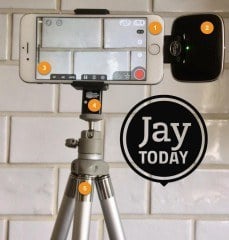
jay today

Partially because I was first (or nearly so), and partially because the content was at least decent, Jay Today got pretty good traction. Not Gary Vaynerchuk traction, but good by my mortal standards.

I did the Jay Today show three times each week for about 14 months. And then, I quit. I simply got tired of doing it, which is rare for me (my Social Pros podcast is 8+ years old). I think I just felt like I didn’t have anything else to say in that format at the time, and I sunsetted the show.

Afterwards came the big explosion in daily video programs and video podcasts. About 18 months after the end of Jay Today version 1.0, I returned with Jay Today version 2.0. And it was fine, but I’d lost my first mover advantage.

I let fatigue convince me to give away an edge I’d developed. That was a mistake.

I Picked the Wrong Competitors

In the early years, Convince & Convert was really just Jay’s blog, and operated as such. Then, as we grew it became a multi-author home of intermediate to advanced social media and content marketing advice and counsel.

Over time, we saw ourselves competing against Content Marketing Institute, Social Media Examiner, MarketingProfs, TopRank and other terrific online resources that publish daily articles with excellent, tactical, how-to guides to all things digital marketing.

We tried to fight that fire with our own fire, and our editorial approach here began to embrace volume and practical advice as key components.

I realize now that was a mistake. We’re not going to out how-to those great sites, and we never should have tried. We’re a thoughtful, strategic, consulting firm that works with many of the world’s most interesting brands to solve large and thorny marketing and customer experience challenges. We’re not in the how-to business, we’re in the “now what” business.

For a while there, our audience for our content was one persona, and our audience for our consulting services was a different persona. We’ve fixed that now, which is why we publish less frequently here than we used to, our content is purposefully longer-form and more detailed, and a lot of our stuff now is based on first or second party research.

We regained the right focus and are trying to serve the same, smart audience with both content and consulting.

I hope you agree. If you like what we’re doing here, you may want to visit this page to sign up for our feed, where we’ll send you a quick email each time we publish something new.

Thanks again for the opportunity to serve. Whether our relationship began today, 10 years ago, or anywhere in between, I very much appreciate your time and your trust.

And congratulations to all at Convince & Convert for being extraordinary every day, and for getting us to TEN YEARS!  I don’t say it enough, but I love each and every one of you.

The post My 10 Biggest Mistakes in 10 Years as an Entrepreneur appeared first on Convince and Convert: Social Media Consulting and Content Marketing Consulting.


from Convince and Convert: Social Media Consulting and Content Marketing Consulting https://ift.tt/2Kq7zA8


How to Improve Customer Experience With Big Data

improve customer experience big data

Customer expectations keep going up, and up, and up. Customers today don’t give your company or organization a “pass” because you’re in B2B, or financial services, or healthcare, or manufacturing. The greatest companies in the world, regardless of category, are teaching your customer what is possible and what is the norm.

Forrester says we are five years into “the age of customer”: an era of manifest customer expectations increases that will challenge almost every business. Specifically, their analysts say:


“The age of the customer will place harsh and unfamiliar demands on institutions, requiring changes in how they develop, market, sell, and deliver products and services.” – @forrester
Click To Tweet


To succeed in this environment, companies must look for every opportunity to understand customer expectations and continuously leapfrog past them, time and time and time again. The cycle for optimization of customer experiences is getting shorter and shorter too. What was a remarkable customer experience in 2016 is table stakes today. And to be able to continue to jump in front of rising customer expectations, your data and systems must be constantly getting better as well.

But data is both a blessing and a curse for CX professionals today.

exceed customer expectations

Oracle CX produced a terrific report called 2018 Smarter Insights CX Report and discovered that 39% of surveyed CX pros believe they are under-proficient and underprepared for the new, data-rich era of customer experience management.

They know data is important, but they aren’t sure how to match the available data to on-the-ground CX improvements and enhancements. So what happens instead? They often sit around a conference room and come up with ideas, relying on instinct and anecdote to guide their initiatives. This CAN work but isn’t the best approach.

Big Data + Machine Learning = CX Improvement Recipes

But using big data to guide CX decisions is doable. You just have to know where to look and how to read the numbers.

This was proven especially true by my friend Christopher S. Penn and his firm BrainTrust Insights, in their recently published white paper “Turning Complaints Into Insights.”

Studying the impact of complaints on your business makes a lot of intuitive sense, doesn’t it? After all, if you’re going to make a CX improvement, fixing whatever your customers complain about is a good starting point. In fact, I wrote a whole book about the science and importance of complaints, Hug Your Haters.

In their research, Penn and Co. analyzed 51,260 customer complaints from a credit reporting customer database to see what made consumers unhappy, which complaints were most emotional, what actions companies took (if any), and what impact those actions had on the company’s bottom line.

They first classified the complaints into one of five categories:

  1. Credit card and related issues
  2. Mortgages and related issues
  3. Fraud and fraudulent transactions
  4. Data breaches and compromised identities
  5. Bankruptcy and adverse financial events

They then used two machine learning libraries to gauge the sentiment and emotional strength of each complaint, yielding a matrix of problem type and problem magnitude.

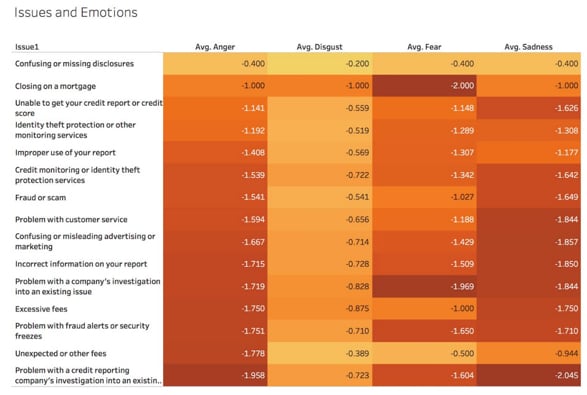
big data and CX improvements anger matrix

The darker the color in the table above, the more emotionally charged the complaint, indexed as anger, disgust, fear, or sadness. The data show that anger at its strongest when consumers complain about credit reporting investigations, followed by unexpected fees and trouble with fraud alerts. Disgust is highest around issues of closing on a mortgage and excessive fees.

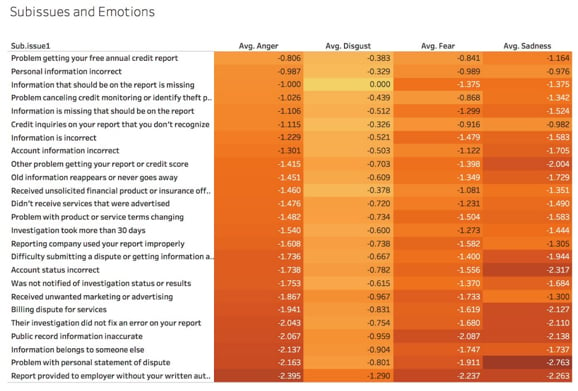
big data and cx subisses chartWhen drilling deeper into the specific sub-issues that caused complaints, the data show tremendous sadness when credit reports are provided to employers without the consumer’s written authorization.
And, there are several other issues—almost all of them operational circumstances that could be changed/fixed—that routinely cause high-emotion customer complaints.

big data and cx improvement outcomes

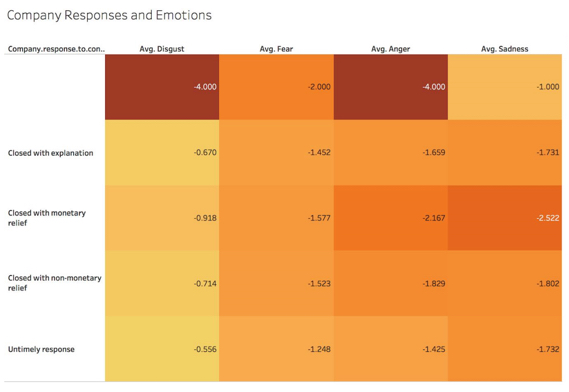
The team at Braintrust Insights then looked at the actual resolution of these complaints, organized by issue type, sentiment (anger, disgust, et al.) and intensity (darkest colors in the chart above).

Row three in the table shows the most emotionally charged complaints are highly disproportionate to have been settled with some sort of monetary relief for the customer. This demonstrates a correlation between intensity and business-level outcome and further emphasizes how important complaints are to company health.

How You Can Use Big Data to Improve Your Own CX

What we learn in this example (and I encourage you to download the entire report, as there is a lot more gold in there) is that when you’re looking at customer complaints, you don’t have to rely solely on complaint volume or simple keyword analysis when classifying and categorizing them. The emotions prism through which this data was sifted is readily available.

Second, we learn that complaints and emotional intensity have a direct tie to business outcomes. People who are the most unhappy often have to be compensated monetarily, at least in this financial services example.

If you are looking to make specific customer experience improvements in your company—and you should be—a great place to begin your investigation into specific potential changes is to uncover the things about which your customers have the most intense feelings.

Good CX professionals use their instinct and experience to find and fix. Great CX professionals augment that expertise with big data and machine learning, peering into the numbers to find larger truths.

Big thanks to BrainTrust Insights for allowing me an early glance at this terrific report. They’ve got more interesting stuff on the way!

The post How to Improve Customer Experience With Big Data appeared first on Convince and Convert: Social Media Consulting and Content Marketing Consulting.


from Convince and Convert: Social Media Consulting and Content Marketing Consulting https://ift.tt/2MFOois

How to Ensure Your Emails Land in Gmail’s Primary Tab

emails-gmail-primary-tab

If recipients never see your marketing emails in their Gmail inboxes, the effort related to creating them is useless. Fortunately, you can decrease the likelihood that Gmail will think your messages are spam. Here are 8 ways to ensure your emails land in Gmail’s primary tab.

1. Review Gmail’s Bulk-Sending Guidelines

You might spend hours searching for generalized tips about keeping emails from getting caught by spam filters, but Gmail’s rules are the only ones that matter here, especially when sending out cold emails.

It’s a good idea to become familiar with the service’s current recommendations for bulk emails and revisit them often in case things change.

2. Encourage Subscribers to Make Simple Changes on Their End

Gmail’s guidelines indicate some things boost the chances of emails not landing in spam folders.

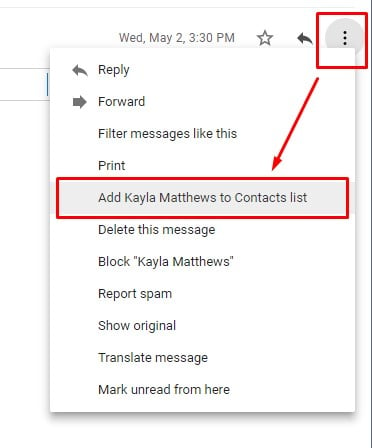
It’s a plus if your company’s email address is in a recipient’s contacts. Ask subscribers to open an email from you, then click the three-dots icon on the right. From there, they can add the address to their contacts.

It helps, too, if recipients immediately mark messages from you as important. They can do that by clicking the flag icon directly to the left of your email address or name in Gmail’s inbox list.

Alternatively, users can click on an email, then select the three-dots icon furthest to the right in the row of icons above the email’s subject line. From there, they should choose the “Mark As Important” option.

add address to contacts gmail

These methods teach Gmail that people value those emails and want to see them again.

3. Make the Emails Personal and Appealing When Possible

If you can include a recipient’s first name in emailed content and feature some message characteristics that aren’t purely promotional, analysts say those things increase the likelihood of content landing in the primary tab, too.

personal emails gmail primary inbox

Keep the content short to increase engagement. Plus, be aware that too many links and images make emails seem not as uniquely targeted to the recipient.

Similarly, avoid some of the spamming red flags that often apply to stuff people consider junk mail. They include subject lines in all caps, misleading subject lines that contain “Re:” at the start even when you haven’t communicated with that person previously, and emails about topics recipients don’t deem relevant.


Emails that look personal and non-promotional are more likely to land in Gmail's primary inbox.
Click To Tweet


4. Send Your Emails Individually (Or in Very Small Batches)

You should also avoid distributing all your marketing messages at once. Even if you’re sending material that research indicates your target audience wants to read, massive sending sprees put email providers — including Gmail — on alert.

Limit a few cold-email mistakes by staggering the sending over several days by breaking your recipient list into sections.

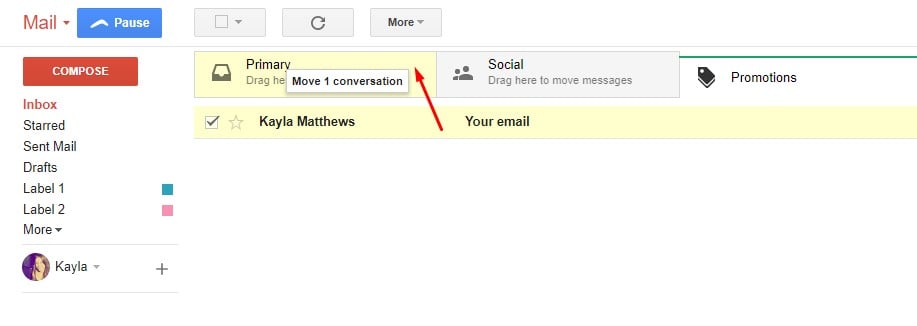
5. Instruct Recipients to Drag Messages to the Primary Tab

Instruct Recipients to Drag Messages to the Primary Tab

Despite your best efforts, there may be cases when your messages don’t initially land in the Primary inbox. That’s why it’s smart to include a short message in an email’s footer that says something like, “Didn’t get this email in your Primary inbox? Please click and drag our message to the Primary tab at the top of your Gmail interface to indicate it’s important.”

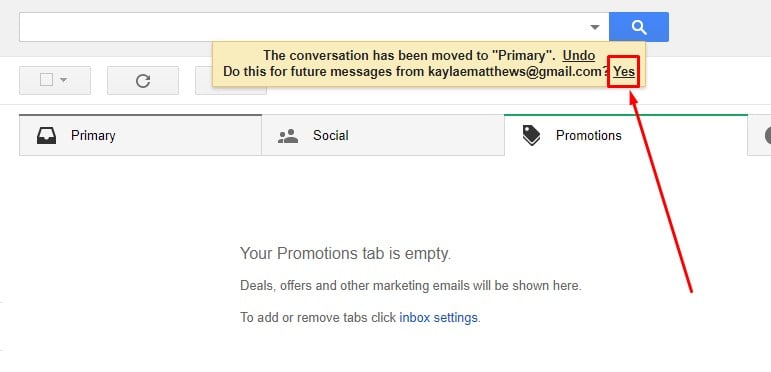
When users do so, they’ll get a message from Gmail asking if this is where they’d like your future emails to land. Encourage recipients to click “Yes” if they’d like to find your emails in the future easily.

“Yes” if they’s like to easily find your emails in the future.

6. Advise People to Check Their Promotions Tab and Spam Folder

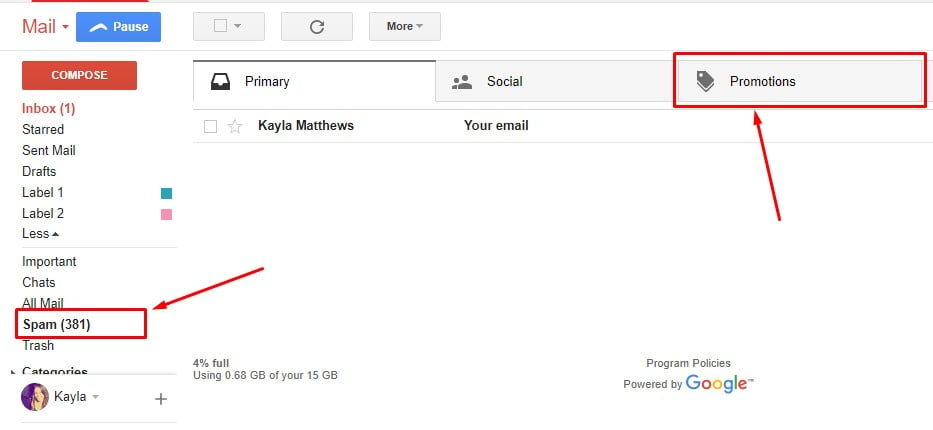
When sending messages to people who sign up for your email list, the page subscribers land on after submitting their details should alert them to be aware that the initial email they receive could land in Gmail’s Promotions tab or the Spam folder.

Advise People to Check Their Promotions Tab and Spam Folder

Recommend that they check those areas frequently. Ideally, let people know when they’ll get the first message from you. Something as straightforward as, “Thanks for signing up! We’ll be in touch within a week” sets expectations.

7. Be Aware of Gmail’s Newest Features

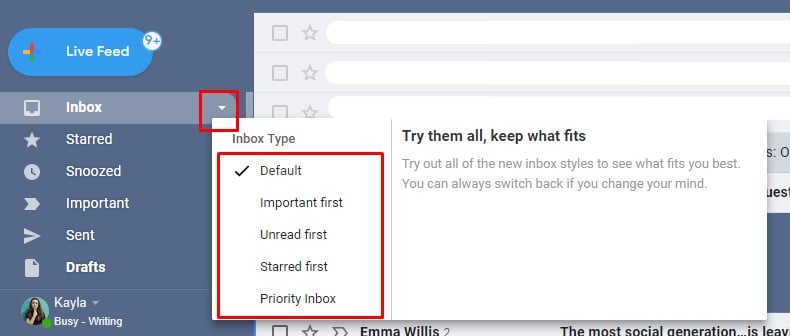
Thanks to a significant update, Gmail allows users to pick from five inboxes and switch between them at will. Hovering a cursor over the Inbox section on the left of the Gmail inbox makes a downward arrow appear. People can click it to change the inbox type.

Gmail users can try out a Priority inbox that combines Starred, Important and Unread emails

The inbox with tabs that you’re used to seeing is the Default inbox. But, users can try out a Priority inbox that combines Starred, Important and Unread emails, or choose the Unread First inbox, along with other options.

If customers reach out to you after receiving the Primary tab-based instructions outlined above and say they don’t see any tabs at the top of their inboxes, they may be using a type other than the Default option.

8. Use of AI

Another crucial thing to note about the Gmail update is it is heavily dependent on artificial intelligence (AI). Even if your recipients don’t apply the tips above for designating your emails as important, the Gmail app learns in the background and depends on collective information based on user habits.

One of those AI-driven components is a nudging feature. Google weighs several factors to judge whether emails deserve replies, including the frequency of previous interactions between a sender and recipient. When applicable, it reminds people they haven’t replied yet and prompts them to consider doing so.

After you move past the point of cold emails and start nurturing leads, writing emails that encourage recipients to write back to your correspondence could be useful.

Land in the Main Inbox

Whether you’re emailing someone for the first time or interacting with a long-time customer, it’s not always easy to make your emails sufficiently prominent in the main inbox. These tips should help.

The post How to Ensure Your Emails Land in Gmail’s Primary Tab appeared first on Convince and Convert: Social Media Consulting and Content Marketing Consulting.


from Convince and Convert: Social Media Consulting and Content Marketing Consulting https://ift.tt/2Kq7goY