
Email marketing is the most efficient way to communicate and build a relationship with your audience. It allows you to speak with them directly through their inbox, at a time that’s convenient for them.
Email marketing is such a valuable tool for small businesses, in fact, 79% of small business owners say email marketing is important to their success.
Did you know that email marketing done right, can actually increase your revenue, create more loyalty between your customers and increase your brand awareness. Yet, despite the impact it can have on a business, only 46% of small businesses are using email marketing.
Why?
Maybe it’s the time it takes to build an email campaign. Or maybe you're simply not sure how. Maybe it’s the cost.
If you know what to look for with an email service provider, then these should no longer be a factor.
Here at AWeber, we want to see your business thrive. So to help, we’ve put together a comprehensive list of what to look for with a free email marketing service provider.
What Should You Look For with a Free Email Marketing Service Provider
This is a bit of a tricky question because every business' needs are going to be different. So we’ll do our best to highlight the pros, cons, and main features of each online email marketing company in order for you to weigh what is most important to the success of your business.
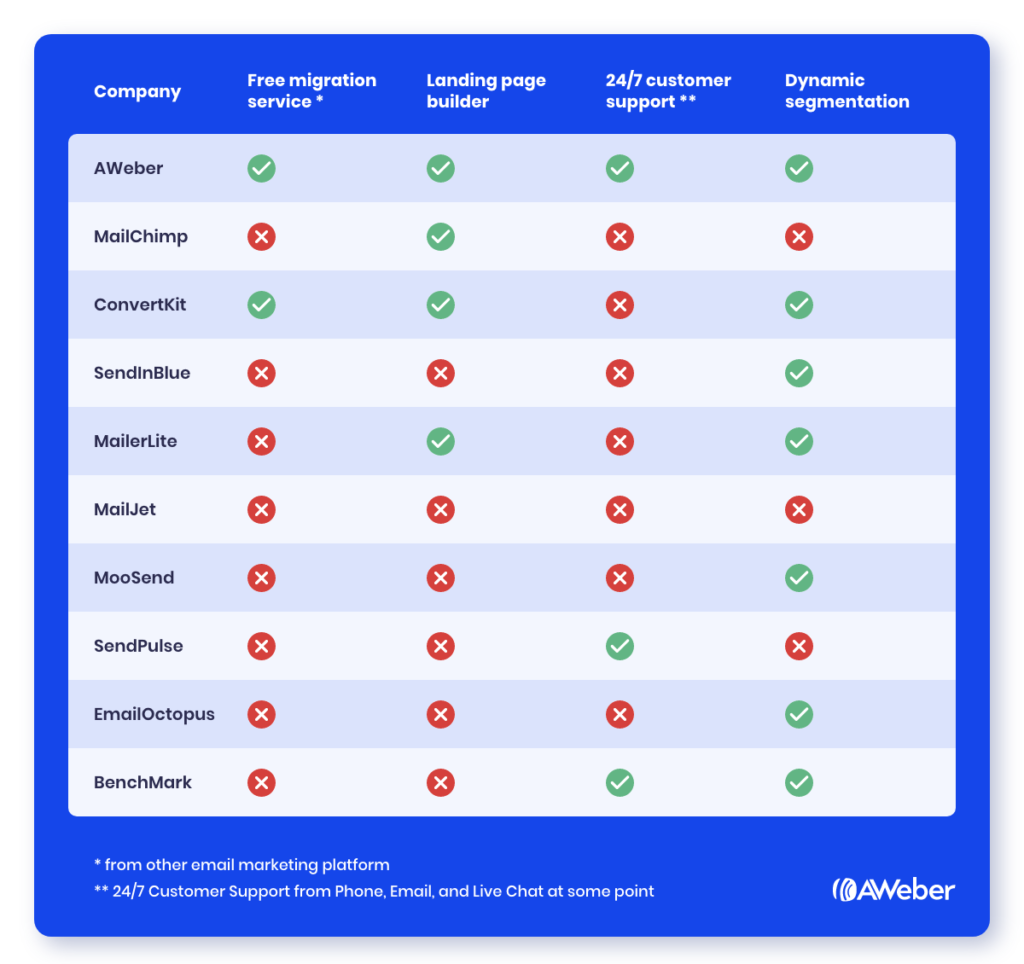
Now that we’ve identified some free email marketing service providers, let's take a deeper dive into each one so you can make a decision that’s best for you.
AWeber

I’ll admit, I may be a little biased when writing about AWeber, so I just let all the powerfully-simple extra features, award winning customer service, and world-class platform do the talking.
AWeber is one of the leading email providers, helping over 1 million small businesses successfully grow their business. And we’ve done it longer than anyone else (we were founded in 1998).
What makes this free version stand out above everyone else is our commitment to you. We truly care about the success of your business. When you open an account with AWeber, you get the same level of service we provide all of our customers. AWeber Free delivers powerfully-simple, industry-leading features at no cost to you. That’s right — no credit card and no payment with AWeber Free. Ever.
Plus, you get our Industry-Leading Deliverability. We are experts in making sure your message hits people’s inbox. We don’t outsource email processing, ensuring we control deliverability from end-to-end.
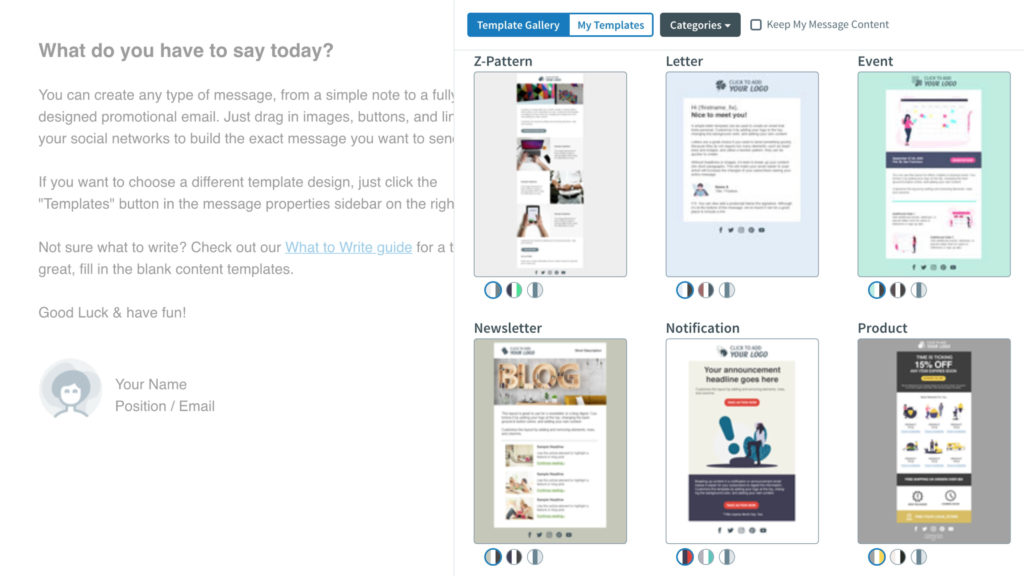
Need to move from another email service provider? No problem, we’ll migrate your contacts and email templates to your new platform. Plus, you’ll have access to 100s of email templates (and climbing), our easy-to-use drag-and-drop editor, and our landing page builder with free templates included.
And we don’t stop there. AWeber is constantly expanding our platform based on feedback we receive from our customers. Whether that’s to add more features to help your business grow or to create a better user experience.
Our mission is simple: to provide you with an easy to use email marketing platform that does 90% of the work for you.
AWeber’s Free Email Marketing Tools
AWeber has everything you need to start growing your business — for free. We offer marketing features in our free plan that actually matter to the success of your business, including:
- All email design tools (including Smart Designer)
- Campaign automations
- Sign up forms
- Landing page builder
- Native integration with leading ecommerce and small business solutions
- Free migration from your current email marketing provider
- 24/7 phone/email/chat access to customer solutions
AWeber Free Email Platform Pros
With so many advantages it’s tough to narrow it down to just a few pros but I’ll give it my best shot. With AWeber Free, you have everything you need to create amazing looking emails AND landing pages, you’ll be able to automate your email marketing, and integrate with 100s of other businesses.
- Drag-and-Drop editor. This could possibly be one of the easiest drag and drop email and landing page editing tools you will ever use. Create custom emails and landing pages in just minutes without ever writing a line of code.
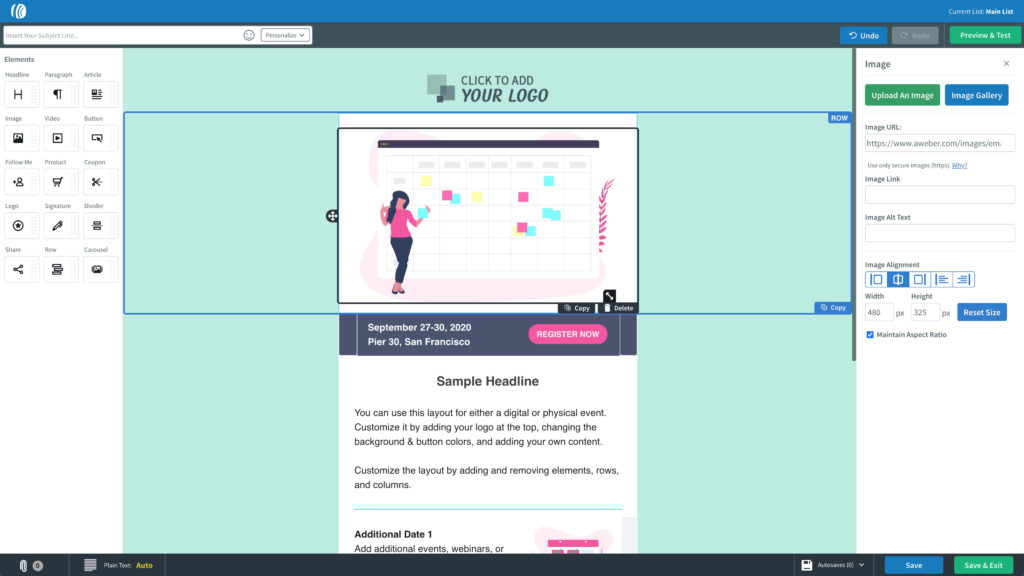
- Landing Page Templates & unlimited landing pages. Many platforms will limit the number of landing pages that you can build. Not us. We know a landing page could be the foundation for your business to increase their leads flow. Part of our mission is to help you grow your business, so why not give you every advantage to power you forward.
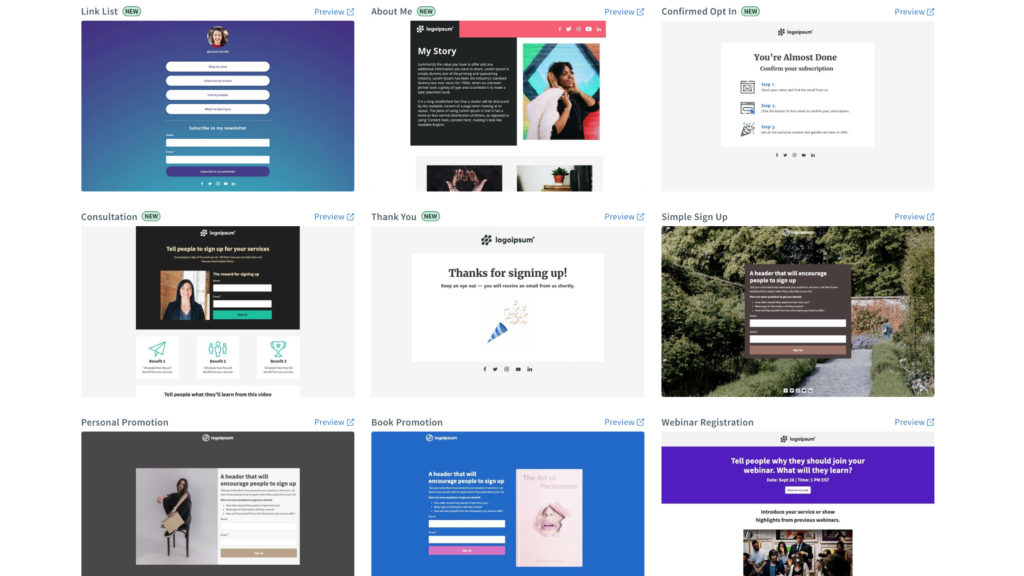
- Access to our Smart Designer, an AI-powered design assistant that automatically builds you amazing-looking branded email templates in seconds. We understand not everyone is a graphic designer, so we make creating beautiful email templates super easy.
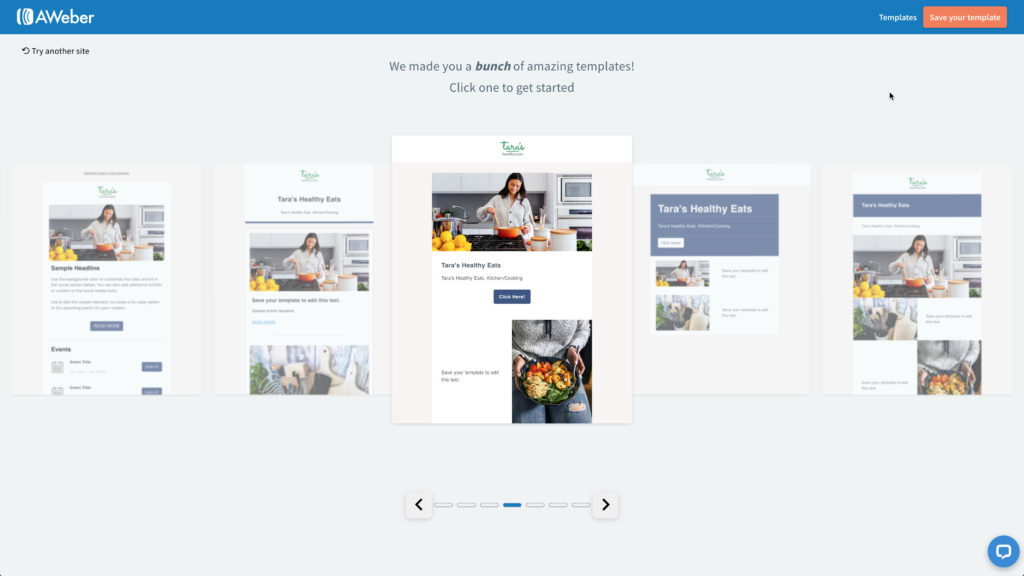
- Get started even faster with a huge library of pre-built email templates. Again, we try to make your job easy by doing 90% of the work. Simply add your logo and you're ready to send your emails.
- Access to our Award-Winning Customer Service Team. Ask our award-winning customer solutions team any question by phone, chat or email. They’re available 24 hours a day, 7 days a week to help you succeed with email marketing.
I can go on forever talking about the fanatic benefits and features that AWeber Free has available. But why go on when you can see for yourself. Sign up today for AWeber Free. No credit card, no commitment, no worries once you’re part of the AWeber family.
AWeber Free Email Platform Cons
I’d be lying if I told you we didn’t have any cons with our free email services. We don’t offer email split testing on the free plan. Plus there are some other fantastic features that you will only have access to with our Pro plan. But we can’t give the farm away, even though we tried.
But the biggest con with AWeber Free is that you didn’t discover it earlier. Really, it’s that good.
Mailchimp

When you think of email service providers, MailChimp is usually at the top of the list due to their brand awareness and how long they’ve been supporting small businesses. Overall MailChimp’s free email platform is solid. In fact, of all the email marketing platforms we evaluated, MailChimp may be the second best option.
MailChimp’s Free Email Marketing Tools
You get access to several of MailChimp’s features with the free plan. However for those tools you receive access to, MailChimp puts a limit on what you can use.
Some of the key features you get with the free plan include:
- Segmentation
- Website builder
- Landing page builder
- Marketing CRM
- Integrations with over 200 apps
Mailchimp Email Platform Pros
You don’t last 20 years in business without knowing what you’re doing, and we’ll give it to MailChimp they have a very robust platform with several benefits with their free plan. Yes, it does have it’s limitations, such as saving most of their main tools for paying customers.
The marketing CRM tool is a nice touch that you won’t see with many other free platforms. You can also build and publish a basic website.
Mailchimp Email Platform Cons
If you value customer support, then Mailchimp may not be for you. You’ll receive 30 days of email support once you sign up, but after that you’re on your own. You’ll receive no phone, no email, or no chat support.
Not everybody has a creative background and can build emails or landing pages that look amazing and can convert, so they rely on the templates provided by their email marketing provider. With MailChimp, you only have access to their “basic” templates.
And while MailChimp’s free plan has some advantages, MailChimp can quickly begin getting pricey as you begin growing your business and need more support and features.
ConvertKit

ConvertKit is an email marketing service provider that’s built by a blogger for bloggers, although the platform is not limited to bloggers. The free plan starts at 100 subscribers for free, but that can jump to 1,000 through their referral program where you can earn an additional 100 subscribers for every referral who also signs up for a ConvertKit account.
ConvertKit’s Free Email Marketing Tools
On ConvertKit’s pricing comparison page they state their free tools as including:
- Landing page builder
- Form builder
- Segmentation
- Subscriber tagging
ConvertKit Email Platform Pros
The biggest pro that I can find with this platform is a tool that is not yet released. ConvertKit recently announced a brand new tool called ConvertKit Commerce. This feature will let you sell digital products right inside ConvertKit’s platform.
Outside of ConvertKit Commerce, there aren’t many pros to ConvertKit’s platform that you couldn’t find in other email service providers.
They provide free migration services, so if you need to move from another email marketing platform, they will assist in moving you to ConvertKit. But you will need to have 5,000+ subscribers for it to be worth their time and effort.
ConvertKit Email Platform Cons
ConvertKit is a very basic platform. There are no drag-and-drop email templates or builders. In fact, you only have two templates to choose from — a plain text version and a very plain-looking HTML version. And with the HTML version, you are limited with what you can customize.
The free plan also does not include email automation, which can be frustrating if you want to begin cultivating a relationship with your clients by sending welcome or thank you emails.
While their landing page builder may be fully customizable, you have far fewer templates to choose from compared to other email marketing platforms such as AWeber.
And they outsource their customer support so it can take hours to days for you to get a response. There is no email or phone support, instead you leave a message in their app and someone will email you a response.
Overall, ConvertKit lacks the bells and whistles that you can get with most other free email marketing services like MailChimp and AWeber.
SendInBlue

SendInBlue was actually founded as a digital agency. They switched to become an email marketing provider when they realized an opportunity to help marketers automate email marketing on a budget.
SendInBlue is a good tool for ecommerce marketers with customized triggers based on purchase behavior and the ability to import customer orders.
SendInBlue Free Email Marketing Tools
While SendInBlue has some very good email marketing features, many of those are only available with their paid plans. Here are some of the better features available with the free plan:
- Unlimited contacts
- Customizable signup forms
- Advanced segmentation
- Marketing automation workflows (up to 2,000 contacts)
SendInBlue Email Platform Pros
SendInBlue possibly has one of the best marketing automation tools. Their automation features are advanced and user-friendly. In fact, they are able to track your customers’ website behavior and trigger an email message at just the right time.
SendInBlue’s email builder is also a very easy and convenient tool to use. You have the option to use one of their 140 email templates, or you can build your email campaign with their easy-to-use drag-and-drop editor.
SendInBlue Email Platform Cons
While SendInBlue is a solid email marketing platform with good tools, they still lack a number of features you can get with other email providers. And they save their core features for their paid customers. You need to be on the Essential plan to start getting some of the real, juicy features, such as A/B testing, more detailed reporting, and better support.
SendInBlue is also limited in the number of integrations with their platform.
Despite these limitations, the biggest con for the SendInBlue platform would have to be their daily email send limit. While you can have an unlimited number of subscribers, you can only send 300 emails a day, up to 9,000 for the month. This makes it nearly impossible to grow on the free plan before you need to upgrade.
MailerLite

MailerLite offers good value and a solid platform. Their email campaigns were easy to set up and use. They cater to small businesses, as roughly 90% of their subscribers have 50 employees or less.
MailerLite Free Email Marketing Tools
The MailerLite free email plan includes access to features like automation, landing pages, and advanced segmentation. However, like other providers, some key features are gated and live chat and phone support are not available.
Some tools that you do get include:
- Landing pages, but limited number of templates
- Drag-and-drop editor
- Built-in photo editing
- Pop-up subscribe forms
- Email automation
- Advanced segmentation
MailerLite Email Platform Pros
MailerLite was one of the easiest to use platforms we evaluated. You don’t need a technical background to set up and send emails. And their email campaign reports are clear and easy to understand.
You also get full access to their marketing automation options which is a convenient option for those more sophisticated marketers.
They also have a popup creator which you can have set up and ready to go with just a few clicks.
MailerLite Email Platform Cons
While the reporting and email setup are really easy to use and navigate, their segments and grouping can be pretty confusing.
And like so many other email marketing platforms we evaluated, you can only build up to 5 landing pages. And they have a very limited number of email and landing page templates. If you don’t have a creative background, you may find this very frustrating.
MailJet

If your main goal is to find a solid platform that is cheap once you graduate past the free plan, then MailJet may be for you. MailJet is one of the most basic email service providers that we researched, especially when it comes to their free email plan.
MailJet Free Email Marketing Tools
MailJet’s free email marketing features are very, very limited. Like SendInBlue, you won’t have to worry about upgrading your account as your subscribers increase, since you get unlimited contacts. However, also like SendInBlue, they limit you to a certain number of sends per day.
Other features in the free plan include:
- API’s, SMTP Relay, Webhooks
- An advanced email editor
- Advanced statistics
MailJet Email Platform Pros
The pros for the free email platform are few and far between. There’s obviously the unlimited contacts, which is a big plus. They also have a very easy to use drag-and-drop editor which is great for a new user. Outside of that, we didn’t find too many pros that would separate MailJet from the competition.
One pro worth noting is a multi-user collaboration feature, which allows multiple users to work together in real-time on the same email. Think Google Docs. However, this is only available on the Premium or Enterprise paid programs.
MailJet Email Platform Cons
MailJet is a very basic email service provider with no added benefits outside of email sending. Many of the other email marketing companies we reviewed have extra features such as a landing page builder or pop up builder. These extra features could be important as you look to grow your business and save money in the process.
And, as mentioned above, although you can have unlimited contacts, MailJet does limit the number of emails you can send in a day to only 200 or a max of 6,000 per month. You may find it tough to grow your business sending to only 200 a day.
Moosend

If you’re looking for a platform with email automation options, but don’t need landing pages as an option for collecting subscribers, then it might be worth checking out Moosend.
Moosend Free Email Marketing Tools
Moosend is relatively new when it comes to providing free email marketing services. And the available features are on par with some of the more well known platforms.
- Unlimited emails
- Sign up and subscription forms
- Reporting and analytics
- Drag-and-drop editor
- Email automation
Moosend Email Platform Pros
Moosend’s free email marketing platform offers a number of features not offered on other free platforms. Marketing automation features like onboarding and abandoned cart sequences and list segmentation, a/b testing options and spam testing are available.
Moosend’s Drag-and-Drop builder and templates also help email marketers get started with email design without worrying about coding.
Moosend Email Platform Cons
Moosend’s platform allows up to 1,000 unique subscribers on the free tier. However, when your subscriber count starts to climb, so does Moosend’s cost.
Other typically important features like the ability to send transactional emails and create landing pages are missing from Moosend’s free email platform. Phone support is also left out of the free plan, and is reserved for enterprise level users.
SendPulse

If you’re looking for a marketing automation platform that lets you do more than just email, SendPulse has options for you. SendPulse offers SMS messaging, transactional email capabilities, chatbots and web push notifications.
SendPulse Free Email Marketing Tools
SendPulse has a good number of available tools, including:
- Email marketing automation
- Web push notifications
- SMS marketing
- Viber marketing
- Chatbot messaging
SendPulse Email Platform Pros
SendPulse lets you send up to 15,000 emails to 500 subscribers. However, the free plan limits the number of sender addresses you can have. Plus, while SendPulse offers some cool features like its Automation360 tool and the ability to resend to subscribers who haven’t opened your messages, SendPulse limits the storage volume for files up to 20Mb.
SendPulse Email Platform Cons
In addition to the limited sender addresses and storage volume, SendPulse doesn’t allow you to bulk manage email addresses — i.e. you can’t export your mailing lists to Excel or other spreadsheets. And if you want to use SendPulse because of its SMS capabilities, you should know that you can only send 10 free SMS text messages through its free plan.
EmailOctopus

EmailOctopus has a solid sender reputation with emails being sent through Amazon SES. Once you move past the free version, EmailOctopus is fairly affordable, but you get what you pay for in terms of features. If all you need are basic email features, then this email marketing service provider worth considering.
EmailOctopus Free Email Marketing Tools
They don't have a large number of features, but those they do have are solid.
- Email marketing automation
- Segmentation
- Sign up forms
EmailOctopus Email Platform Pros
Yes, EmailOctopus has one of the more generous free plans in terms of subscriber count. Free users can send 10,000 emails each month to up to 2,500 contacts, which is great if you want to send a weekly newsletter. Plus, with an easy-to-use WISIWYG email builder, creating good looking email newsletters isn’t difficult.
EmailOctopus Email Platform Cons
EmailOctopus’ simplicity — which some could view positively — is also one of its main downsides. Their feature set is extremely limited and their usability is not that strong. The tool also stores your statistics for only 30 days at a time.
So, if you want to take a more strategic approach to email marketing beyond weekly newsletters and analyze your email marketing results, it may be best to look elsewhere.
BenchMark

BenchMark provides a simple email marketing service, but that's just how they want it. They designed their email builder to be simple and straightforward. Their email editor is super easy to use, one definitely doesn’t need a technical background to use this feature.
They pride themselves on being international as they have a presence in fifteen countries around the world. Plus, from a useability standpoint, BenchMark gets it right.
BenchMark Free Email Marketing Tools
If you are just starting out with email sending and have a very small email list, then the available features may work for you. However, compared to the competition, BenchMark’s available features on their free plan are very lite.
- Basic Email Marketing
- Lite Marketing Automation
- Signup Forms
- Basic Drip Campaigns
- Heatmap reporting
BenchMark Email Platform Pros
BenchMark’s biggest pro is their, as they put it, insanely simple drag & drop editor. And you’ll get no argument from me. This editor is as simple as it gets.
Automation Pro is a tool developed by Benchmark Email to create automations for your email subscribers. Automations are a set of elements or modules that automatically perform specific tasks based on your subscribers’ interactions with your emails and website. Within Automation Pro, automations can add or remove subscribers from lists or automatically send an email based on website activity, which are tasks that regular automations can’t do.
Their heatmap reporting is a nice touch for the more sophisticated marketer. And they have a basic, but solid marketing automation tool where you can set up simple behavior-based email campaigns.
BenchMark Email Platform Cons
As nice of a platform the BenchMark has to offer, they have their cons. For starters, you can only send 250 emails per month. I don’t know about you, but that’s not enough for me to send one email to my list.
The free plan is also missing a lot of key features needed to grow your business such as their landing page builder, more advanced email automation, and priority support.
So, how do you decide what’s right for you?
We know, that’s a lot to take in. But putting in the time upfront to figure out what email marketing service is best for you will pay off in the long run. Just want a quick comparison of the most important features? Check out the table we put together at the top of this article.
Ultimately, make sure you choose a provider who has — and will — stand the test of time. While migrating to AWeber from another platform is painless, we can’t promise the same for the other guys. So do your due diligence upfront to make sure you’re choosing a platform that’s powerfully-simple and gives you the features you need now and in the future.
The post What to Look for with a Free Email Marketing Service appeared first on AWeber.
from AWeber https://ift.tt/2Pbs2ss


