Now that you reviewed your SMBs’ 2019 performance, it’s time to refocus and think about goals for 2020. Have your goals changed? Are you now focusing more on efficiency, new customer acquisition, or building upper-funnel leads?
Are you trading efficiency for awareness or vice versa? Are there new customer segments that you are pursuing? Do you have new products, services, or functionalities to introduce? The answers to these questions should form the foundation of your digital growth strategy and should define the tests you run to support that strategy.
In this post, we’ll talk about the alignment of goals and tests to get you on the right path for 2020 growth.
Goal/test alignment
If your main goal is building brand awareness and your base of engaged users, testing new audiencesshould be a key focus, with a secondary step planned for retargeting these users in the future. Facebook/IG has great demographic intelligence to tap into, and LinkedIn allows B2Bs incredible targeting capabilities by title, industry, company size, and other relevant parameters.
If you’re more focused on getting more value out of an already-healthy customer base, bringing them back to your site and working to earn more conversion, turn your attention to remarketing and user experience.
What does this mean for B2C and ecommerce?
For B2C and ecommerce, this means optimizing remarketing campaigns (testing promotions and other messaging) and running CRO tests to make sure your landing pages are finely tuned and moving the users through the conversion funnel.
What does this mean for B2B and lead gen?
For B2B and lead gen, moving a strong upper-funnel base of leads through the funnel means making sure your content and messaging is aligned with their place in the purchase journey – so test different copy and themes to see which resonate the best, then target leads that went dark during the sales process with retargeting campaigns on LinkedIn and GDN.
If your goal is to lower CPA and establish more reasonable CPCs in a world of oversaturation on Google and Facebook, I recommend testing new channels with less competition and lower CPCs/CPAs. Those platforms include Instagram, Pinterest, Quora, and Reddit.
Goal-agnostic testing
No matter what your overall campaign goals or business type are, it’s critical to establish a testing strategy and framework for creative assets and automated features. For creative, this includes everything from ad format (video, single-image, carousel) to the aspect ratio, and specific messaging/offers. For automation, consider that Google and Facebook’s powerful machine-learning tools, including automated bidding and campaign budget optimization – can help improve performance. However, they would require oversight to ensure they’re on target. Automated creative tools, includingGoogle’s responsive search ads and Facebook’s dynamic creative, blend machine learning with creative testing and should be tested and monitored to leverage in campaigns for all business types.
Measurement
Once you begin these tests, the rock-solid measurement must inform decisions and optimizations moving forward. If your goal is to drive brand awareness, focus on improvements, on metrics such as impressions, clicks, site visits, and reach. Customer acquisition goals for B2B and lead gen should incorporate metrics including upper-funnel leads, converted leads, opportunities, CPL, and lead-to-opportunity conversion rates.
Ecommerce businesses focused on driving sales should focus on metrics like ‘add to cart’, purchases, CVR, ROAS, and CPA. Reviewing these metrics at a campaign level, ad group or ad set level, audience, and creative level will help inform decisions and future tests.
There are many more testing layers to get into, but make sure you have started towards your 2020 goals by aligning the first wave of tests and KPIs accordingly to give yourself a foundation for growth in the coming quarters.
Lauren Crain is a Client Services Lead in 3Q Digital’s SMB division, 3Q Incubate.
Facebook Blueprint offers free courses and learning paths to learn more about marketing on Facebook and its platforms, including Instagram, Messenger, and Audience Network. Here is a list of recent tutorials for Facebook.
If you want to get more clicks from Google, you need to optimize what your site looks like in the search results. The Yoast SEO plugin has a Google preview (FKA the snippet preview); a simulation of what your post will look like in those results. Here, we explain how to use that Google preview to get more clicks! And, we clarify why this snippet preview might not always match what you see in the actual search results.
What is Yoast’s Google Preview?
Yoast’s Google preview, formerly known as the snippet preview, is a feature of the Yoast SEO plugin. It allows you to preview what your page or post will look like in Google’s search results. It has a mobile and desktop view and shows elements like the slug, title and meta description. In this preview, you can edit those elements to make sure your site looks good in the search results.
Where do you find Yoast’s Google preview?
In Yoast SEO, there are two ways to preview your snippet. You can either get there from the Yoast SEO sidebar or the Yoast SEO meta box.
The Yoast SEO sidebar
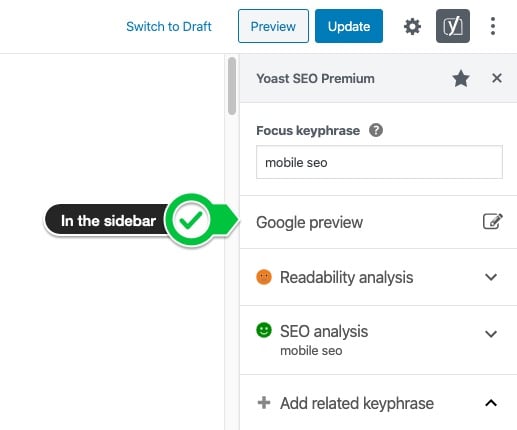
You can activate the sidebar by clicking on the Yoast icon on the top right of your screen. In the sidebar, you’ll see the “Google preview” tab:
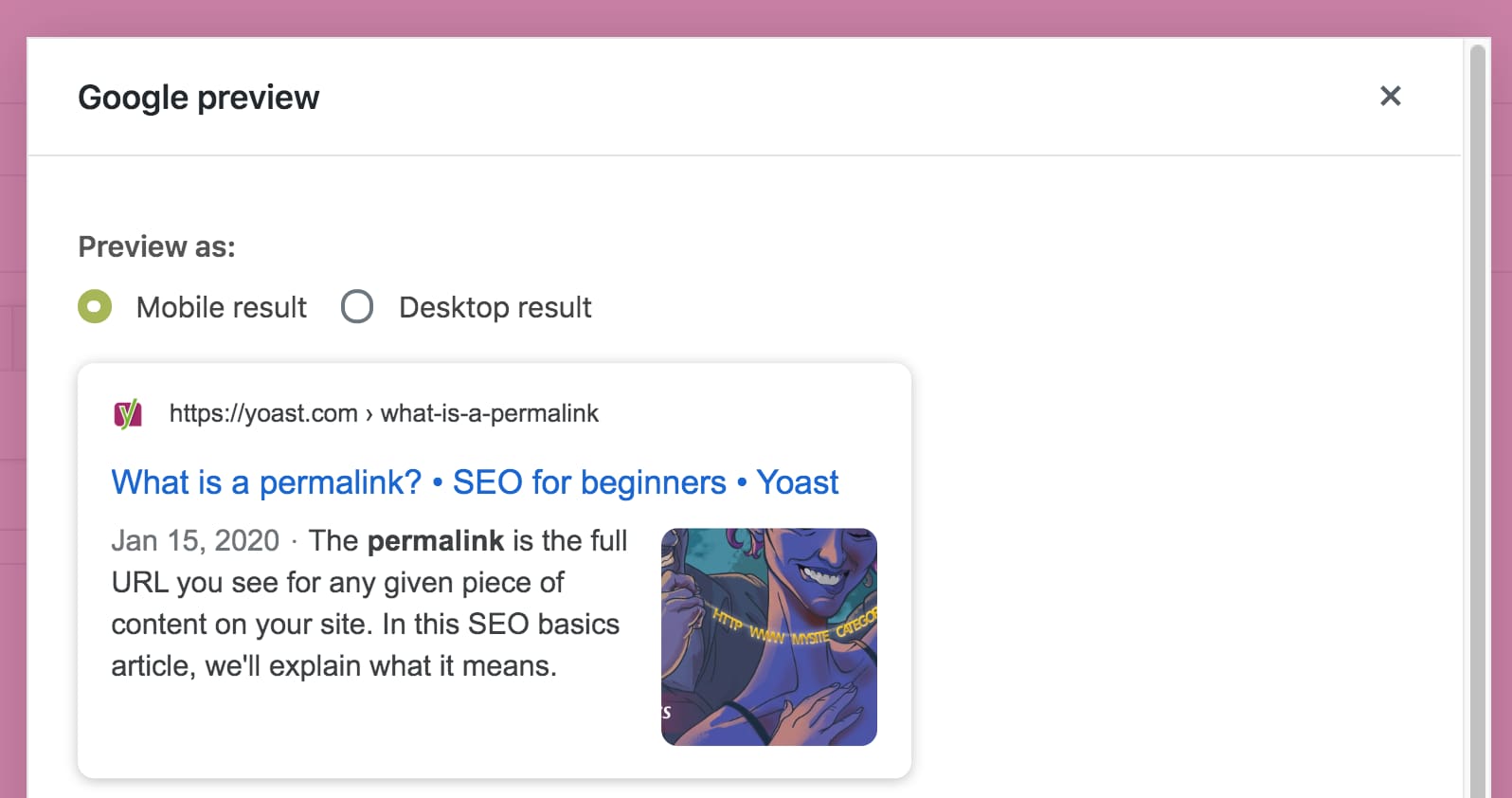
A modal will pop up and show you a preview of your post or page in Google’s search results:
Yoast’s Google preview as part of the Yoast SEO sidebar modal
The Yoast SEO meta box
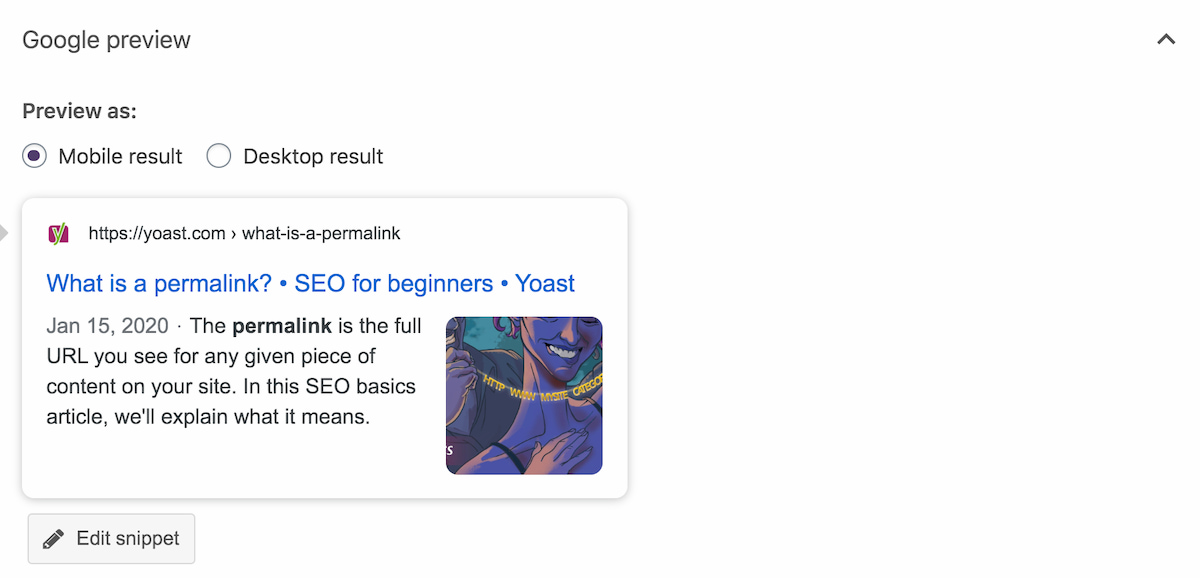
You can also get a Google preview of your post below your post in the Yoast SEO meta box. Just scroll down in your post until you see the Yoast SEO meta box. There, it’ll be the first thing you see:
Yoast’s Google preview as part of the Yoast SEO meta box
Mobile result or desktop result
In the screenshots above, you might have noticed you can choose between two versions of the snippet: the mobile snippet and the desktop snippet. Since Google presents the results differently on a desktop and a mobile device, it makes sense to check both previews before you publish a post. The radio buttons above the snippet let you switch between the two, so you can make sure they both look good.
The components of the snippet preview
In our Google or snippet preview, you’ll see the following elements:
The SEO title
The meta description
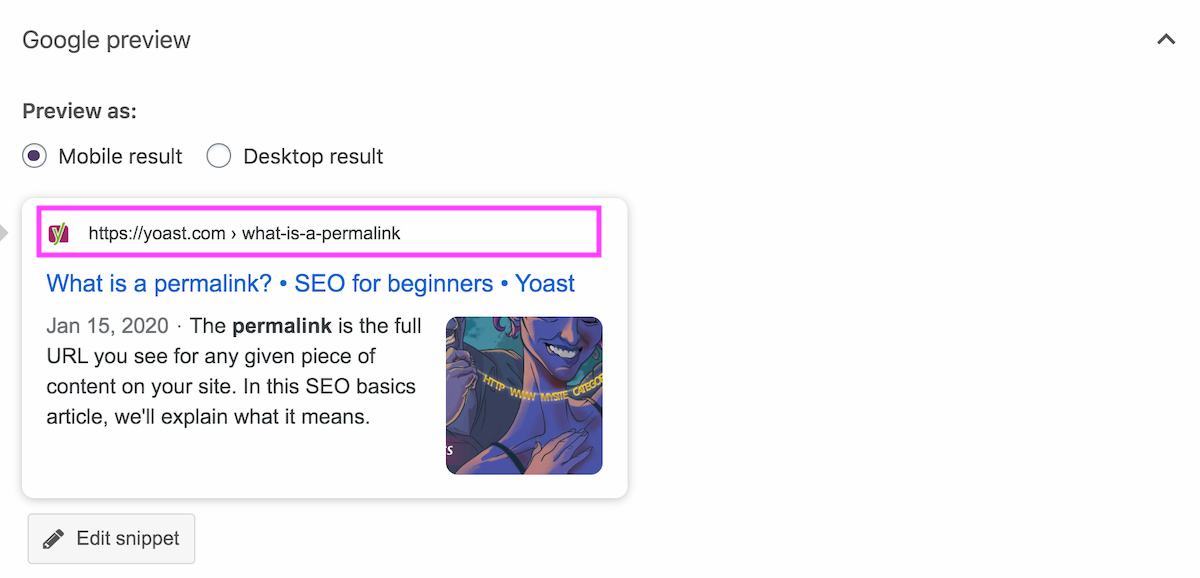
The URL, slug or breadcrumb (or a combination)
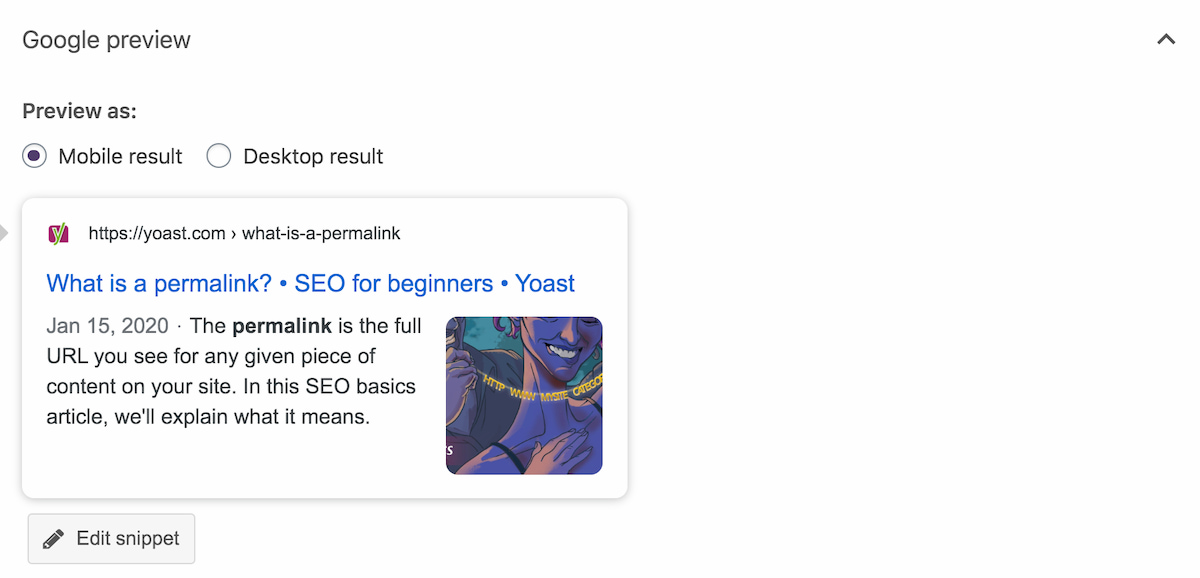
In the mobile preview, we’ve added a favicon and image too. Here, we’ll discuss these elements step by step. Please note that Google regularly experiments with elements like favicons, breadcrumbs and images, so the preview might slightly differ from what you see in the actual search results.
The SEO title
The title is the first thing people see in the search results for your posts and pages, and in many, many cases it’s the only thing – so it’d better be good!
What is the SEO title?
The SEO title is the title of your page you’ll see in Google’s search results. It’s not to be confused with the post name/H1. You can set a template for this title in the search appearance section of Yoast SEO, but you can always change and finetune it for a specific post with our Google preview tool.
The SEO title template
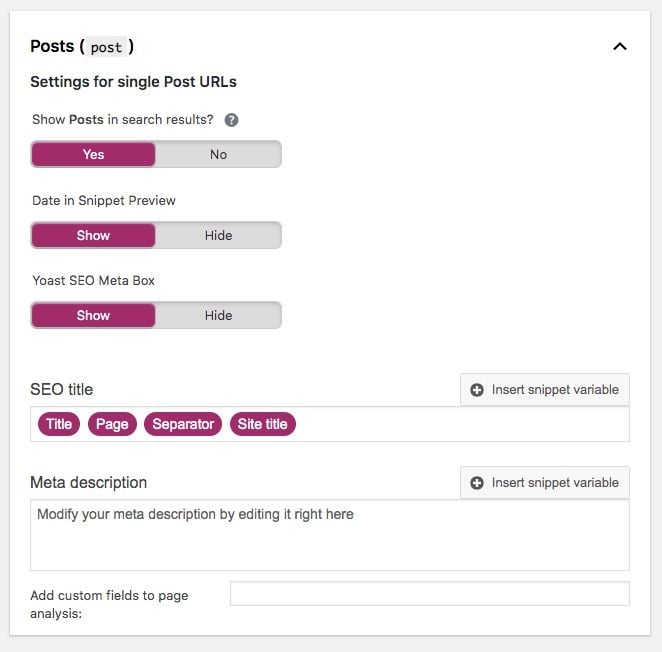
The title in the snippet preview is determined by the title template you’ve set. You can set the template in the Search appearance section of Yoast SEO. Just click on SEO on the left-hand menu in your WordPress dashboard. Then go to Search appearance and select Content Types. There you can set a template for posts, pages or other content types you might have. This is the default template for posts:
In Yoast SEO’s Search appearance section, you can set a template for your titles
By default, the plugin takes the Post title and adds the Separator (in our case a middle dot) plus the site name. The Page number parameter is only used when you have a paginated post. The Site’s title is included and removing it is not a good idea. Google might rewrite your titles if they don’t contain branding.
You can play with this template, for instance by adding a category. You can read all about that in this post on snippet variables. But beware, if you add too many variables, you’ll reduce the space to properly craft a title manually, which is best in most cases!
Write a proper SEO title
With the above template, your SEO title will be created automatically. This might be sufficient to show a good title in the search results. But we always recommend to check the title in our Google preview tool:
Is this title accurate? Does it communicate what this post is about? Does it set the right expectation?
Perhaps you’ve done some keyword research – or used the Yoast Suggest tool – to determine the focus keyword for your page, and you’ve noticed there are several variations of that keyphrase. With the Edit snippet button, you can edit the content of the snippet, which allows you to play with those variations to make your title matches people’s queries and expectations. Do make sure to use your main focus keyword in the title, as that’s probably what people will notice first.
The right wording will convince users to click on your result instead of others’, so this post by Joost on how to craft an accurate and enticing SEO title may be worth your while!
The meta description
Now that your title is up to snuff, let’s work on the second-biggest item in the snippet: the meta description. The meta description is the short text you see below the SEO title.
Why add a meta description (with the focus keyphrase)?
If you search for a specific phrase, Google will make that phrase bold in the meta description it displays. But it actually goes one step further. Once it has decided which pages will rank for your search, it tries to find part of the page that includes that exact term. If your meta description doesn’t contain the keyword searched for, it’ll grab a “random” snippet from the page that does.
This is one of the reasons why it helps tremendously if you know what the most searched for keyword for a page is likely to be. So you can use it in your meta description! In our Yoast SEO plugin, you can set the focus keyword or keyphrase of your post. That word will then automatically be displayed in bold in the snippet preview, just like Google does. Here, for instance, the focus keyphrase is permalink:
So by adding a good meta description with the focus keyphrase, you increase the chances of Google showing your own meta description in the search results. Which provides you the opportunity to promote what’s on your page directly in the search results!
Write an awesome meta description
If you want to write a good meta description, there are some points you should pay attention to. It should accurately describe the main content of the post or page, include the focus keyphrase and entice people to click on your result. If you want to avoid repetition, you can also play with synonyms or related keywords in your meta description. Read here why you should do that and how Yoast SEO Premium helps you with that.
Include a date in the meta description, or not?
In general, we’d say that with time-related content, like blog posts, including a date makes sense, as Google shows it too. Adding this date doesn’t change anything for Google, but it will help you write meta descriptions of the right length.
In its snippets, Google includes a reference to where the page sits on your site. This could be a URL, a breadcrumb trail, or a slug. Which one it picks might vary, it’s something Google seems to experiment with regularly. Currently, they show a breadcrumb trail on desktop and the site’s URL plus the slug on mobile. In our Google preview, we show the URL on desktop and the site’s URL plus the slug on mobile.
The slug is the part you can optimize in the snippet preview. In general, we’d advise to make the slug as short as possible but to include the most essential words and, at least, the keyphrase. A short keyphrase means it’s easier to share and including the keyphrase will help Google and users to identify the topic of your post or page.
A short but clear slug on this article about permalinks
The favicon
The favicon (the little icon next to the URL) has only been added recently to the snippets in the search results. A while ago, Google added it to mobile search results. And, it has been experimenting with showing the favicon for desktop results, too. In WordPress, you can easily set this favicon. We’d advise doing that because, although it’s a small icon, it can mean a lot for your site’s branding a click-through rate. In our Google preview tool, you can check if it’ll look good in Google’s search results.
The image
In the mobile version of our Google preview tool, you’ll find an image. Sometimes, Google adds this image to its search results snippets on mobile. To mimic this behavior we automatically add the featured image of your post to Yoast’s Google preview.
But, I see something else on Google?!
Unfortunately – or maybe not – we cannot fully control what Google shows in the search results. You can set a title and meta description but in the end, Google decides. In some cases, Google actually chooses another meta description or changes the title for you. That doesn’t mean you shouldn’t put any effort into writing those. Although there’s no guarantee, they offer you the chance to shine in the search result. So grab that opportunity!
Use the Google / snippet preview to optimize your posts
I hope this post has made it clear how you can use the Google preview feature to increase click-throughs from the search results. This functionality is available in our Yoast SEO plugin and, of course, in Yoast SEO Premium as well.
If you’re unsure about whether you’re getting the best out of Yoast SEO, our Yoast SEO for WordPress training might be something for you! Be sure to check it out.
If you want to start a blog or publish content online, two of the most popular options you’ve come across are likely WordPress and Medium. Both make it easy to start publishing content online, but they do it in fairly different ways. So — which approach is right for your situation? Should you use WordPress... View Article
Not sure if you are distributing your content on the right social channels or in the right way to drive action? Here's how to build a social media marketing plan to put all the essential decision-making info right at your fingertips. Continue reading →
IDC’s year-end report on the tablet market shows good news for Apple and, to a lesser extent, Amazon—and bad news for pretty much everyone else.
According to IDC’s research, Apple widened its market share lead over the course of 2019, going from 29.6% in 2018 to 34.6% in 2019. In particular, the 10.2-inch iPad was a big hit, accounting for 65% of the company’s tablet sales.
Amazon also had a decent year. Although the company posted a 29% decrease in 4Q19 shipments, compared with Q418, Amazon saw an overall increase of 9.9% market share for the year in total, compared with 2018.
In contrast, Samsung, Huawei, Lenovo and others all saw declines in the their market share. Even the segment in general saw an overall decline of 1.5%, making Apple and Amazon’s positive results all the more impressive.
It’s increasingly difficult for organic search results — the 10 blue links — to win the click. Rich snippets, which are powered by structured data, can make your links stand out. Here seven types of rich snippets that enhance blue links and thus drive clicks and sales.