There’s one thing I hate about email marketing copy: You never know how it’s going to perform until the campaign goes live. What seemed like a rock-star line of copy could become the campaign’s kiss of death.
Sure, you can A/B test every element of each email all month, but taking that time means you’ll probably start losing leads. Fortunately, I’ve taken that route and want to share with you some valuable copywriting techniques that have bolstered the performance of my emails.
For 59% of surveyed B2B marketers, email is the best channel for generating revenue, likely because the majority of the audience voluntarily opted to receive the brand’s emails, indicating an interest in the company and its products or services.
59% of surveyed B2B marketers say #email is the best channel for generating revenue via @adage. #BtoBMagazine
Click To Tweet
Given the value of email and my experience testing what works better, here are eight email copywriting methods to help you successfully transform your prospects and leads into customers.
1. Write a minimum of 3 email versions
One of the biggest problems I’ve encountered is the inclination to create an email quickly, assume it checks all the boxes, and accept the first draft as your final draft.
Here’s how I approach writing new marketing emails:
- Write a rough draft.
- Use it to create two variations.
- Create a more refined, targeted third draft.
- Evaluate the need for additional drafts.
If you aren’t excited about the final draft, your audience won’t be either. Keep revising until you craft one you’re sure will convert prospects.
2. Start email structure with a headline
Many marketers forget that the email structure controls the flow of information – telling prospects how to read the email and interpret the information. Properly structuring the email is necessary to hold the recipients’ interest and have them view content in a desired order.
A headline at the top of the email can be the best way to grab your prospects’ attention and get them to follow through with your desired action (i.e., clicking the CTA and making a purchase).
I like to formulate headlines that intrigue and compel prospects to convert.
Always place the headline at the very top of your email. You never want to place it below a line (or several lines) of copy because your prospect will immediately read the headline and ignore the copy above. Structure your emails to mimic a natural reading flow: top-to-bottom and left-to-right.
Always place a headline at top of your #email, says @BArailrunner. #writingtips
Click To Tweet
Here are a few eye-catching headlines I’ve used in successful cart abandonment emails:
- Your shopping cart is lonely.
- You left some items in your cart.
- We’re holding your items for you.
- One less lonely shopping cart.
- Good news! Your shopping cart items are still available.
- Was there a problem during checkout?
3. Don’t worry about the length
Length is an irrelevant consideration when you’re creating a stellar email. What matters is the substance of your writing. If you can convey your message in two short paragraphs but spread it over seven paragraphs, that’s a problem.
Email copy needs to conform to the message, not the other way around. The message always comes first, otherwise, your recipients won’t have a clue what to do with your email.
Say enough to motivate prospects to take your desired action. The more focused your email is the better.
Sometimes prospects need a little more information and encouragement to convert. Focus on the prospect. That’s the bottom line. Forget about trimming your writing to fit above the fold. That doesn’t matter. The only thing that matters is outweighing purchase hesitations with benefits that drive prospects to convert.
4. Make it about the recipient
Believe it or not, using first-, second- or third-person nouns can make a huge difference on how your prospects react.
Choose which line of email copy you would respond to the best:
- We’re always looking for ways to improve, so please don’t hesitate to contact us and let us know how we can help.
- Don’t hesitate to let us know if you have any questions or feedback we can use to improve your experience.
The first line focuses on the email sender (i.e., the company) using pronouns like “we’re” “us,” and “we.” The second line focuses on the prospect using language like “you” and “your.”
Create marketing emails that are about the prospect and not the brand.
Create #emails about the prospect, not the brand. Use second-person language via @CampaignMonitor. #writingtips
Click To Tweet
Some simple rules to follow:
- Use forms of second-person (i.e., you) and similar language.
- Avoid making your brand the focus by using first-person or other self-focused language.
- Use the prospect’s name when appropriate.
- Focus on being helpful.
5. Follow CTA best practices
The internet is flooded with CTA best-practice recommendations, but I’m focusing on the four most important ones:
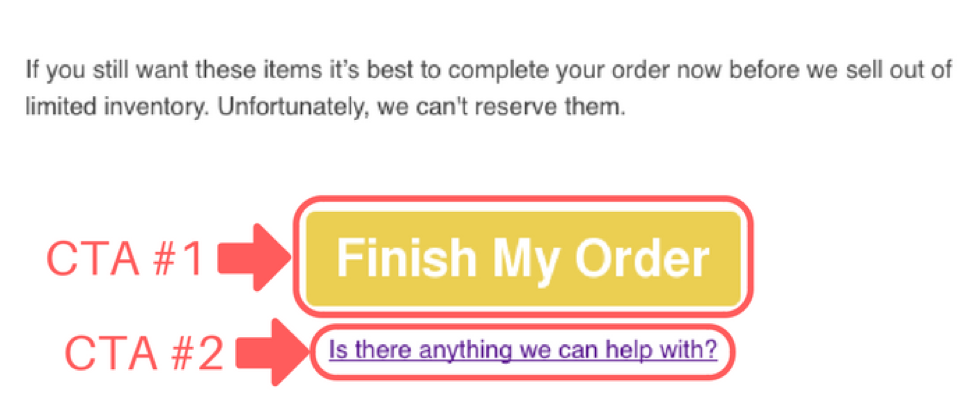
Use only one CTA button
Don’t force your prospects to choose between two or more actions. Keep their attention focused on one thing. Just as cart abandonment emails have one purpose – to get prospects to purchase – each CTA button should have one objective – getting your prospects to click.
Use only 1 CTA button in an #email. Don’t force prospects to choose b/n 2 actions. @BArailrunner #writingtips
Click To Tweet
Include secondary CTAs only as linked text
There’s nothing wrong with having a secondary CTA, but it can’t be a button. Write your second CTA copy within a sentence and hyperlink. Always put the secondary CTA in a smaller font than the primary button CTA.
Focus on what the prospect is getting, not what they’re doing
Don’t use a CTA to tell prospects what they’re doing, tell them what they’re getting. Saying “Download now” is a waste of copy. Conveying a benefit or end result, such as “Increase conversions by 10%,” is more compelling.
Place the main CTA toward the end of the email
Structure every aspect of your email to encourage prospects to advance through to making a purchase. Placing your CTA at the end of your message can have the best impact because you’ve created a captivating argument in the main body that helps overcome purchase hesitations. The CTA is the final blow that pushes them to click and complete a purchase.
6. Use the bucket brigade copywriting method
Ever watch an old movie that shows a house fire? The characters form a human train, passing buckets of water person to person until the final member hurls the water onto the blaze. That’s a bucket brigade.
The bucket brigade copywriting method grabs your readers’ attention and moves the reader through the copy – it holds their attention long enough to convey a complete message.
Here’s how it works:
- Create a line of copy that grabs attention and promises a resolution.
- Provide a resolution.
- Create another attention-grabbing line of copy that again promises a resolution.
- Provide a resolution.
- Repeat.
Check out this example:
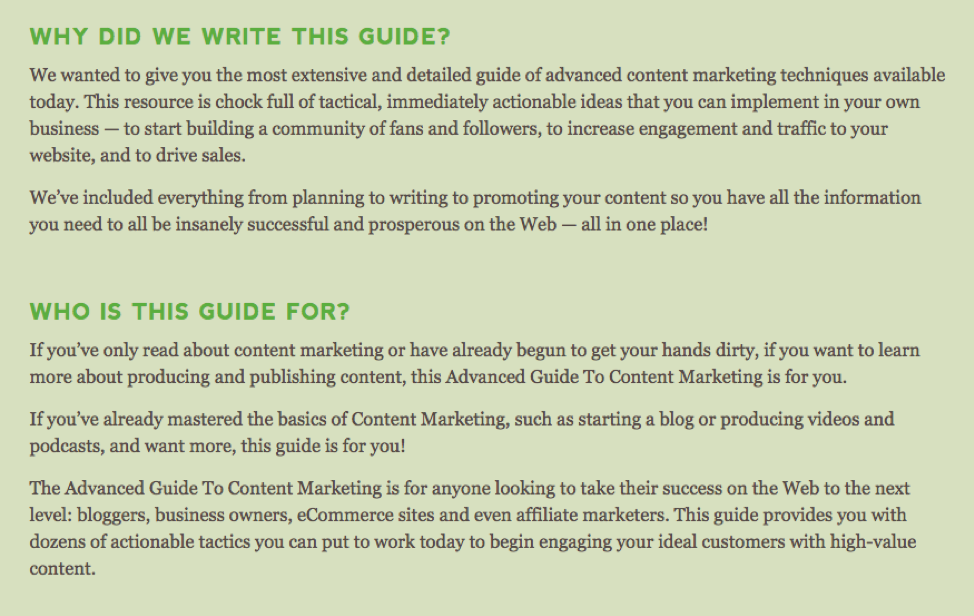
In this content marketing guide from Quick Sprout, you can see the bucket brigade copywriting technique in practice – a bold headline followed by a resolution, followed by another bold headline with another resolution.
Want to know a secret?
I used the bucket brigade copywriting method throughout this article. Here are some successful bucket brigade copywriting elements for your marketing emails to hold interest and move prospects further down the sales funnel:
- Use subheadings that build curiosity (questions and statements followed by a colon work well).
- Use bullets to convey interesting information that resolves your headings.
- Include images and graphics that resolve headings.
The goal is to get prospects to read your entire email and hold their interest long enough to earn a conversion. Start forming your own brigade with buckets of effective copy.
7. Create amazing subject lines
A great subject line is the most important aspect influencing your email open rates. Nailing a catchy subject line is vital to the success of your campaign.
Here are five subject-line tactics that lead to exceptional open rates:
- Avoid ho-hum messaging in favor of unique, flavorful copy.
- Personalize when appropriate.
- Think outside the box and surprise when possible.
- Length matters – stay under 65 characters.
- Create a sense of urgency or interest.
Successful #email marketing includes subject lines under 65 characters, says @BArailrunner. #writingtips
Click To Tweet
Generic subject lines are boring. Don’t settle for a subpar subject line. It’s safe to say I go through seven to 10 iterations before finding an appropriate subject line style and tone. Then I make another five to 10 iterations before I’ve got one I’m happy with.
Make as many new versions as you need to feel 100% satisfied with your work.
Look at these subject-line examples:
- Bad: Complete your purchase now before we run out of inventory!
- Good: Did you forget to finish your order?
- Good: Your items are still available. Complete your purchase now.
The first one sounds desperate. You might as well say, “Please come back and buy from us!” The second and third examples work for several reasons. They:
- Ask a question that makes prospects take notice
- Sound friendly and helpful
- Create a sense of urgency without being overbearing
Focus on creating subject lines that convey the meaning of your email and incorporate some sense of curiosity.
8. Phrase questions so prospects are compelled to agree
This is one of the most valuable copywriting tactics you’ll learn and it’s conveyed best through an example.
Let’s say you sell office supplies and are trying to convert prospects who loaded up their shopping carts with back-to-school supplies before abandoning your website. You’re building an email campaign that targets cart abandonments and have a list of four questions you could include in your first email:
- Do you still want your back-to-school items?
- Do you want to save money on back-to-school supplies?
- Are you ready to complete your purchase?
- Want to complete your back-to-school supply shopping in one trip?
OK, now let’s go back through each question and determine if your prospects would agree with an emphatic “yes.”
- Do you still want your back-to-school items? – no
- Do you want to save money on back-to-school supplies? – yes
- Are you ready to complete your purchase? – no
- Want to complete your back-to-school supply shopping in one trip? – yes
The first question offers no motivation for your prospect to answer yes.
The second question is a yes. Every prospect wants to save money.
The third question is another no. It doesn’t indicate any benefit for the prospect.
The final question implies convenience that most prospects would find appealing and answer with a yes.
Every time you include a question in your email copy, ask if the prospect will agree. If not, delete and start again.
If you can get prospects to agree with you once, it becomes easier to convert them. Deep down they begin to feel that you “get” them and their barriers to purchasing begin to deteriorate.
Putting it all together
That’s a lot of information. But, if you’re able to implement these methods into your next email campaign you’ll be pleasantly surprised with the results.
Just remember, never settle for the first attempt, focus on the prospect, employ smart copywriting techniques, and get prospects to agree with you and follow a predetermined flow of actions.
Hitting all those marks will result in an email marketing campaign that successfully boosts your conversion rates.
Do you want to be a better content marketer? Improve your knowledge and skills? Register for Content Marketing World and gather insight from over 100 presenters. Make plans today to be in Cleveland Sept. 4-7. Use code BLOG100 to save $100.
Cover image by Joseph Kalinowski/Content Marketing Institute
The post 8 Copywriting Techniques to Boost Email Conversions appeared first on Content Marketing Institute.
from Content Marketing Institute https://ift.tt/2JiprYU